20
MAC: XXXXXXXXXXXX
Master password: XXXX
Remote access password: XXXXXX
The MAC number, master password, and remote access password registered on the
label will come saved in the center from the factory. This new label and the previously
saved passwords will prevent all centers from leaving the factory with the master pas-
sword
1234
and the remote access password
878787
. If you want to access the center
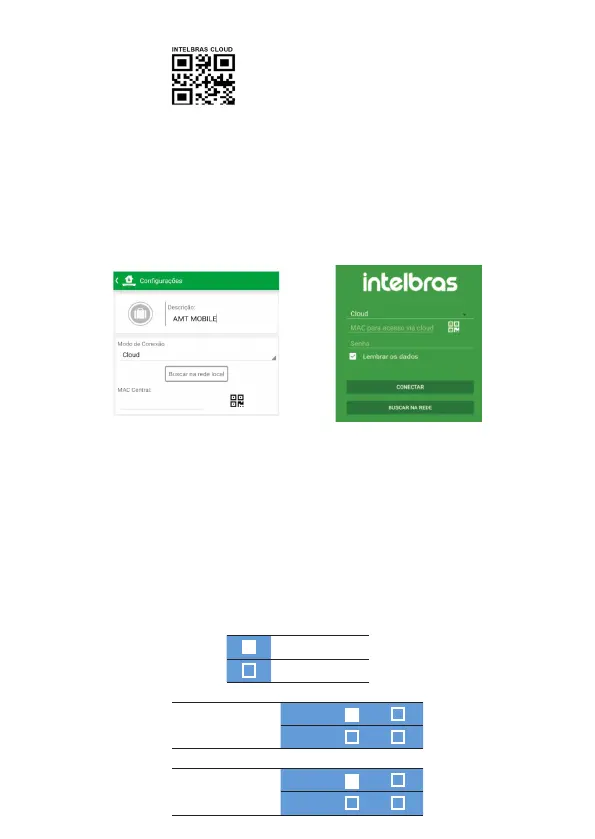
with one of our compatible applications via Cloud, just use the QR Code reader of the
application, which are always displayed on the left side, as shown in the images below
of the AMT Mobile V3 and AMT Remoto Mobile applications respectively.
When you select the reader, bring the cell phone close to the label on the cover of
the center to read the code. The application will automatically ll in the MAC, Master
Password and Remote Access Password elds. If you want to use any other feature of
the center that requires a master password (4 digits) or remote access password (6
digits), use the passwords that are registered on the QR Code.
Note:
the centers leave the factory already programmed to connect through the cloud.
Pressing the 9 key on the XAT 2000 and XAT 4000 for 2 seconds will display the
status of the connections to the monitoring servers for the Ethernet and GPRS/3G
channels. To exit, press the Clear key.
Connected
Disconnected
AMT 2018 E/EG
and AMT 2118 EG
Eth:
IP1 IP2
GPRS:
IP1 IP2
AMT 2018 E3G
Eth:
IP1 IP2
3G:
IP1 IP2



 To Next Page