55
Setting Satellite Information
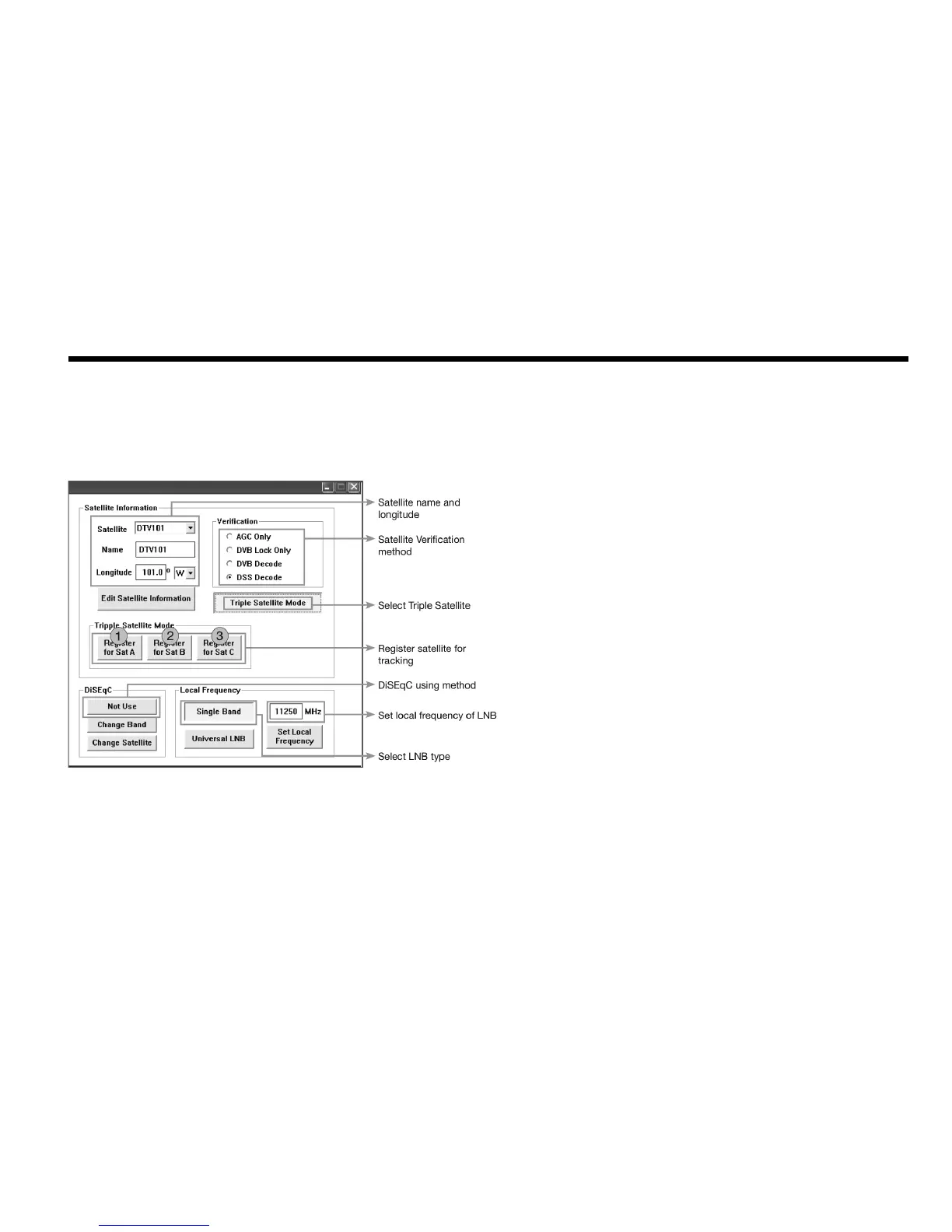
•SatelliteInformation
The name, longitude and conrmation method of the satellite is displayed
when a satellite is selected in the list box. Push “Edit Satellite Information”
button to update the information on modifying the value.
•DiSEqC
When the operation method of DiSEqC is selected to “Change Band”,
DiSEqC may be used for updating the local frequency and to “Change
Satellite”, for updating the target satellite.
•Registrationoftargetsatellite.
Pushing ➊ or ➋ button after selecting the satellite in the list box makes it
possible to register A or B in Dual-sat mode.
Pushing ➊ or ➋ or ➌ button after selecting the satellite in the list box
makes it possible to register A or B or C in Tri-sat mode.
•LocalFrequency
In case that DiSEqC is selected to “Change Band”, be sure to push the
“Universal LNB” button. In case that the DiSEqC is selected to “Not Use”
or “Change Satellite”, be sure to push “Single Band” button and input the
Local Frequency, and then push “ Set Local Frequency” button.
Figure 33 : Setup for Satellite Information


 To Next Page
 Loading...













