InMode Without Vasculaze Operator Manual
Section 4: Device Description
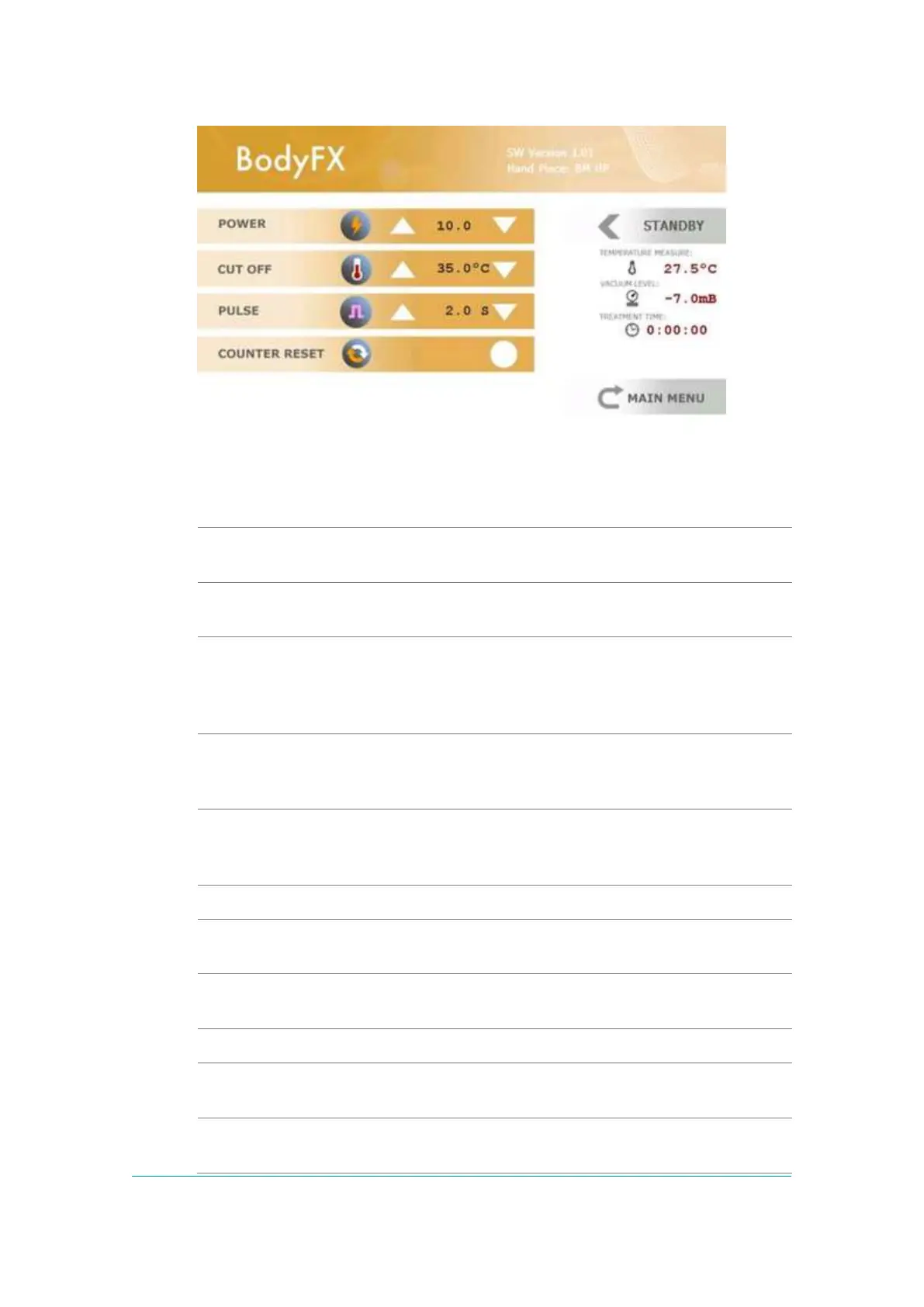
Figure -11: BodyFX/MiniFX Treatment Screen
The BodyFX or MiniFX Screen contains:
The BodyFX or MiniFX is determined by the Handpiece that
is connected to the System.
The frame selects parameters that can be change by
functional keys.
RF power is changed within the limits allowed for the
connected Handpiece. Power level settings are changed
from 10 to 50W for BodyFX and from 10 to 25W for MiniFX.
The System starts up at minimal power level setting.
This indicator shows the Cut-Off temperature, which is
adjustable from 35 to 43oC. This indicates measured
temperature at which the RF delivery is stopped.
This indicator shows the time period during which vacuum is
applied and RF energy is delivered, which is adjustable from
2 to 7sec for BodyFX and from 1-5sec for MiniFX.
The Treatment Time can be reset.
This indicator shows on line the skin surface temperature,
C.
o
with a maximal Temperature of 43
This indicator shows on line the negative pressure applied by
the vacuum.
This indicator shows the total time of RF delivery.
Return to the Main Menu to select another Applicator and
change the Applicator if needed.
The System has three treatment modes, Standby, Ready and
Active.



 To Next Page