9
SL7D REAR SEAT VIDEO HEADREST SYSTEM Owner’s Manual
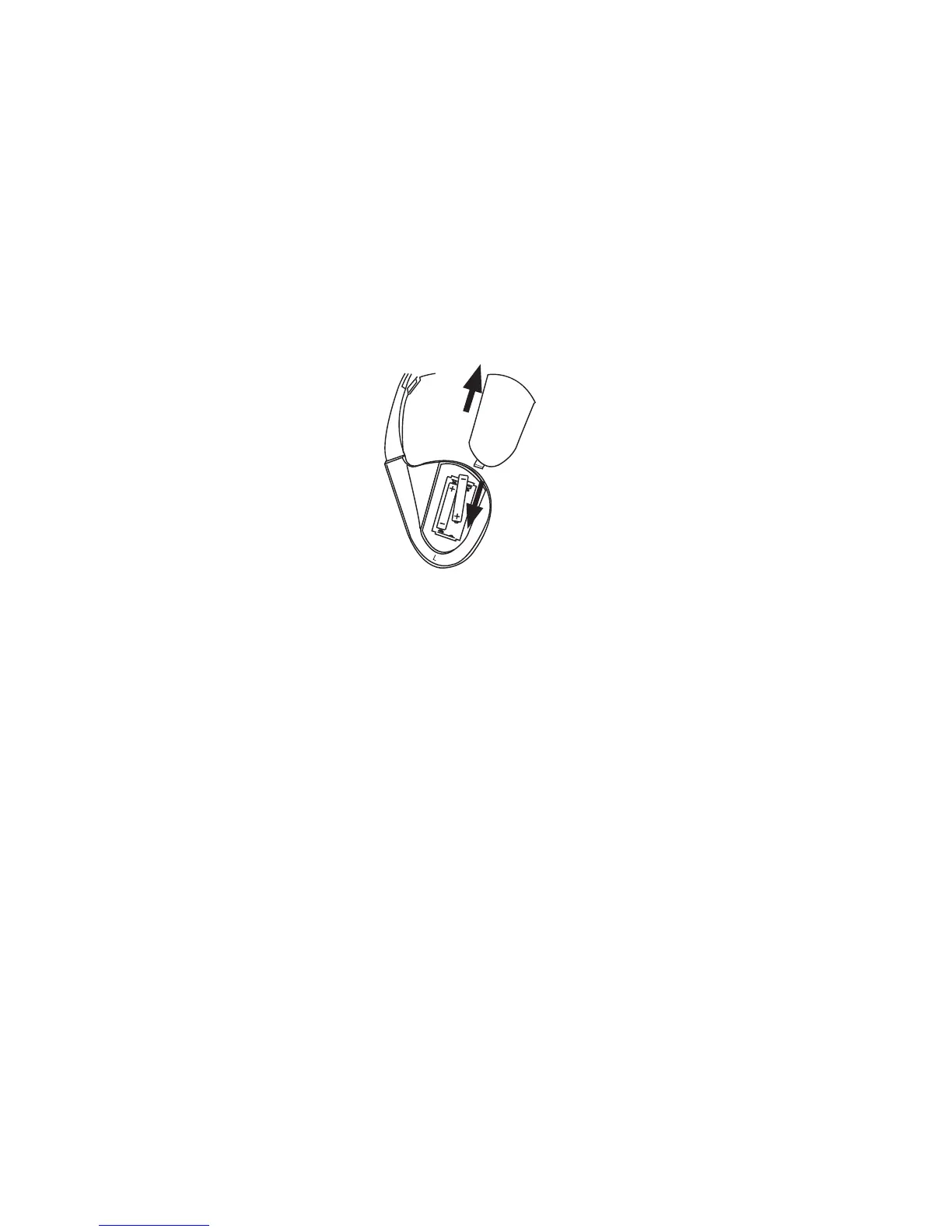
The wireless IR headphone unit requires two AAA batteries�
1� Locate the battery compartment cover on the left earphone�
2� While holding the left earphone in one hand, press down on the battery compartment
cover and slide it UP and OFF in the direction shown� (Figure 7)
3� Insert two AAA batteries (included), carefully following the polarity markings inside the
battery compartment to ensure the batteries are installed properly ( “+”and “-” ends in
the correct positions�)
4� Replace the battery compartment cover� (Figure 7)
Installation of the Headphone Batteries
HEADPHONE BATTERY INSTALLATION
Figure 7
• Always keep the remote controls and
headphones clean and dry�
• Always seek qualied personnel to
perform repairs to the system or individual
components of the system� Never attempt
your own repairs.
• Do not drop remote controls and
headphones or expose to strong impacts�
• Do not expose monitors, remote controls
and headphones to direct sunlight for
extended periods of time�
• Always ensure that the batteries are
correctly installed in the remote controls
and headphones with the positive and
negative polarities in the direction as
shown in the battery compartment�
• Use one CR2025 (3V) Lithium battery (160
mAh) in each of the remote controls�
• Use two AAA (1�5v) Alkaline batteries
in each of the headphones� Do not use
dierent types�
• Do not use old batteries in the remote
controls or headphones�
• When the battery fails to function, replace
it immediately�
• Remove the batteries if the remote
controls and headphones are not used for
a month or longer�
• Keep all batteries out of the reach of
children� Should the battery be swallowed,
immediately consult a doctor�
• When disposing of used batteries, please
comply with governmental regulations
or environmental rules that apply in your
area�
BATTERY CAUTIONS AND WARNINGS
Cautions and Warnings


 To Next Page