3
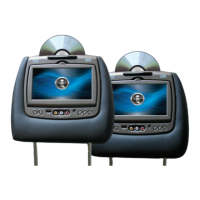
SL7D REAR SEAT VIDEO HEADREST SYSTEM Owner’s Manual
Features of the SL7D Rear Seat Video
Headrest System are as follows:
1� Two factory matched headrests, each with
a 7-inch Color LED backlit LCD screen (800
x 480), 16:9 aspect ratio and built-in DVD
player�
2� HDMI®/MHL® input on the front panel
for media streaming devices such as
Roku Streaming Stick and Chromecast
(Not Included)� This input will also allow
connection of a smartphone (with the
proper adapter) for playing digital content
from your phone to the LCD screen�
3� USB 2�0 input on the front for phone/
tablet charging or for playing digital
content from a USB Flash drive�
NOTE: Refer to the HDMI/MHL information
on pages 31 and 32 for tablet/phone
charging capability and supported digital
audio and video le formats.
4� Built-in wireless IR (Infrared) transmitter
for use with the supplied dual-channel
headphones�
5� Two Wireless Infrared (IR) Headphones
equipped with volume control and A/B
switch to select between “M1” and “M2”�
NOTE: The wireless IR headphones must
be used within a line of sight from the
transmitter as infrared transmission, like
visible light, travels only in an unrestricted
line of sight.
PRODUCT FEATURES
6� Remote IR sensors for the wireless remote
controls�
7� Two wireless remote controls: Each user
has their own remote control� To control
the M1 monitor, press the M1 button
on the remote control, to control the
M2 monitor, press the M2 button on the
remote control�
8� Front panel controls: Basic system
operations can be performed using these
controls (Power, Play/Pause, Source Select,
Home, Stop, Eject, Up, Down, Left (Fast
Reverse), Right (Fast Forward), Enter�
9� 100 channel Wireless FM modulator for
listening to audio from the M1 monitor
on the vehicle radio� The modulator is
controlled from the M1 monitor�
11� OSD (On Screen Display) for monitor
status and monitor control�
10� MVGP1 Game Pack (Optional): The
Game Pack consists of fty four 32-
bit games (six dual player games) and
includes 2 Game Controllers (P1 & P2),
see pages 33 and 34 for more information�
When the Game Pack is installed, either
monitor can be designated as “Player 1”�
Selection is based on a “rst come,
rst serve” basis� The second monitor
will automatically become “Player 2”,
see page 34 for more information�


 To Next Page