4
SL7D REAR SEAT VIDEO HEADREST SYSTEM Owner’s Manual
6� If audio playback through the
vehicle radio is preferred, use the FM
transmitter ON/OFF button on the
remote control� Set the vehicle radio to
the channel selected on the M1 monitor�
If interference with a local radio station
occurs, set the FM modulator to one
of the other 100 radio frequencies�
NOTE: The FM modulator function
is only available on monitor M1.
NOTE: To operate the M1 screen, press
M1 on the remote control. To operate
the M2 screen, press M2.
7� To turn OFF either the M1 or M2
monitor, press and hold the Power ON/
OFF button for 5 seconds or turn the
vehicle OFF�
1� Press the POWER ( ) button on each
monitor� The control keys will light up
blue�
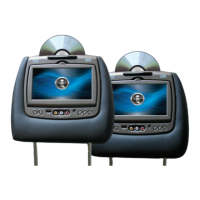
2� Insert a DVD, CD, or MP3 disc into the
disc slot located on top of the M1 or M2
monitor (disc label toward user)� Push
down gently on the disc until the player
pulls the disc in (Do not force the disc)�
3� Tilt the monitor to a comfortable
viewing position�
4� The wireless IR headphones have an
”A-B” switch used to receive select the
audio from either the “M1” or “M2”
monitor� When sitting in front of the
M1 screen, use the CH A setting� When
sitting in front of the M2 screen, use the
CH B setting� Turn the volume down
to its lowest setting before putting the
headphones on�
5� When the DVD menu appears, select
the menu item using the UP or DOWN
buttons and press Enter or Play button�
QUICK START GUIDE


 To Next Page