33
SL7D REAR SEAT VIDEO HEADREST SYSTEM Owner’s Manual
MVGP1 GAME PACKAGE OPTIONAL OPERATION
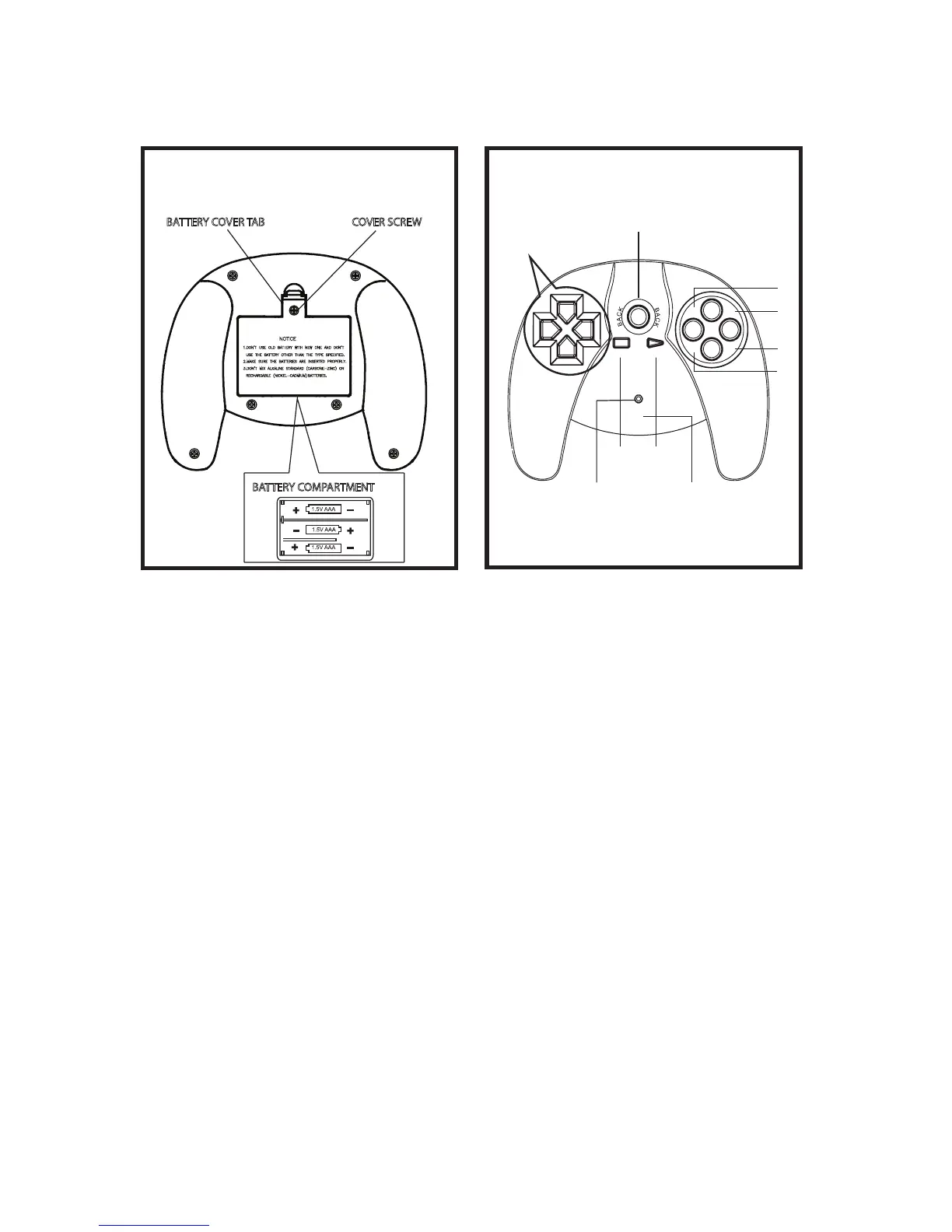
Battery Installation
The MVGP1 is an optional 54 Game Package
(32 Bit Games) and two controllers (P1 and
P2)�
Before attempting to operate your remote
control, install the batteries as described
below:
1� Turn the game controller face down�
2� Using a Phillips head screwdriver,
remove the cover screw�
3� Use your nger to lift the battery cover
tab and remove the cover�
4� Install three “AAA” batteries� Make sure
that proper polarity (+ or -) is observed�
5� Align the cover tab with the game
controller and press down on the cover
tab until the cover locks�
6� Reinstall the cover screw�
CAUTION:
The Game Controller will go into a sleep mode
after 3 minutes if no buttons are pressed. Do
not store the game controller in a seat pocket
where the buttons may be inadvertently
pressed.
BATTERY COVER TAB
BATTERY COMPARTMENT
Rear Side of the Game Controller
COVER SCREW
Figure 32
Functional Description
1� Select the game source using the Source
button (S) on the front panel of the
system (Figure 12) or the Source button
(SOURCE) on the remote control�
2� Use the START button to enter the games
list (1-54)� Then use the direction buttons
to move the arrow to the desired game�
Press the START button to select the
game� Use the SELECT button to exit to
the game list�
3� A Key: “A Function Key” activates the
jump function and optional weapons�
4� B Key: “ B Function Key” activates the re
and attack functions�
5� TA Key: TURBO “A” Function Key�
6� TB Key : TURBO “B” Function Key�
7� BACK Key: The Back key is used to return
to the previous page� While playing
a game pressing the Back button will
return to the games list� Pressing the
Back button again will return to the
games main page “54 Arcade Games”�
Figure 33
UP
DOWN
LE F T
RIGHT
SELECTSTA RT
B
A
TB
TA
P1
STARTSELECT
DIRECTION
BUTTONS
LED-POWER
INDICATOR
A
TA
TB
BACK
B
CONTROLLER
I.D. (P1 or P2)
Game Controller


 To Next Page