6
SL7D REAR SEAT VIDEO HEADREST SYSTEM Owner’s Manual
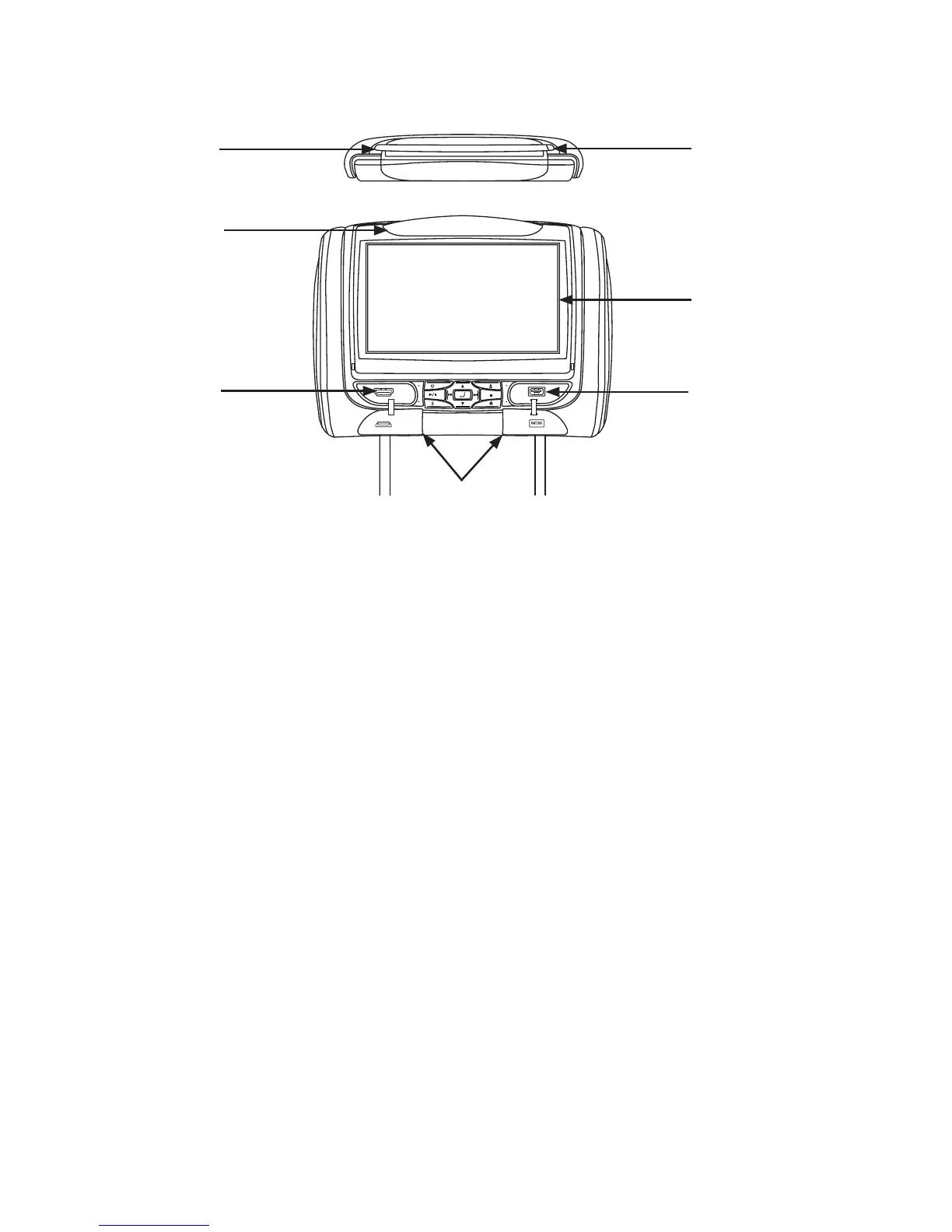
Figure 2
FRONT PANEL CONTROLS
1. Disc Insertion Slot
2. IR TRANSMITTER and IR SENSOR
IR Transmitter: Broadcasts audio
signal to the wireless IR headphones�
IR Sensor: Receives signals from the
remote control�
3. HDMI/MHL INPUT
This input is used for connecting
devices with HDMI/MHL outputs�
NOTE: Requires a HDMI/MHL enabled
device and/or a special HDMI/MHL
adapter. Contact your HDMI/MHL device
supplier for adapter�
4. Protective Covers
Used to protect and cover the HDMI jack
and USB port when not in use�
5. USB PORT
This port is used to connect a USB device
for playback of content� To view content,
select “USB” as the video source and
insert the USB device� The USB device
will start automatically�
6. 7-inch TFT LCD Display Screen.
7. Disc Slot LED.
WARNINGS
• Do not use any solvents or abrasive
cleaning materials when cleaning the
screen� Use only a lightly dampened lint
free cloth to wipe the screen if it is dirty�
• Lock the front panel in the fully closed
position when not in use� Do not put
pressure on the screen, caution children
to avoid touching, scratching or pulling
down on the screen�
SL7D
1
3
2
6
4
7
5


 To Next Page