5
SL7D REAR SEAT VIDEO HEADREST SYSTEM Owner’s Manual
For best disc operation, it is important that
you read this section completely�
DVD Region Coding
The SL7D and the DVD disc are coded by
region� These region codes must match in
order for the DVD to play� If the codes do
not match, the DVD will not play� The SL7D
code is set to region 1� Playback of a DVD
disc from any other region will not work in
the SL7D�
Type of Discs the SL7D Will Play
• DVD-Video: DVD containing video
content�
• CD-DA: CD containing musical or sound
content only�
• CD-Video: CD containing video only�
• CD-R/RW: A disc that containing audio les
(for example, a CD-R with downloaded
MP3 les), MPEG, or JPEG les�
NOTE: The following discs will NOT play in
the SL7D: Optical disc- CD-1, CD-ROM, and
DVD-ROM Mini disc- CDG (audio only, not
graphics), Blu-ray.
Loading and Playing Discs
Before loading a disc, make sure that it is
compatible with the player�
• Press the POWER ( ) button to turn the
system ON�
• Load the disc (label facing the user)
into the disc slot� The disc will load
automatically and begin to play�
NOTE: Some discs may start at the root menu
where Play must be selected to start movie.
Notes on Discs
• Do not touch the disc surface� Handle the
disc by the edge�
• It is important that discs are clean prior to
use�
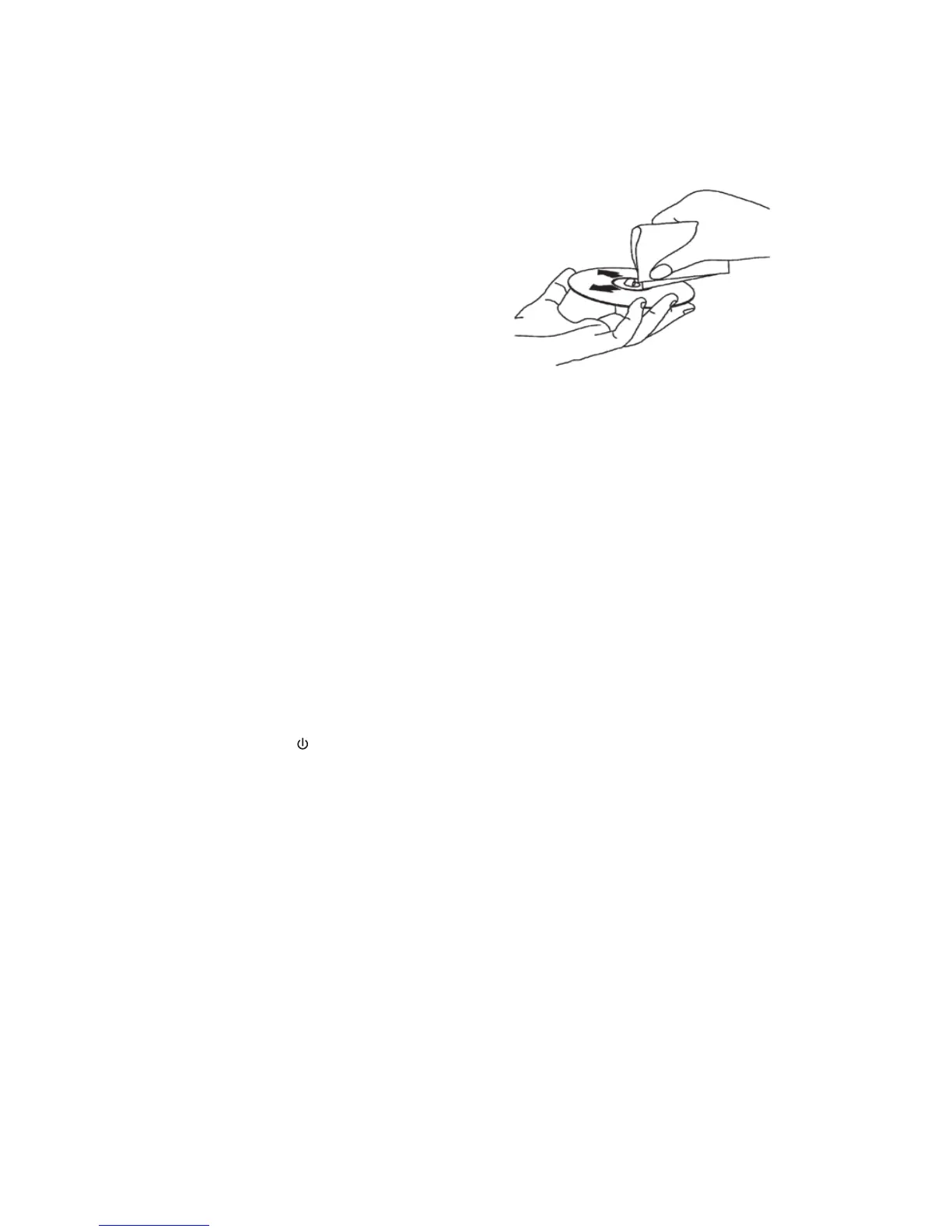
• If disc is not clean, use a commercially
available cleaning cloth to gently wipe
the disc from the center out� (Figure 1)
NOTE: Do not use solvents such as
benzene, thinner, cleaners, or antistatic
spray intended for analog discs.
• Keep discs protected in their cases or
disc magazines when not in use� Do not
subject discs to heat/high temperature�
Avoid leaving discs in a parked vehicle or
on a dashboard/rear tray�
• Do not use discs that have after-market
paper or plastic labels/stickers attached�
The following malfunctions may result
from using such discs:
• Inability to eject a disc (due to a
label or sticker peeling o and
jamming the eject mechanism)�
• Inability to read audio data correctly
(i�e�, playback skipping, or no
playback) due to heat shrinking of a
sticker or label causing a disc to warp�
• Use only standard, round discs� If you
insert irregular, non-round, shaped discs
they may jam in the DVD player or not play
properly�
Figure 1
GENERAL OPERATING INSTRUCTIONS


 To Next Page