8
SL7D REAR SEAT VIDEO HEADREST SYSTEM Owner’s Manual
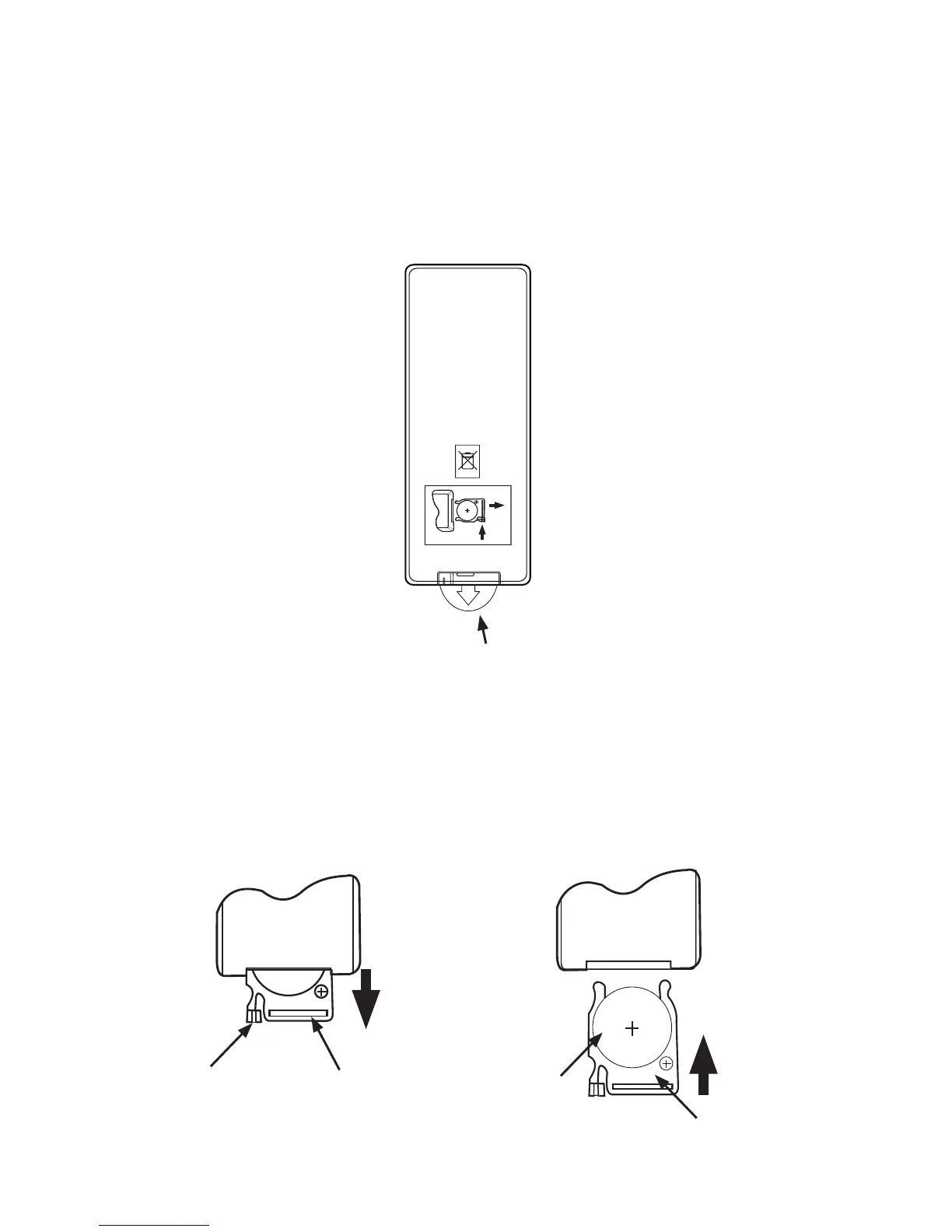
Figure 5 Figure 6
(1)
(2)
CR2025
3V
REMOTE CONTROL BATTERY INSTALLATION
Installation of the Remote Control Battery
Figure 4
The remote controls come with a battery already installed along with a Pull Tab to prevent
battery discharge� Remove the Pull Tab before using the remote control for the rst time�
(Figure 4)
NOTE: The remote control will only operate the SL7D Rear Seat Video Headrest System. It is not
a universal remote control and will not control other equipment.
Remote control
Back View
PUSH
OPEN
CR2025
Protective Pull Tab (Clear Plastic)
1� While holding the remote control, insert thumbnail into the battery door side notch (1) and
index ngernail into battery door upper notch (2) and slide battery holder open� (Figure 5)
2� Install one CR2025 battery (1) into the battery holder (2)� (Figure 6)
NOTE: Make sure that the proper polarity (+ or -) is observed.
3� Slide the battery holder (2) back into the remote control until it locks in place� (Figure 6)
(1)
(2)


 To Next Page