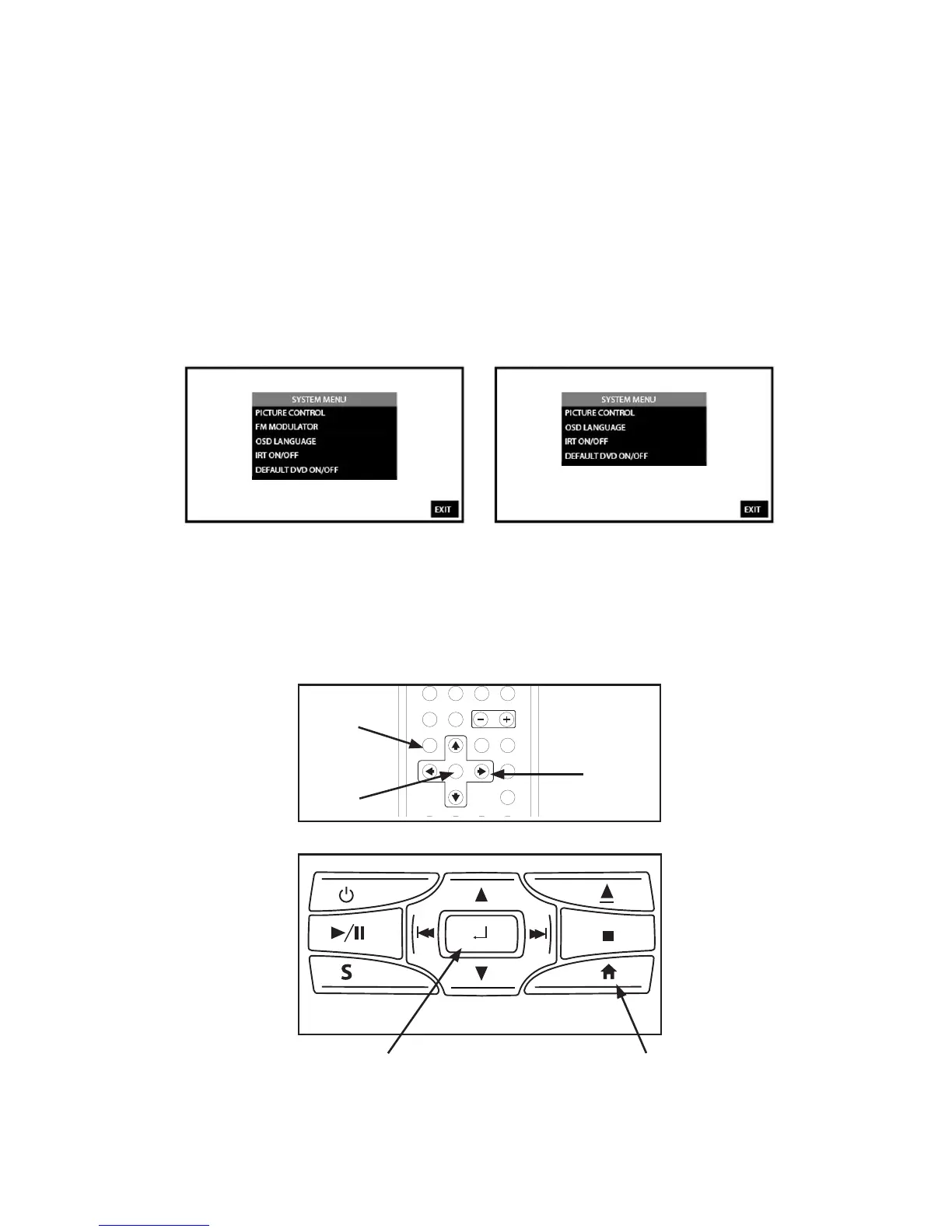
SYSTEM MENU
SL7D (M1)
SL7D (M2)
Figure 10
SL7D
Figure 12
MENU
SELECT
ENTER
The System Menu allows the user to personalize the SL7D settings� It is used in the initial setup
to adjust the picture quality and customize adjustable functions� Once the initial settings are
customized, they will remain the same until modied or reset to the factory default settings�
NOTE: System Menu changes are best made without a DVD inserted into the unit.
This section describes how to adjust and set settings using the ve setup features (Figure 10):
1� PICTURE CONTROL
2� FM MODULATOR (M1 Only)
3� OSD LANGUAGE
4� IRT ON/OFF
5� DEFAULT DVD ON/OFF
Using the System Menu
Navigating and selecting available settings in the System Menu is accomplished using the
Remote Control buttons (Figure 11) or the Front Panel buttons (Figure 12)� Follow the steps
outlined in this section to select and customize each of the ve adjustable functions (Sub-
Menus) listed above, and refer to the sections that apply�
Figure 11
SYSTEM
MENU
UP,DOWN,
LEFT and
RIGHT
DIRECTION
BUTTONS
ENTER
BUTTON


 To Next Page