10
Ioline 300/350HF System Quick Start Guide
Step 1: Install the 301 Software
1. Insert the 301 Software CD-ROM (packaged in the Accessory
Kit) into the CD-ROM drive.
2. The
installation program should automatically start. If it does
not, go to Start Menu>Run. Click on Browse and choose the
CD-ROM drive (often drive D:\). Select iosetup.exe, then Open
and Run.
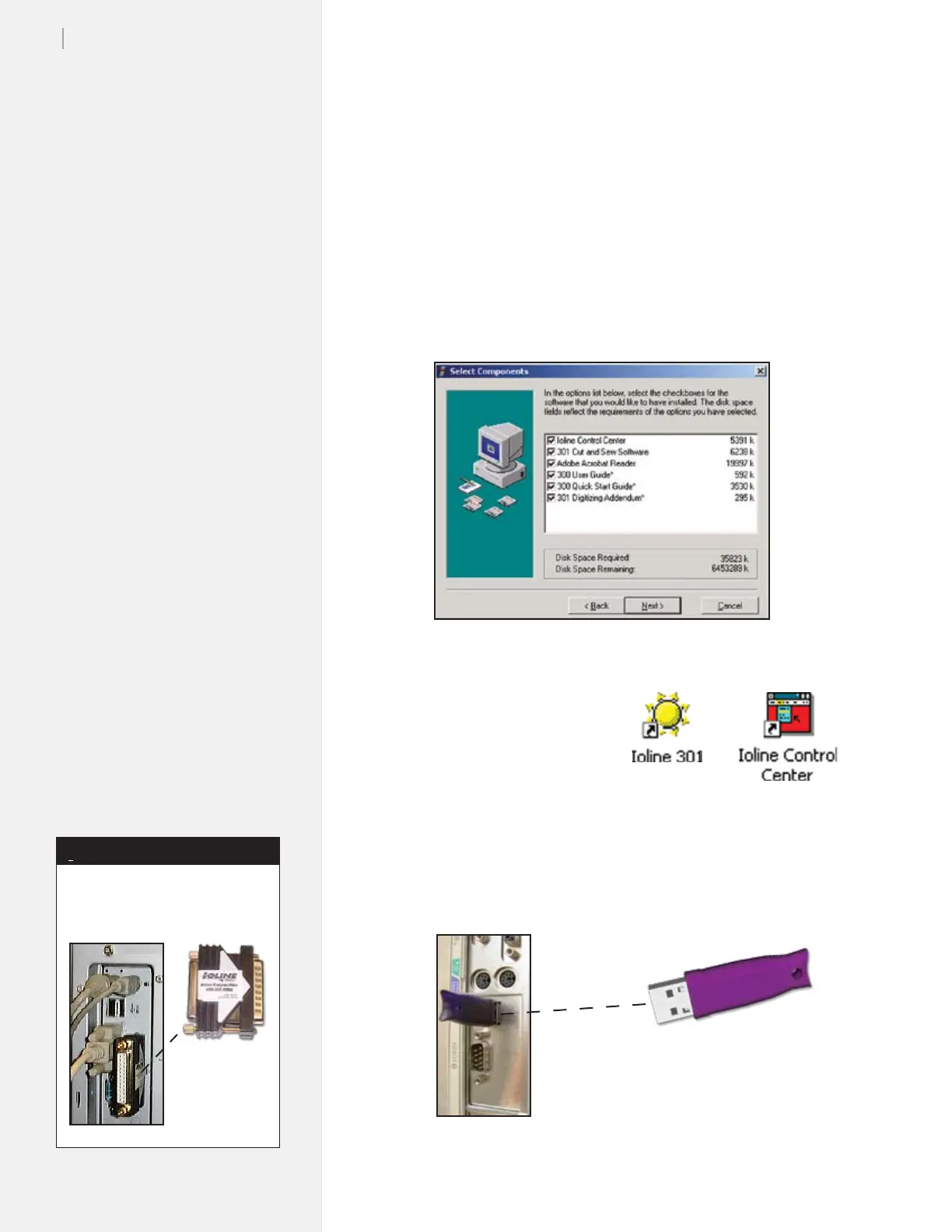
3. Follow the self-guided installation instructions to install the
Ioline Control Center, 301 Software, Acrobat Reader, and all
manuals. (See Figure 3.)
4. When prompted, answer
‘Yes’ to all questions about
installing drivers.
5. The installation program will
place icons on the desktop
for the 301 Software and
Ioline Control Center. (See
Figure 4.)
6. Power off the computer.
7. Connect the Ioline
301 Software key to the USB port (Figure 5).
Figure 3. The 301 Software installation screen.
Figure 4. The Ioline software icons
will be placed on the desktop.
Figure 5. Install the drivers, then insert the USB key into the PC.
Older 300 and 350HF Systems
used a parallel key rather than
USB, as shown below:
Note
i


 To Next Page