14
Ioline 300/350HF System Quick Start Guide
You can substantially extend the
life of the blade by making sure
to adjust it to the proper depth
for the material you are cutting
and setting down-force pressure
as low as necessary to get a clean
cut, This also reduces the possibil-
ity Tray damage.
Note
i
The blades are very sharp
and the tip is fragile. Use
caution when inserting
them into the blade holder.
Caution
Step 5: Select and adjust the blade
1. Find one of the included blades in the Accessory Kit. Figure 11
shows blade information.
Figure 11. Blade selection guidelines.
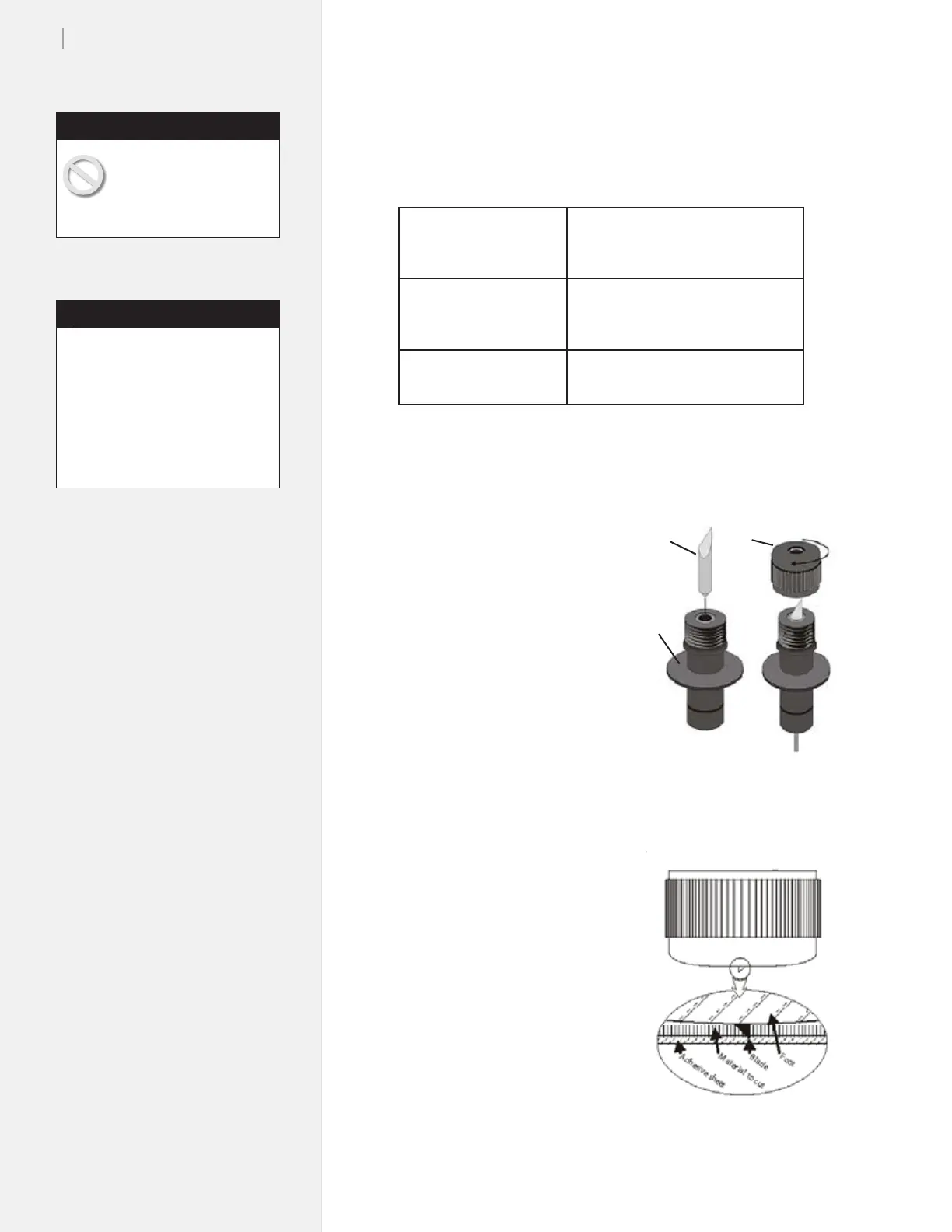
2. Unscrew the foot (Fig-
ure 12) from the blade
holder.
3. Insert the blade into the
blade holder (Figure
13). It will resist at first
then slide freely to a
hard stop when properly
inserted.
4. Gently turn the foot onto
the blade holder until
just before the tip of the
blade protrudes from
the opening in the foot.
Insert the blade holder in
the jaw then tighten the
clamp.
5. Follow the steps in the
300/350HF System User
Guide to adjust the blade
exposure and force.
Note: this step is very
important!
6. The cutter is ready to
use!
Blade
Foot
Blade
Holder
Figure 12. Installing the blade in the
blade holder.
Figure 13. A properly adjusted
blade.
30
o
Blade
0.094-in offset
Reduces fraying and pulling on fragile
or exible materials.
300: Order 321 (PN 107076)
350HF: Order 324 (PN 107418)
45
o
Blade
0.094-in offset
General purpose blade. Cutts some
thick materials.
300: Order 322 (PN 106989)
350HF: Order 325 (PN 107419)
60
o
Blade
0.094-in offset
For cutting thick and stiff materials.
350HF: Order 326 (PN 107420)


 To Next Page