Chapter 1
Assembly & Set-up
Assembly
This Quick Start Guide shows how to assemble and set up the Ioline
300 System. Consult the 300 System User Guide on the CD-ROM for
more detailed information about installation and operation. Use the
provided Adobe
®
Acrobat
®
viewer to read and cut the User Guide if
necessary.
Unpacking the 300 System
Follow the enclosed instruction sheet to remove the cutter and
Accessory Kit from the box. To avoid injury, always lift the cut-
ter with two people. Check the Packing List and save all packing
materials.
1. Set the cutter on a stable surface.
2. If you purchased an extra tray, lift it off the 300’s
Table and set
it aside.
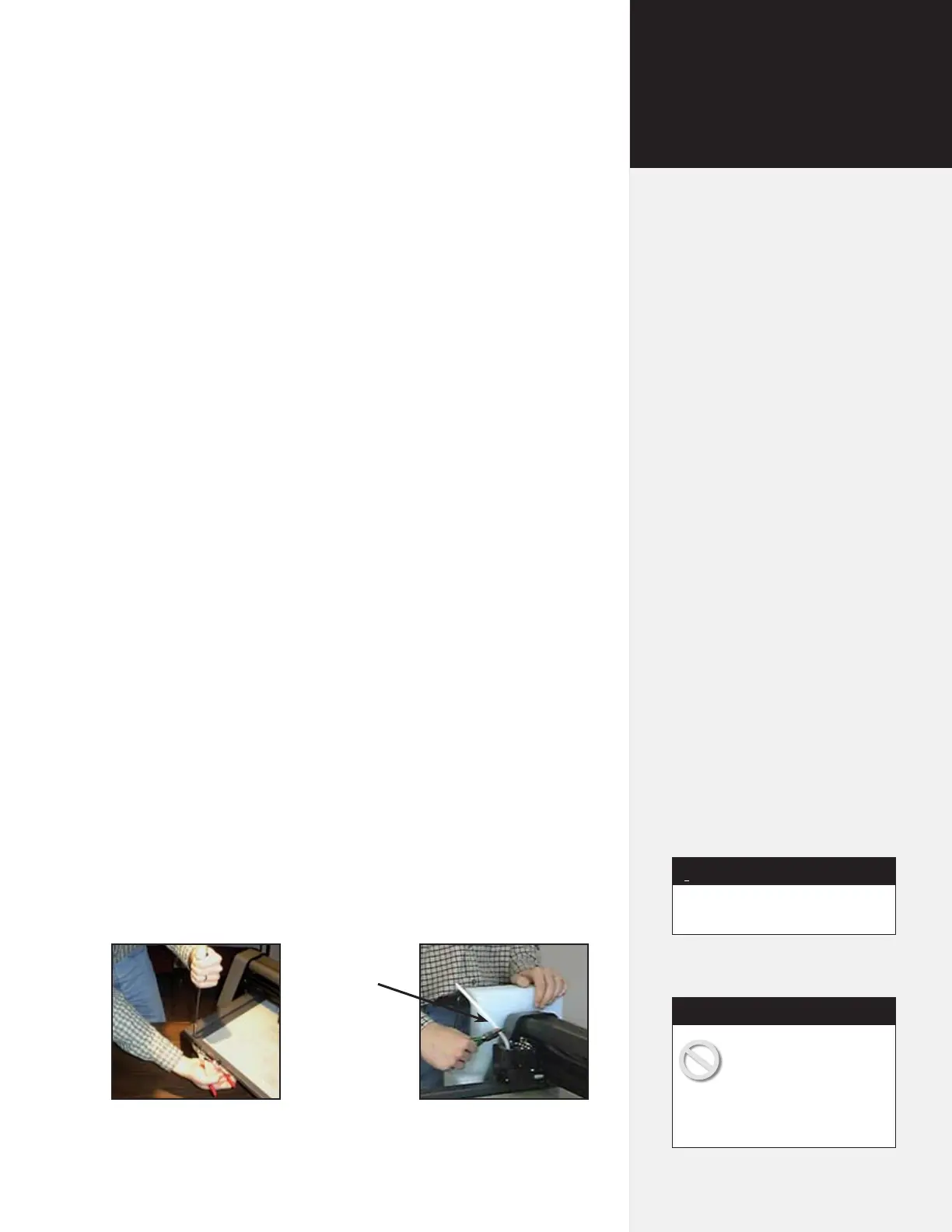
3. Remove the 4 screws holding the
Table in place for shipping.
4. Cut the tie wrap that hold the
carriage in place and remove all
the packing material. (See Figure 2.)
Prepare the Production Area
Clean the table top and clear any obstacles. Place the cutter 9-inches
away from the wall to allow the material tray to move freely toward
the back.
Save all packing materials.
Note
i
The 300 and 350HF
Systems are heavy and
could cause injury if they
fall. A minimum of two people are
required to safely unpack the cut-
ters and attach them to the stand.
Caution
Figure 2. (Left) remove the shipping screws from the Table and (right) cut the ship-
ping tie wrap holding the carriage.
Tie wrap


 To Next Page