TIGER MANUAL Ion Science Ltd
Page 35 of 45
Unrivalled Detection. www.ionscience.com
Diagnostics
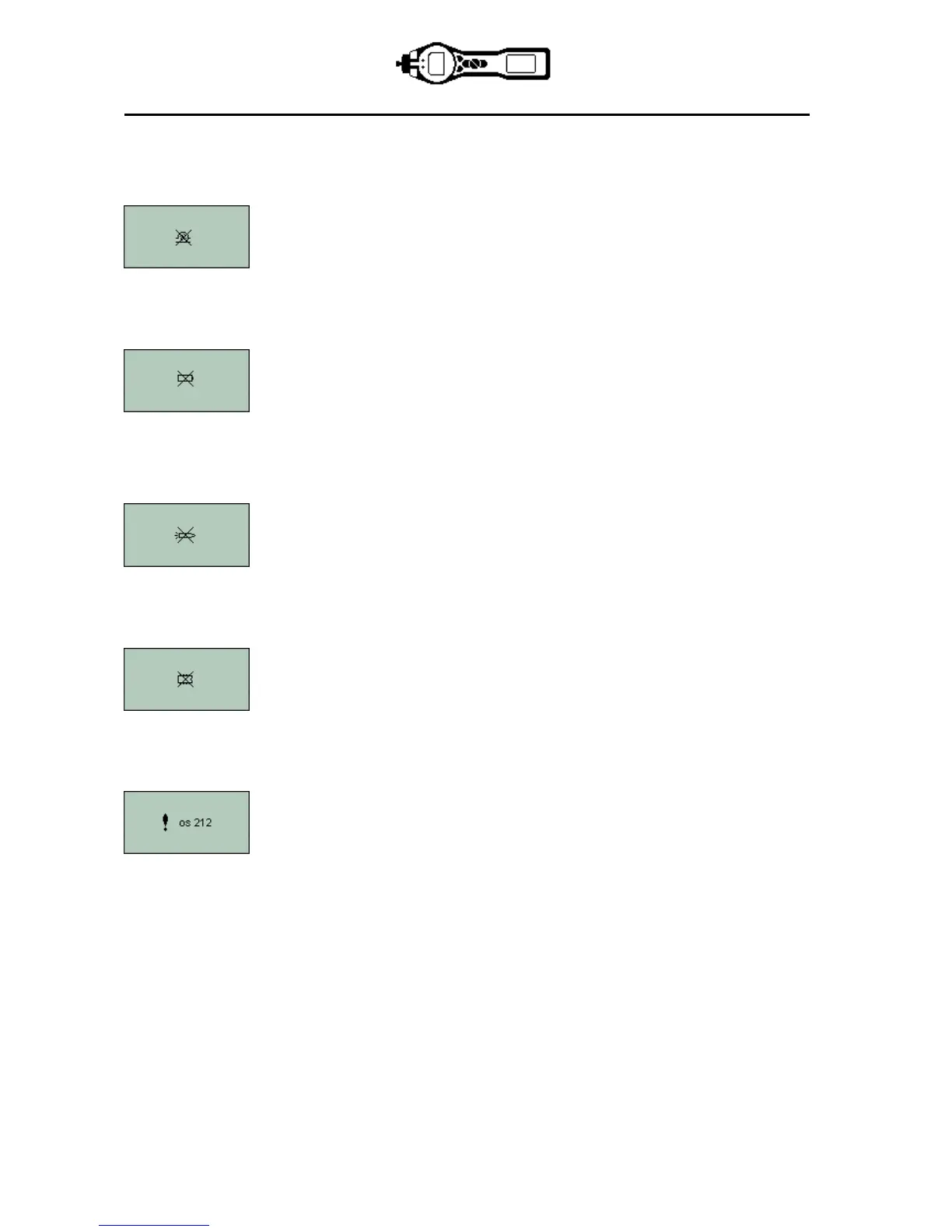
Basic faults or diagnostics are presented as symbols. Should a fault occur most can be corrected by
pressing Enter or Esc to clear the fault message. All fault conditions cause the TIGER to alarm.
Pump blocked or pump failure
The flow of gas through the instrument has fallen below 50cc/minute. Check the
probe and filter for signs of blockage. Water or dirt in the probe, a bent probe, dirty
filter on the inlet or blockage of the exhaust (finger over hole on the back?) can all
cause low flow. If the blockage can be removed, press Esc to clear the alarm. If the
fault persists send the instrument to your distributor for service.
Battery low or battery failure
The TIGER will shut down when the battery level falls below 2%. Recharge the
battery as instructed in the ‘Batteries’ section of this manual ensuring that all
connections are sound and the indicator lights on the charger are in order. If the
battery fails to charge, fit another battery pack if available. If using alkaline batteries,
replace them. If the fault persists send the instrument and charger to your distributor
for service.
Lamp failure
The PID lamp has failed to strike (illuminate); this may occur at switch on or during
use. Switch the TIGER off and replace the lamp. See the ‘Maintenance’ section.
Memory cannot receive more data
The data log memory is full. This will only happen if the Log Full box is set to ‘alarm’
on the TIGER PC configuration screen. Press the Esc key to continue, but the TIGER
will no longer continue to log data. Select ‘recycle’ in TIGER PC and the TIGER will
overwrite the oldest data and no alarm will be raised.
Total system failure
The instrument’s firmware is corrupted. In the unlikely event of this message
appearing, contact Ion Science Ltd or your nearest authorised service centre.


 To Next Page