TIGER XTL Instrument User Manual V1.0
Pioneering Gas Sensing Technology. Page 29 of 56 ionscience.com
First connect TIGER XTL to your PC.
TIGER PC
LT
offers a two-point custom calibration (zero + span). Send this information to your TIGER
XTL.
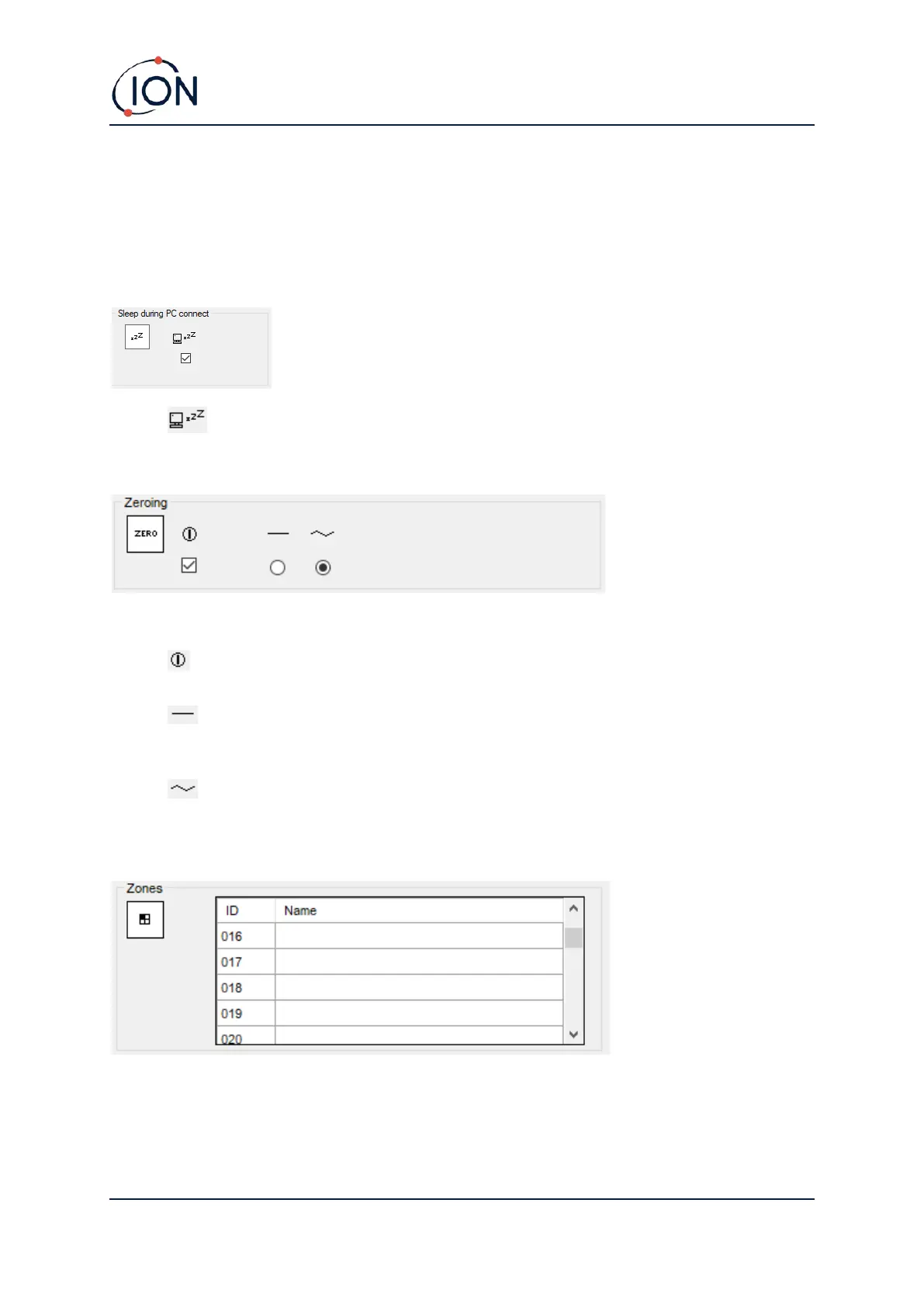
Sleep during PC connect
• When connected to a PC the instrument will go into Sleep Mode. The instrument will
“awaken” when disconnected from the PC.
Zeroing
The following options are available:
• When selected, the TIGER XTL will automatically set its Zero reading based on ambient
air when it is switched on. When deselected the instrument will use its calibration Zero.
• When selected, TIGER XTL uses the fixed calibration Zero. If used in conjunction with
the ‘Zero at switch on’ option the instrument will Zero at switch on and then remain at that
level.
• When selected, the Zero level will change to negative if cleaner ambient air is detected.
This ensures 0.0 ppm is displayed in clean air and ensures sub ppb levels are always
detected.
Zones
Use this table to define and name up to 128 separate zones. The name field is limited to eight
characters including spaces.



 To Next Page