ioSafe Duo User Manual
3.2.1 Formatting the ioSafe Duo
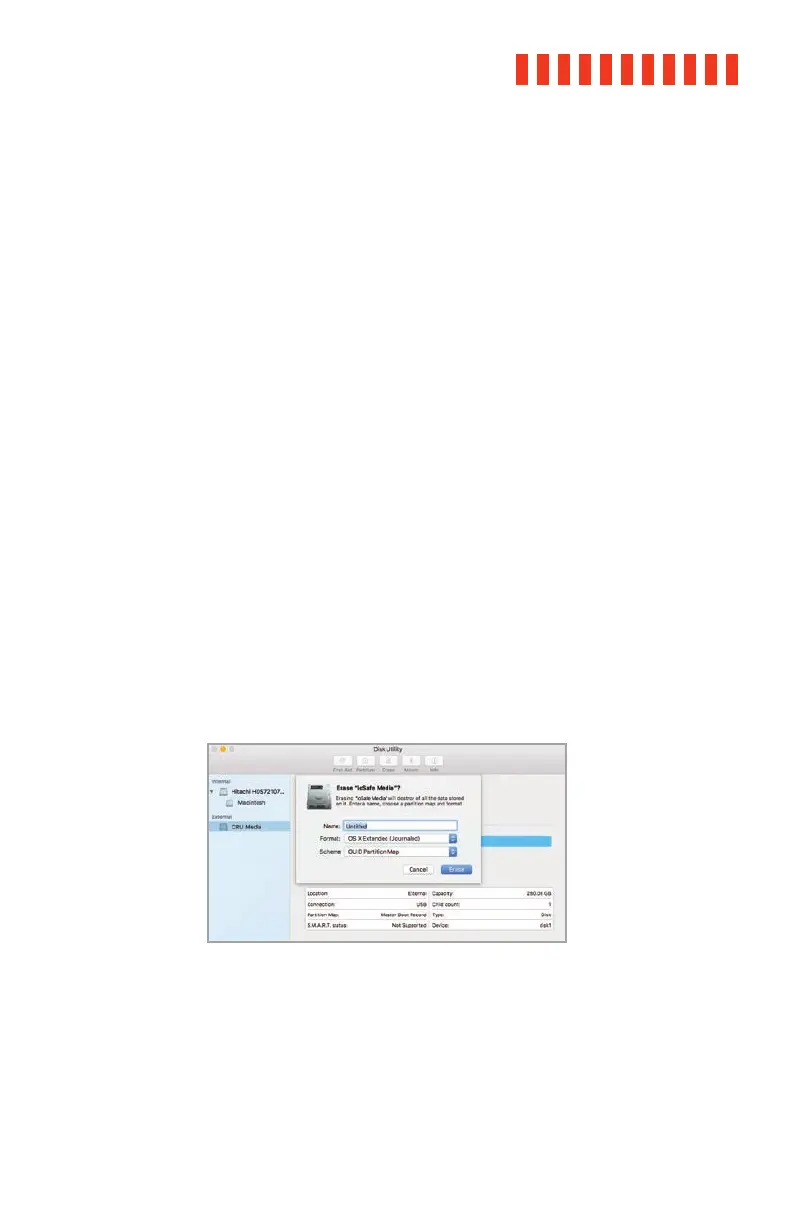
Use Disk Utility to format the drives in the Duo, which can be found in Applications →
Utilities, or by selecting Spotlight Search (Command + Space) and typing in “Disk Utility”
and then hitting Return on your keyboard.
a. Click on the drive in the window to the left.
b. Click on the Erase button at the top.
c. Enter a name for the new volume.
d. Select the format type. Select APFS if you are using SSDs. If you purchased the
ioSafe Duo with pre-installed drives or are using your own hard drives, choose OS X
Extended (Journaled). If you need to use your ioSafe Duo with both macOS and Win-
dows computers, select ExFAT instead.
e. For the scheme, select GUID Partition Map.
f. Click Erase to start the process.
g. Once the format is complete, click Done.
h. Once the ioSafe Duo is formatted, double-click on the icon representing the Duo on
the desktop to access it.
macOS Disk Utility, showing the “Erase” submenu.
23



 To Next Page