ioSafe Duo User Manual6
1.5 LED Behavior
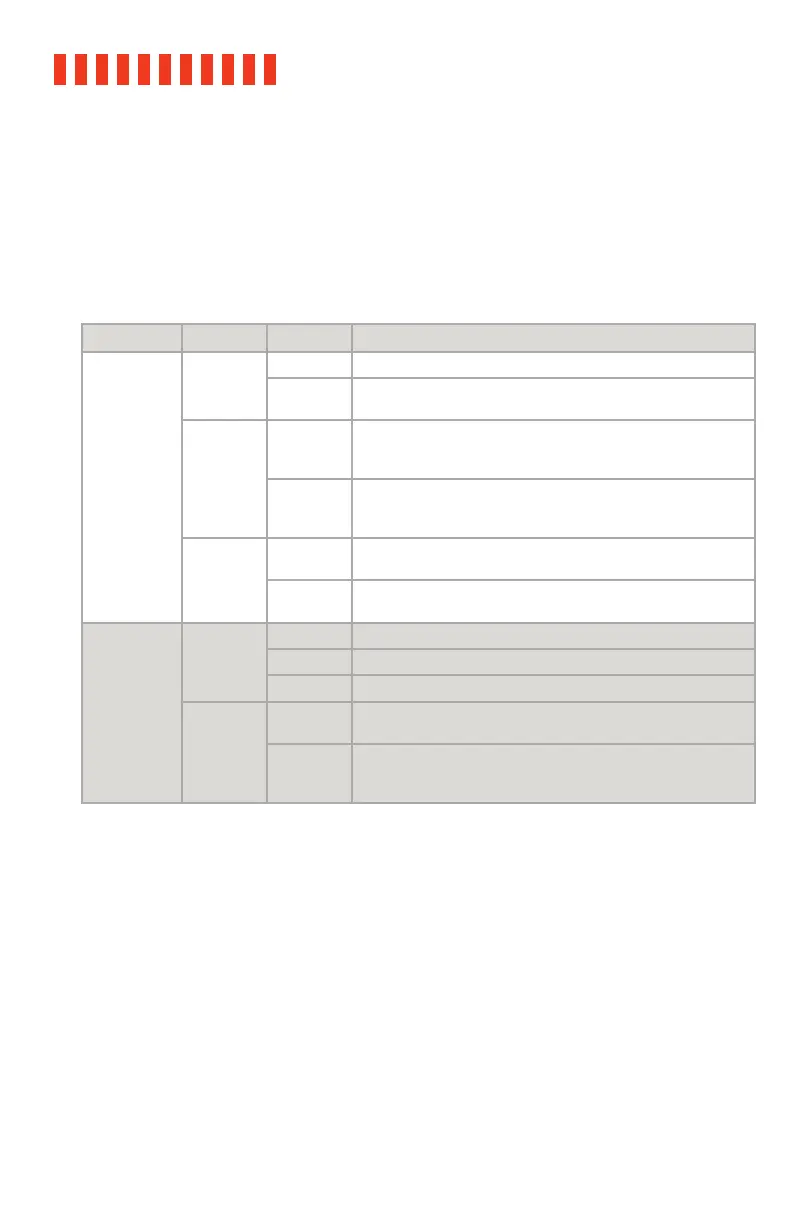
This table describes the behavior of the LEDs on the front of the ioSafe Duo. Note that a “RAID
array” is how the two hard drives inside the ioSafe Duo are linked together. One of the ways
they can be linked together is as a RAID 1, which automatically ensures that an exact copy of
your data is always available in case one of the hard drives in the ioSafe Duo dies. Other RAID
modes are available. To use them, see Section 2.3.
LED Name Color State Description
Disk Activity
LEDs #1-2
Green
Solid The corresponding drive bay is powered on.
Slow
Blinking
The corresponding drive is being accessed.
Amber
Solid
Both LEDs are solid amber when the internal temperature of
the ioSafe Duo is over 131° F/55° C. Ensure the unit is being
stored in a properly ventilated area.
Slow
Blinking
Indicates that the correspending drive is being accessed while
the internal temperature of the ioSafe Duo is over 131° F/55° C.
Ensure the unit is being stored in a properly ventilated area.
Red
Slow
Blinking
Indicates a drive failure or disconnection of the corresponding
drive.
Fast
Flickering
The RAID 1 array is being rebuilt. The disk with the red LED is
the disk that is being overwritten.
Power LED
Blue
Off The unit is powered off.
Solid The unit is powered on.
Blinking A RAID array is being created.
Red
Solid
Indicates a fan failure. Please contact Technical Support to
obtain a replacement fan (see Section 7).
Blinking
A RAID array is being created at the same time a fan has failed.
Please contact Technical Support to obtain a replacement fan
(see Section 7).
1.6 Warnings and Notices
Please read the following before using the product.
General
• If a hard drive inside the ioSafe Duo ever fails, do not replace it without consulting
Section 5.2 in this manual first. We’ve made the drive replacement procedure very
easy to follow, but if you don’t follow it you might accidentally erase your data!
• The circuit boards within the product are susceptible to static electricity. Proper
grounding is strongly recommended to prevent electrical damage to the product or
other connected devices, including the computer host. Avoid all dramatic movement,
tapping on the unit, and vibration.



 To Next Page