ioSafe Duo User Manual 29
g. In the Value box, you should see text similar to “ASM1352R-XXXXXX,” where the X’s are
placeholder names. The X’s correspond to the RAID mode that the device is currently in.
Mode Corresponding Device Name
RAID 0 ASM1352R-FAST
RAID 1 ASM1352R-SAFE
JBOD ASM1352R-PM
SPAN ASM1352R-VOLUME
If the text corresponds to the RAID mode you expected, then you have successfully veri-
fied that the RAID array was created successfully. You may skip the remaining steps.
If the text does not correspond to the RAID mode you expected, continue to the next
steps to recreate the RAID.
Recreating the RAID will result in the loss of data on your drives. Do not proceed to the next
step unless you are sure your data is backed up!
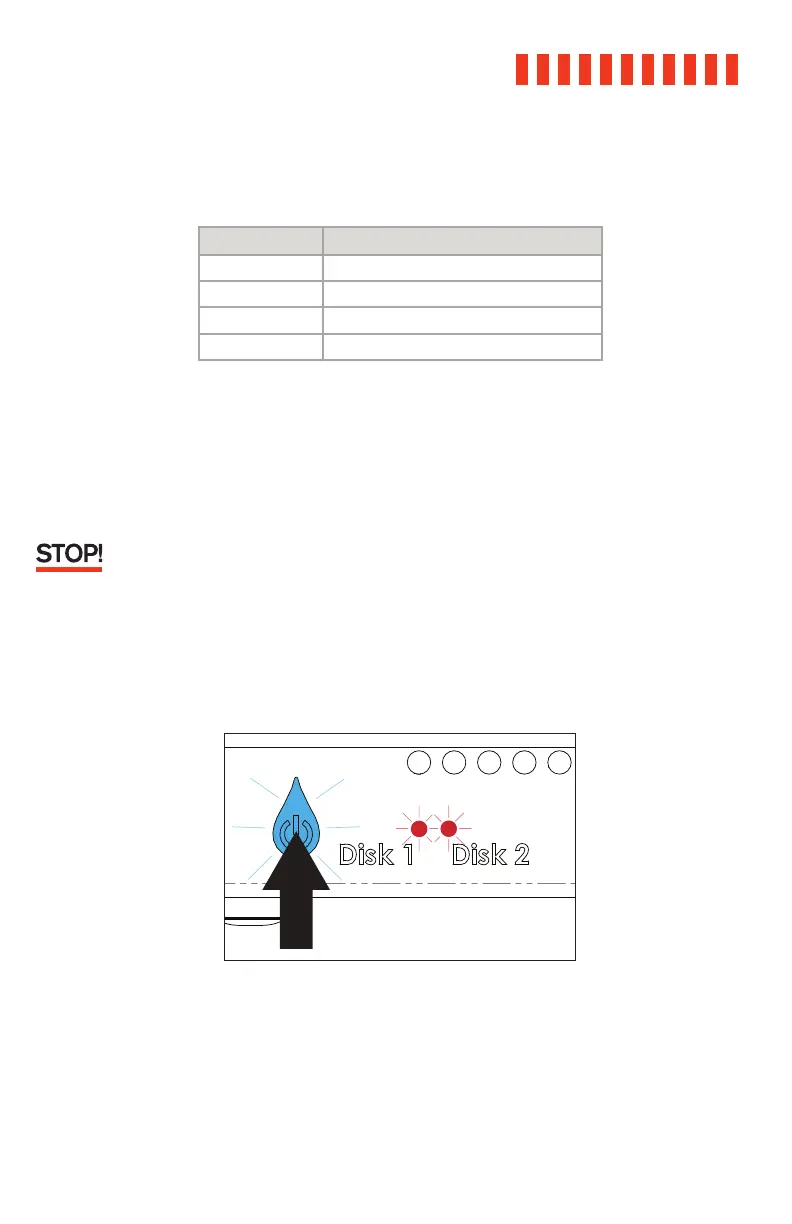
h. If the RAID mode is incorrect or the ioSafe Duo does not appear on your computer, restart
the array creation process by powering off the ioSafe Duo. Then, press and hold down on
the Power button until the Power button begins blinking blue. The Drive Activity LEDs for
both disks will also briefly blink red. The blinking indicates that the array is being created.



 To Next Page