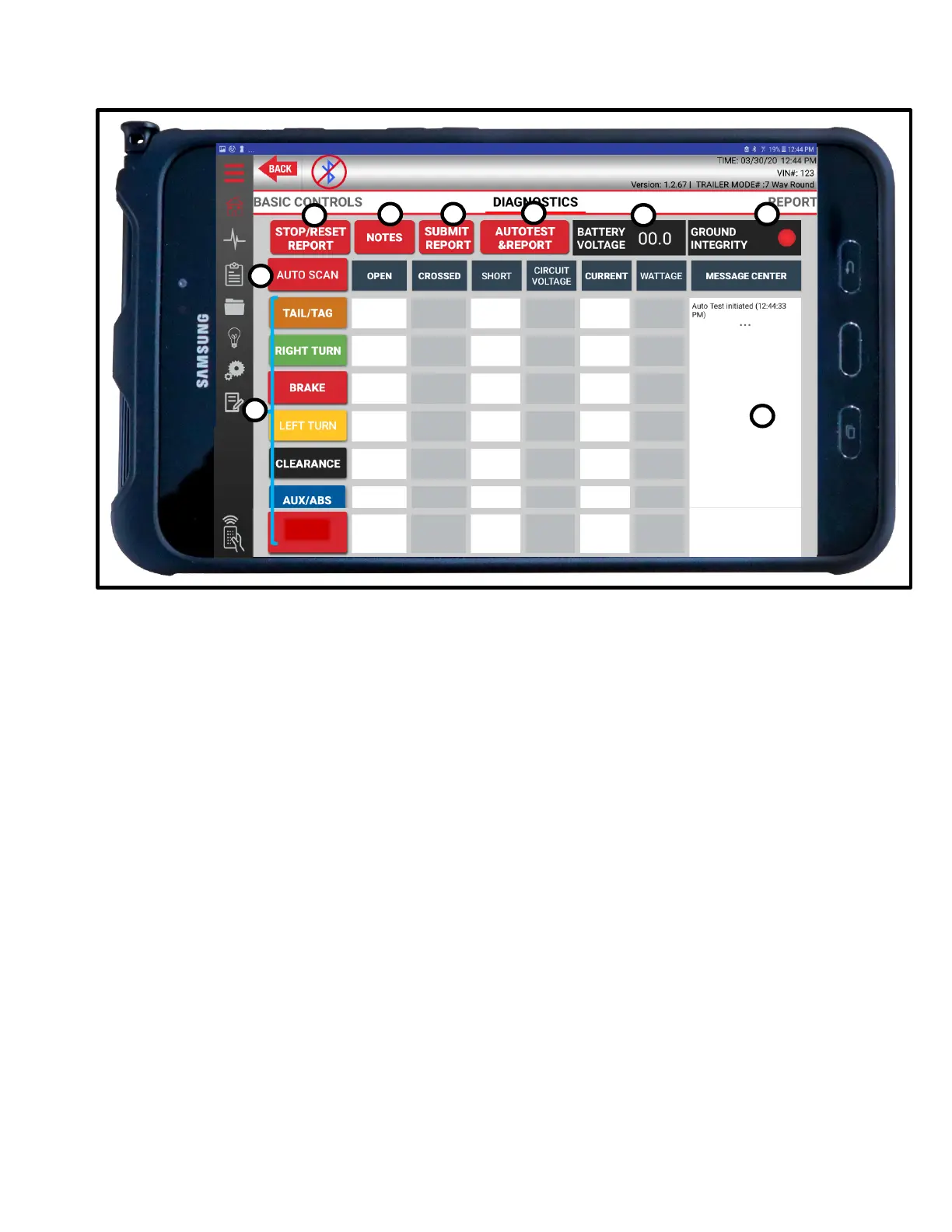
7.3 Diagnostic Controls
A. Stop/Reset Report
Press once during diagnostics to stop report before completion. Press again to clear all diagnostics
reported.
B. Notes
Press to log a note with report. Notes can be viewed on the Notes List page or on the report once
completed.
C. Submit Report
Submits report for saving. Must execute a test before report can be submitted. See Part 8:
Electrical/Lighting Testing for various testing procedures.
D. Auto-Test & Report
Automatically tests one circuit at a time in a clockwise rotation then submits report.
E. Battery Voltage
Displays battery voltage when connected.
F. Ground Integrity
Red light indicates a bad/poor ground or bad cable condition. Green light indicates a
solid/healthy ground connection. See Part 8: Electrical/Lighting Testing for more information
on ground integrity.
G. Auto Scan
Engages all electrical circuits at the same time
H. Available Circuits
Pressing any one of these buttons will initiate a test of the selected circuit, noting circuit conditions,
voltage, current, and wattage.
I. Message Center
Shows messages relating to tested circuits.



 To Next Page