GB
! IMPORTANT!
Follow the instructions below to congure the machine’s software for the type of batteries
installed:
see the “Technical menu section”.
Batteries: preparation
! DANGER!
During battery installation and any type of battery maintenance, the operator must be pro-
vided with the necessary personal protection devices (gloves, goggles overalls, etc.) to limit
the risk of injury. Keep clear of naked ames, avoid short circuiting the battery poles, avoid
sparks and do not smoke.
Batteries are normally supplied lled with acid and ready for use.
If the batteries are dry, proceed as follows before installing them in the machine.
Remove the caps and ll all elements with sulphuric acid solution specic for batteries until the
plates are entirely covered (this requires at least a couple of passes for each element).
Leave the batteries stand for 4-5 hours to allow air bubbles to come to the surface and the plates
to absorb the electrolyte.
Make sure the level of electrolyte is still above the plates and if necessary top up with sulphuric
acid solution.
Close the caps.
Install the batteries in the machine (following the procedure described below).
Charge the batteries before starting up the machine for the rst time. Follow the instructions in the
“Battery maintenance and charging” section.
Batteries: installation and connection
! DANGER!
Check that all switches on the control panel are in the “0” (o) position.
Make sure you connect the terminals marked with a “+” to the positive poles of the battery.
Do not check the battery charge by sparking.
Meticulously follow the instructions given below as short circuiting the batteries could
cause them to explode.
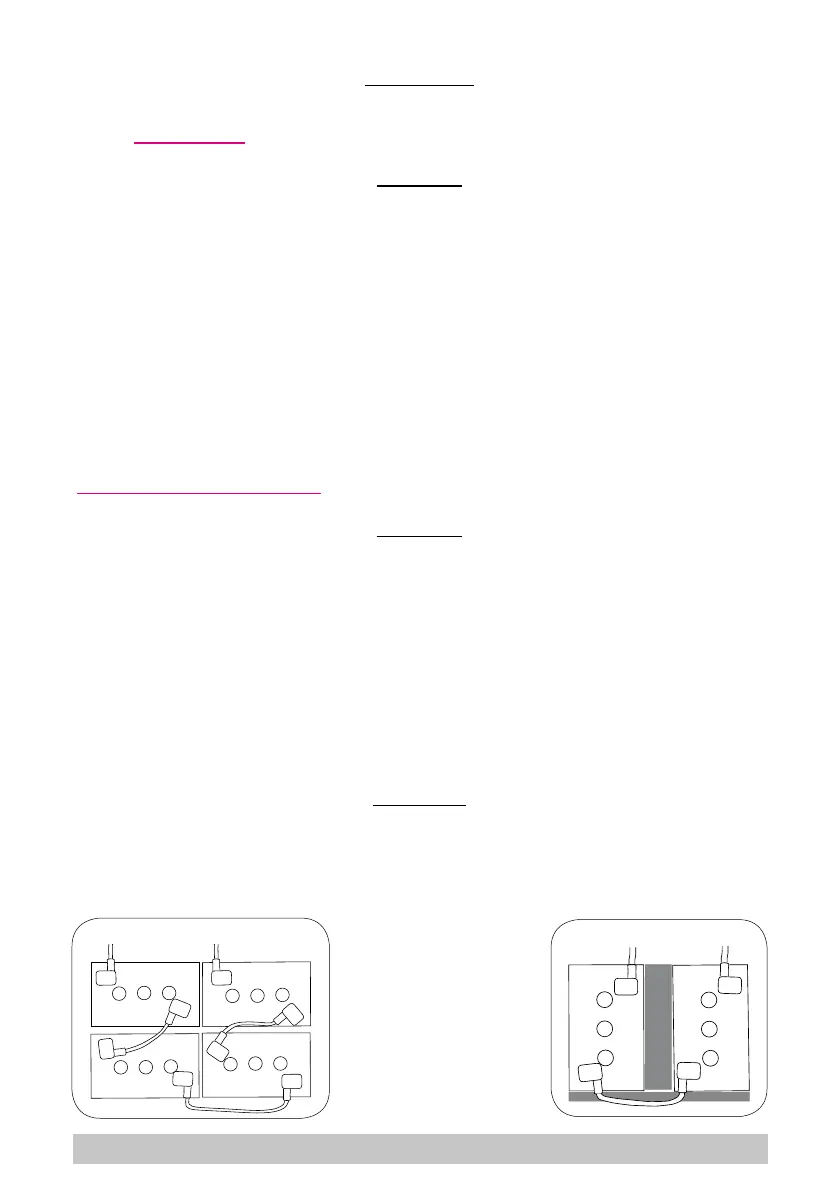
Place the batteries in the battery compartment, orienting them as shown in the drawings (gs. 2
and 3). On machines tted with two batteries, place the polystyrene spacers supplied between the
compartment and the batteries, see the drawing (g. 3)
Referring to the cable layout shown in the above diagram, connect the battery cables and bridge
terminals to the battery poles. Arrange the cables as shown in the diagram, tighten the terminals on
the poles and coat with Vaseline.
Lower the tank into the working position.
When using the machine, follow the instructions below.
! WARNING!
Never allow the batteries to become excessively at as this could damage them irreparably.
2
3
15



 To Next Page