GB
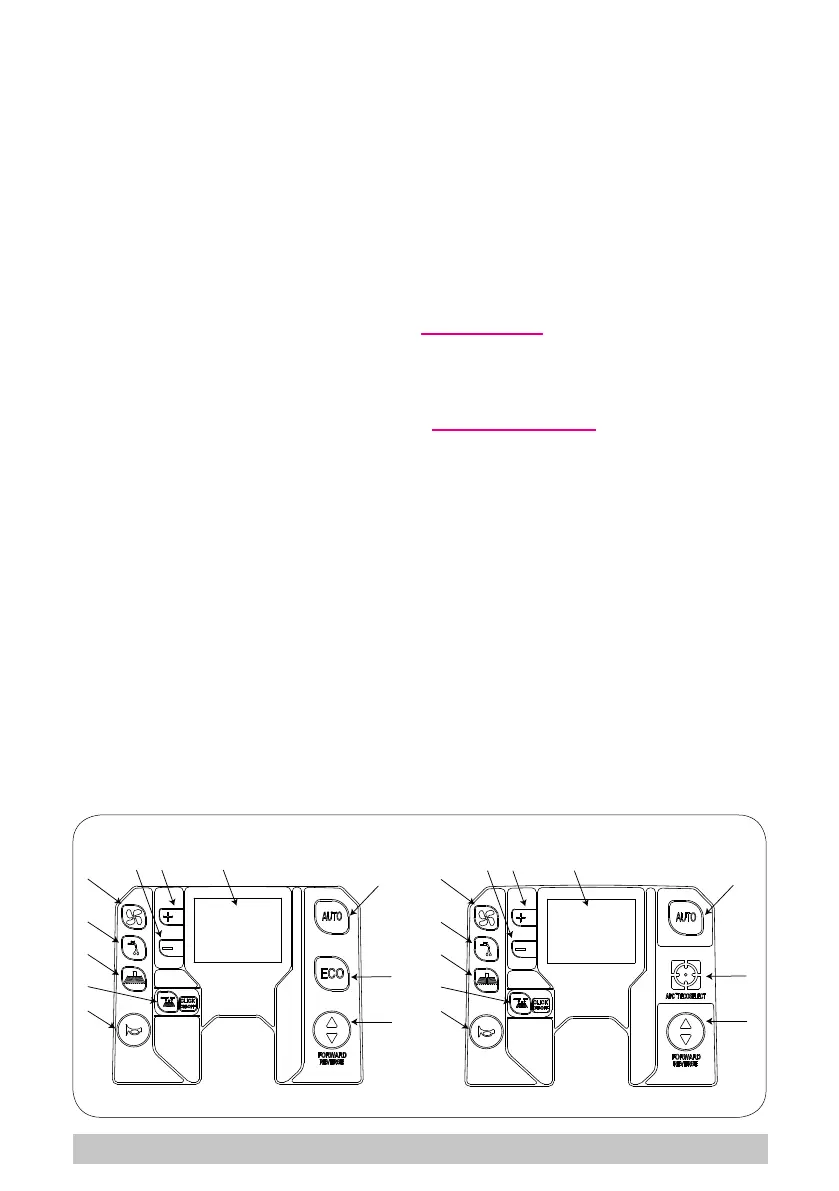
► Horn button (g. 12, ref. 5): Press to sound the horn.
► Forwards travel button (g. 12, ref. 6): selects the machine’s travel direction; when se-
lecting reverse gear, the display shows the letter “R” and the buzzer sounds intermittently.
► ECO program button (g. 12, ref. 7): all the functions are activated in “ECO” mode:
brush pressure, water/detergent ow-rate, brush speed and suction motor speed. In this
program, energy consumption is reduced and the machine emits less noise.
► APC program button (ADVANCED PRODUCTIVITY CONTROL) (g. 12, ref. 7): the
APC system continuously monitors the quantity of water/detergent delivered. This control
improves washing quality and optimises the cleaning operations. The display shows the
quantity of water/detergent contained in the tank in real time, as well as the remaining
operating autonomy in minutes and m
2
.
► AUTO program button (g. 12, ref. 8): all the functions are activated in “AUTOMATIC”
mode: brush pressure, water ow-rate and detergent delivery are preset by the manufac-
turer, however can be modied from the “Technical Menu”.
► “+ , -” buttons (g. 12, ref. 9-10): these are used to set travel speed, or increase or de-
crease the user parameters.
► Display (g. 12, ref. 11): displays the remaining battery charge, expressed as a percenta-
ge, the logo of the active functions, “hour counter” - the machine operating hours, the set
travel speed and any alarms, see chapter “Alarms on the display”.
► Variant with APC (ADVANCED PRODUCTIVITY CONTROL): when the machine
is on, as well as the values described above, the number of litres remaining in the
solution/detergent tank is displayed. During operation with the AUTO or APC pro-
grams, the display shows the remaining machine operating autonomy in minutes,
which depends on the quantity of water/detergent in the tank. During operation,
pressing the “CLICK-ON-OFF” button changes the type of display, and the remai-
ning number of litres is replaced by the remaining useful area that can be washed,
expressed in m
2
.
6
7
8
6
7
8
1
9 10 11
9 10 11
2
3
4
5
1
2
3
4
5
APC
12
23


 To Next Page