3 DEVICE MANAGEMENT
3 DEVICE MANAGEMENT
3.1 Adding a Device
3.1 Adding a Device
• Use administrator account – Administrator account will be used for both administration and view access.
This setting is not recommended for security reasons. Administrator credentials will need to be transfered
through the network every time a stream from this device is requested (either for live view or recording),
which increases the risk of them being eavesdropped.
The table of user names and passwords to cameras (including the automatically generated ones) is later
available in the menu Configuration – Devices – Password Printing.
Confirm adding the devices into the system by clicking the Activate button at the end of the list.
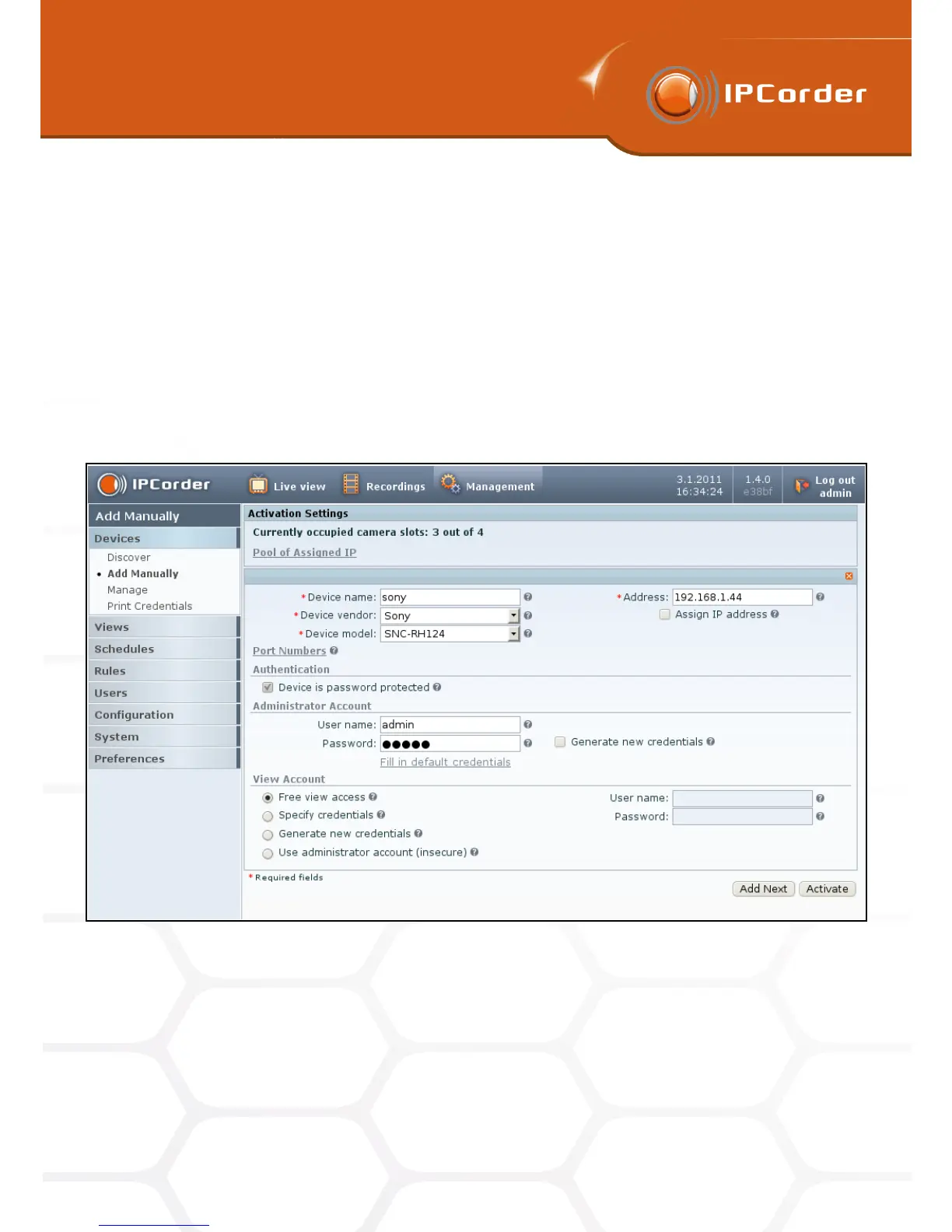
The alternative to the automatic detection of the connected devices is the possibility of adding the devices
manually (Figure 15) in the menu Management – Devices – Add Manually (for example if the device is in a
different network that the IPCorder).
Figure 15: Manual device activation
Similarly to detecting the devices automatically, there are input boxes for the Device Name, possibility to
automatically assign IP address (only for the devices in local network) and security settings, which serve the
same purpose.
Further it is necessary to know the IP address of the device (or – for cameras in a different network – the
IP address of the gateway to this network) and to choose what type of device is being added. In the section
22



 To Next Page