For more detailed information, visit: www.irobot.com 23
TIP: When maintaining Roomba, look for the yellow parts. These parts are
designed to be removed and cleaned every time you empty Roomba’s bin.
3
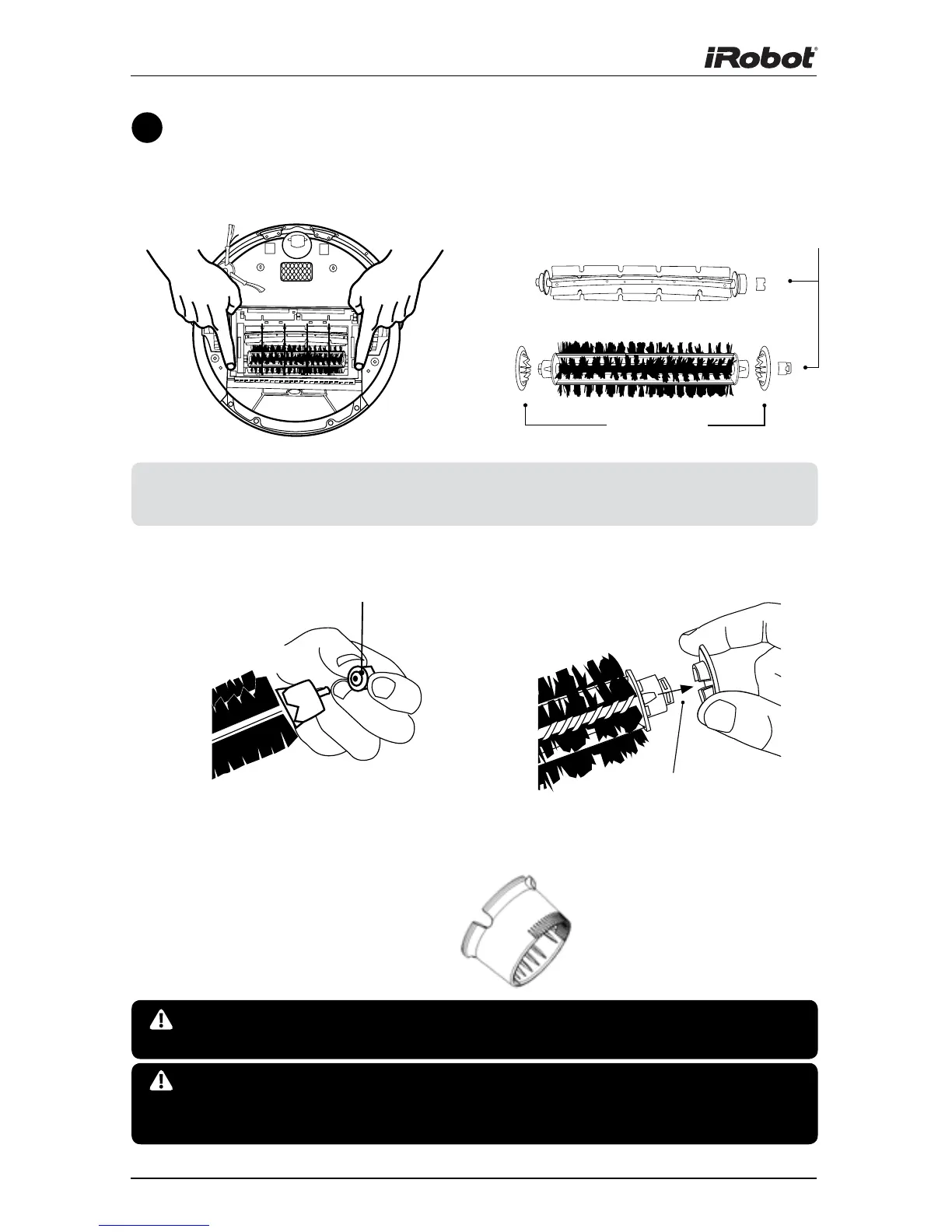
Clean Roomba’s brushes
B.
Remove and clean Roomba’s
brushes.
A. Remove brush guard by lifting both
yellow tabs.
D. Remove and clean Roomba’s brush
caps.
C. Remove and clean hair and dirt from
Roomba’s yellow brush bearings.
Do not attempt to run Roomba without the bearings. If you
misplace Roomba’s brush bearings, contact iRobot Customer Care
for replacement bearings.
Excessive build up of hair can permanently damage Roomba.
Remove brushes and inspect brush bearings regularly.
Bearings
Brush
Bearings
Brush Caps
E. Use the included cleaning tool to
easily remove hair from Roomba’s
bristle brush by pulling it over the
brush.
Alignment Feature











 To Next Page