0 sec. 15 sec.
20 sec.
10.1
10.2
1×3 Volt
CR2025
CR2025, 3 V Li
9b
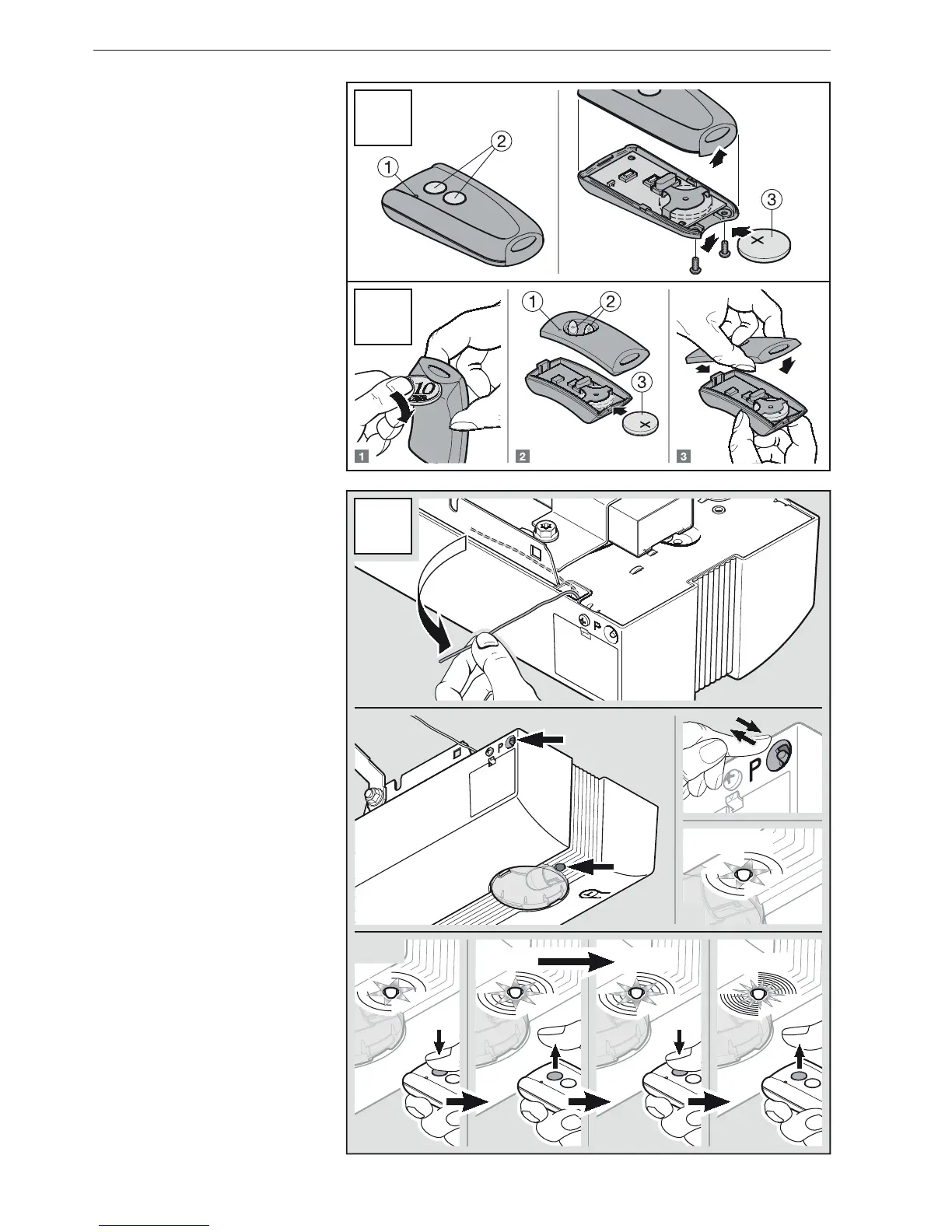
4.2 Inserting/changing the
batteries
Hand transmitter RSC2 (see Figure9a).
Hand transmitter RSE2 (see Figure9b).
4.3 Adjusting the antenna
Determine the best orientation, by trial
and error (see Figure10).
4.4 Teaching in the desired
hand transmitter button
▶
SeeFigure10.1 – 10.2
1. Press the button P.
The red LED flashes.
2. Within 20 seconds, hold the hand
transmitter button down until the
LED begins flashing rapidly.
3. Within 15 seconds, press the hand
transmitter button again until the
LED begins flashing very rapidly.
4. Release the hand transmitter
button. The LED will beilluminated.
The hand transmitter button has been
taught in and is now ready for
operation.
4.2 Batterien
einlegen / wechseln
Handsender RSC 2 (siehe Bild9a).
Handsender RSE 2 (siehe Bild9b).
4.3 Antenne ausrichten
Ermitteln Sie die beste Ausrichtung
durch Versuche (siehe Bild10).
4.4 Gewünschte Handsender-
taste einlernen
▶
Siehe Bild10.1 – 10.2
1. Drücken Sie die Taste P.
Die rote LED blinkt.
2. Innerhalb von 20Sekunden die
Handsendertaste so lange drücken,
bis die LED schnell blinkt.
3. Innerhalb von 15Sekunden
dieselbe Handsendertaste nochmal
drücken, bis die LED sehr schnell
blinkt.
4. Lassen Sie die Handsendertaste
los. Die LED leuchtet konstant.
Die Handsendertaste ist
betriebsbereit eingelernt.
DEUTSCH / ENGLISH


 To Next Page