EasyManua.ls Logo

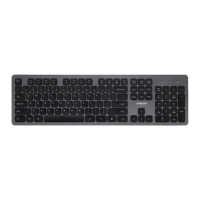
J.Burrows KB110 - User Manual

J.Burrows KB110
6 pages
Print Icon
To Next Page IconTo Next Page
Loading...
Instruction Manual
KB110
SILENT BACKLIT
KEYBOARD
1/6
MADE IN CHINA
Compatible with:
Windows® 10 or later
Mac OS X 10.10 or later
Question and Answer IconNeed help?

Do you have a question about the J.Burrows KB110 and is the answer not in the manual?

Summary

Keyboard Functions Overview

Media and Audio Controls

Manages volume, mute, and media playback functions.

Display and System Navigation

Adjusts screen brightness and navigates system features.

Productivity and Utility Shortcuts

Provides copy, paste, save/lock, search, and music functions.

Installation and Setup Guide

2.4 GHz Wireless Connectivity

Instructions for connecting via USB receiver.

System Operation Mode Change

Guide for switching between Windows and Mac modes.

Indicator Light Status

Low Power Indicator

Describes red LED flashing for low battery.

Charging Indicator

Details blue LED for charging and status.
Product Specifications

Safety and Compliance Warning

J.Burrows KB110 Specifications

General IconGeneral
BrandJ.Burrows
ModelKB110
CategoryKeyboard
LanguageEnglish

Related product manuals