JABLOTRON ALARMS a.s.
Pod Skalkou 4567/33 46601 Jablonec n. Nisou
Czech Republic www.jablotron.com
||
|
JA-14K(R) Security System Control Panel 53 / 72 MNX22101
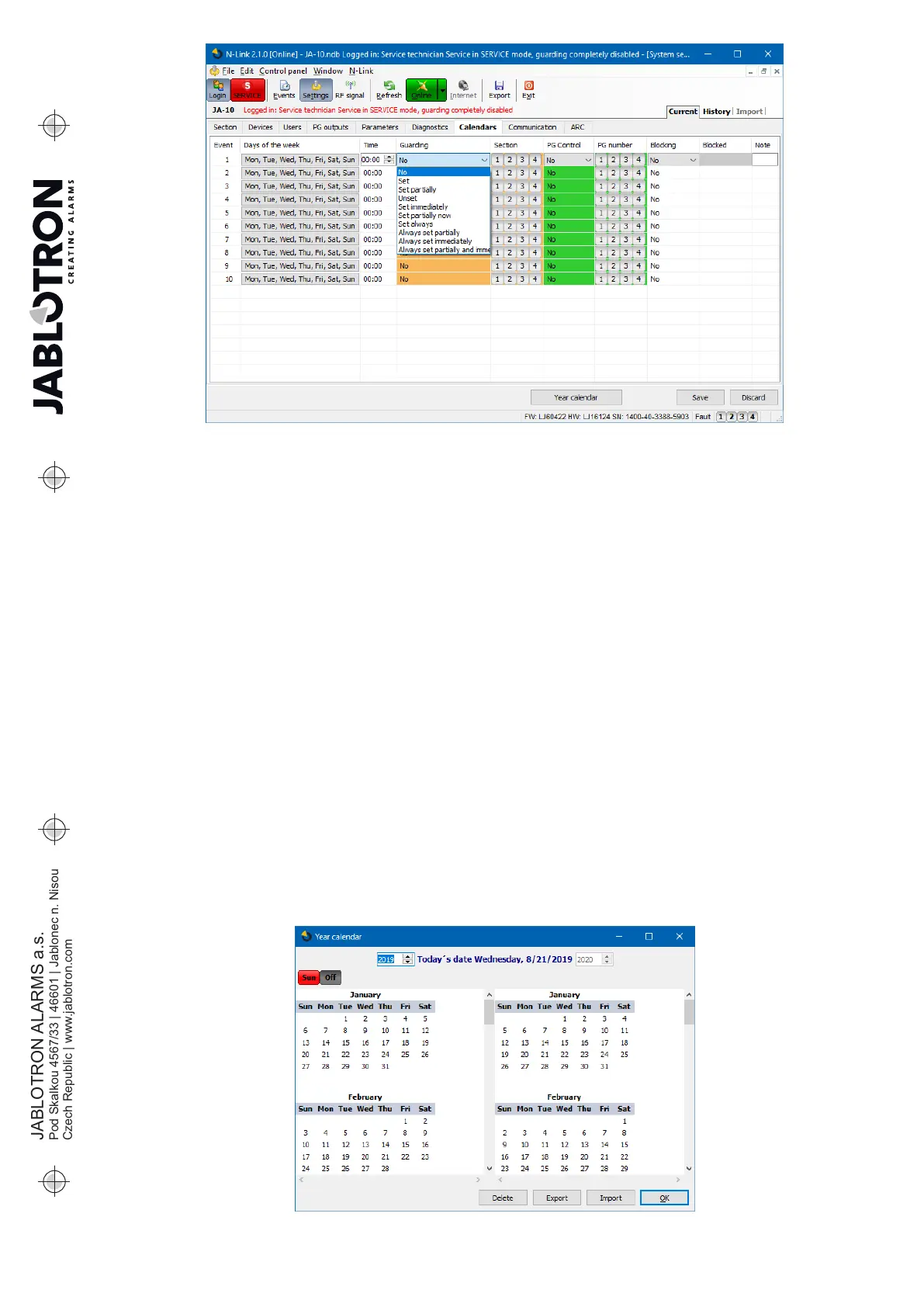
Days of the week – defines on which days the action is executed (e.g. every Monday)
Time – Defines at what time the action is executed on the specified day.
Guarding – Allows you to execute the actions “Set”, “Partially set” with the variant “Immediately” (no exit delay
or acoustic indication) and the variant “Always” (it always ignores the ready to be set rules) and also “Unset”.
Section – Specifies in which section (sections) the action of the set type is executed.
PG Control – Allows you to set PG Activation, PG Deactivation, PG Blocking or Unblocking of PG outputs.
Blocked PG outputs cannot be controlled by the functional button or with an SMS.
PG number – Specifies which output/s will be enabled or disabled.
Blocking – PG outputs are offered here, their activation allows blocking a calendar action.
Blocked – possibility to block a particular action. Disabling is indicated by a red dot. The Service Technician
(using N-Link) is authorized to disable the schedule.
Note – Provides the possibility of customized description of scheduled events
Year calendar – Allows you to change the attribute of the day to “Sunday” for individual days of the current and
next year. You can change the attributed by (repeated) clicking of the mouse button on the corresponding day.
Application example: For a public holiday (non-working day) falling on Wednesday you can change
the attribute of the day from Wednesday to Sunday. Events that are automatically planned in accordance with
the basic settings of the Schedule and valid for working days are not carried out on this day. However,
the program valid for Sundays will be kept. This way you can adjust the control of Sections or PG Control e.g.
also for company holidays etc. The “Off” attributed means disabled – on days indicated like this no scheduled
event is executed.








 To Next Page