Description and Operation
DELTA Configuration
Establishing a USB Cable Connection
24 www.javad.com
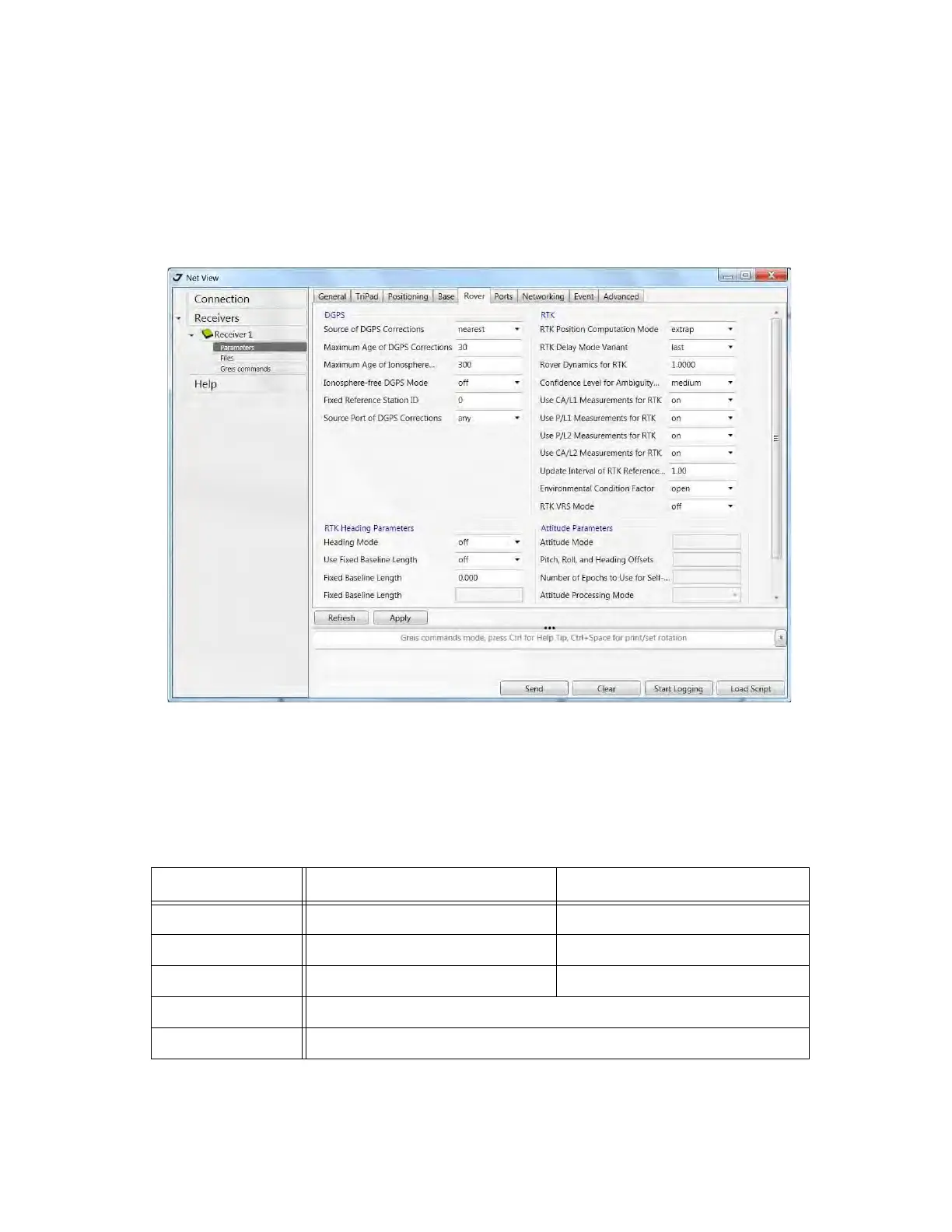
• Confidence Level for Ambiguity – list box governs the process of the RTK engine fixing integer
ambiguities. The RTK engine uses the ambiguity fix indicator when making a decision whether
to fix ambiguities or not. Low, Medium and High correspond to the indicator's 95%, 99.5% and
99.9% states, respectively. The higher the specified confidence level, the longer the integer
ambiguity search time. This is the price one pays for the higher reliability of the ambiguity fixed
solution..
Figure 1-11. Rover tab
8. For RTK survey, open the Ports tab and set up the parameters according Table 1-2, then click
Apply (Figure 1-12 on page 25).
Note:
For the survey with the post-processing keep default parameters.
Table 1-2. Settings for Ports tab
Parameter Base Rover
Input - The same correction type as Base has
Output Select the correction type. None
Period (sec) Set the period of correction output -
Baud rate baud rate for the corresponding receiver port
RTS/CTS Enable


 To Next Page