75
5. Turn the on/o switch or key.
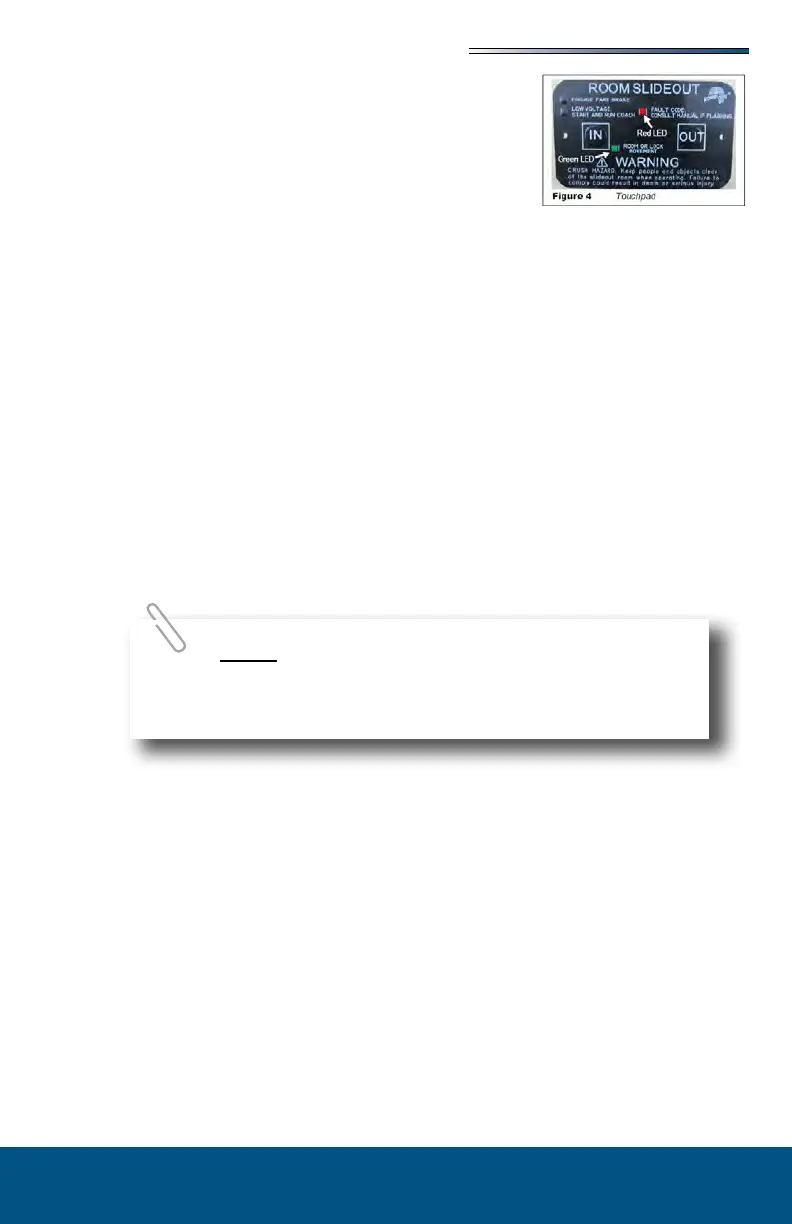
6. Press and hold the OUT button (Fig 4). To retract, press
and hold the IN button. There will be a slight delay
before the room begins moving.
7. The GREEN LED should be solid ON when room is in
motion.
8. Release the OUT button when the room is fully extended
or the IN button when fully retracted, and stops moving.
9. Turn the on/o switch or key.
The control has the ability to detect and display several faults. When a fault is detected,
room movement stops and two dierent LEDs will ash in a pattern.
The RED FAULT CODE LED (Fig 4) will ash a number of times corresponding to a
specic fault code (refer to the Fault Code Chart).
The GREEN ROOM MOVEMENT LED (Fig 4) will ash GREEN a number of times
corresponding to which motor has the associated fault.
Example: (4) RED ashes and (2) GREEN ashes indicate a motor fault on motor 2.
; faults must be cleared for the room to operate normally.
faults can be cleared by pushing and releasing theor buttons on the
wall touchpad (Fig 4).
faults must be cleared by pushing and releasing the SET STOPS/CLEAR
FAULTS button located on the back of the wall touchpad (Fig 2).
For MAJOR faults, the control must be overridden by follow-
ing the EMERGENCY RETRACT MODE in the OVERRIDE MODES
section.






 To Next Page