76
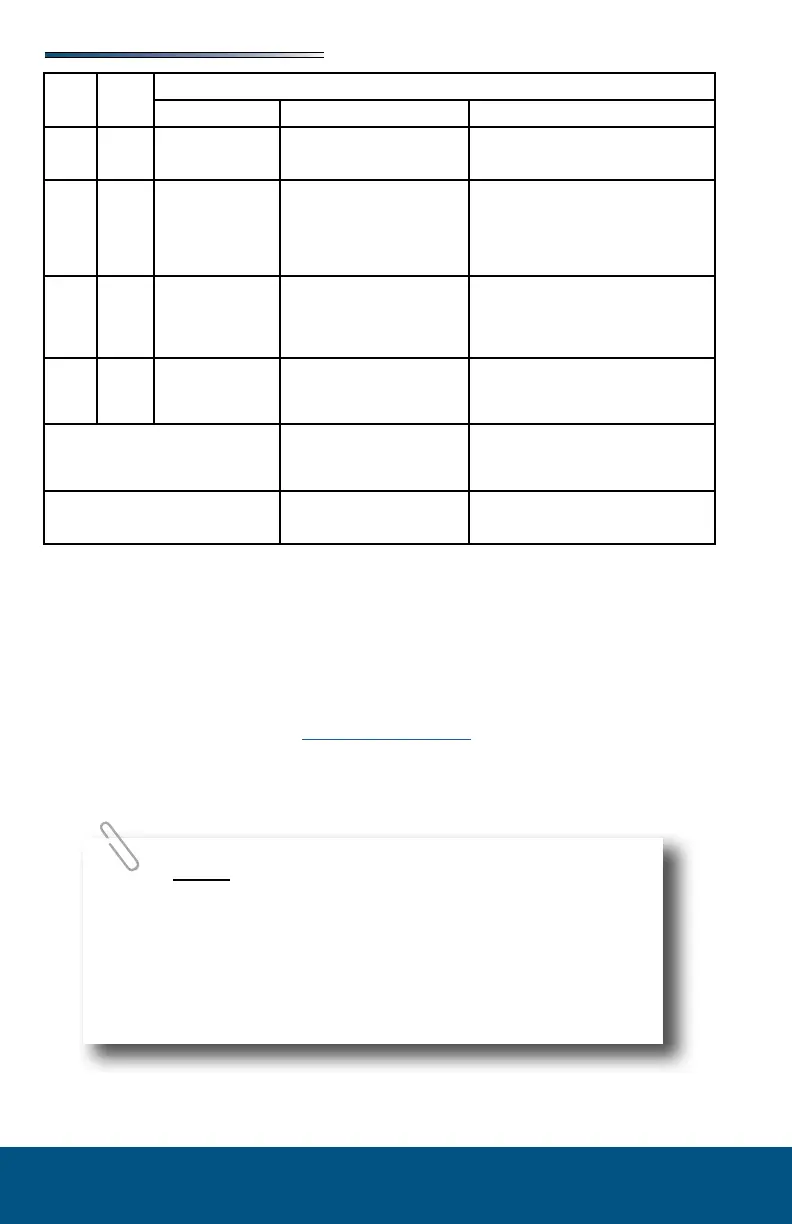
Code
1 Major Stops not programmed
-Stops have not been set
-Stops were cleared
-Stops were improperly set
Steps need to be programmed by an authorized
service facility.
2 Minor System Fault
-Obstruction present
-Excessive system drag
Run room in opposite direction. If it continues
to move in the opposite direction, remove
obstruction, excessive weight in room or repair
of damaged component. If room stops moving
in opposite direction, observe fault code and
refer to this chart
4 Major
Excessive Battery
Voltage
-Bad or loose connection
-Defective harness
-Open or shorted motor
-Check all connections at control box
and motor
-Check the harness for broken wires.
-Put 12.0 VDC direct to the motor. If it
does not run replace the motor.
6 Minor
Supply voltage to control box is 17
0 V DC or greater
Check 2-pin power connector at control box. If
the voltage is 17. VDC or higher, contact O.E.M
for power and ground supplies
Park brake LED ashing
-Parking brake not set (if
applicable)
-Ground signal lost at park
brake control
-Set parking brake (if applicable)
-Check for continuity to ground on wire
plugged into park brake connector at
control box
Low voltage LED ashing
Incoming violated to control box is
below 12.0 VDC
Check 2-pin power connector at control box. If
voltage is below 12.0 VDC contact O.E.M for
power and ground supplies.
The Power Gear® slideout system requires very little maintenance. Read and follow these
procedures:
When the room is extended, visually inspect the slide rail assemblies. Check for excess
buildup of dirt or foreign material; remove any debris that may be present.
If the system squeaks or makes any noises, blow out any debris from the gear rack arms
and apply a dry lubricant to prevent and/or stop squeaking.
Refer to the Power Gear® website (www.powergearus.com) for additional information.
In the event of component failure or loss of system power, your slideout can be manually
overridden and retracted for travel.
During the override procedure, the unit will exit this mode
if the room has not been moved for two (2) minutes or if a fault is
detected during room movement. The Fault Code (RED) and Room
or Lock Movement (GREEN) LEDs will ash rapidly for 10 seconds to
indicate the override procedure failed. After 10 seconds of ashing,
the control will automatically default to FAULT CODE 1. Program-
ming must be restarted.




 To Next Page