JB-lighting Lichtanlagen GmbH Sallersteigweg 15 D-89134 Blaustein Telefon ++49(0)7304 9617-0
- 126 -
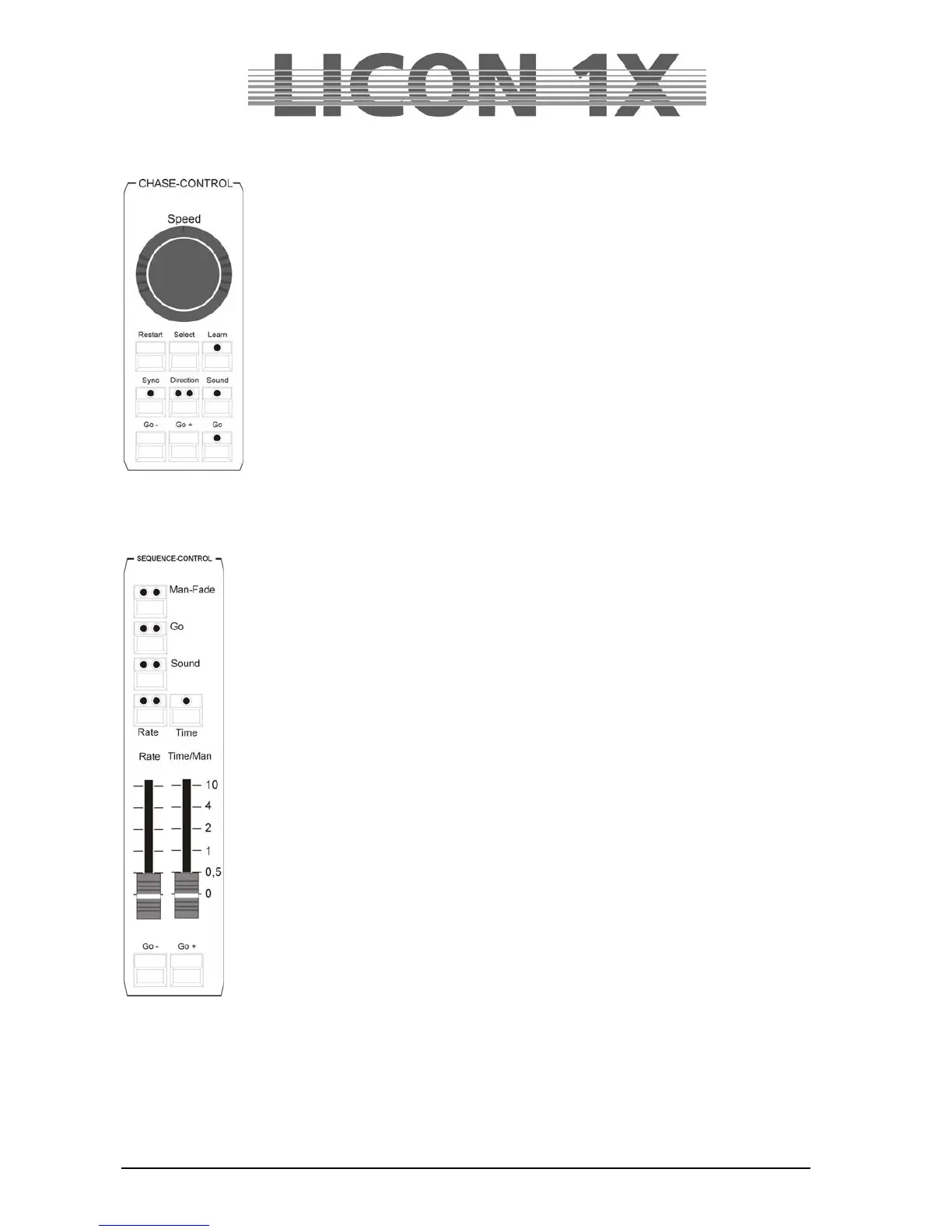
26.15 CHASE-CONTROL
Changes the speed of chases.
SPEED encoder: changes speed by turning the outer or inner ring.
RESTART: resets the activated chase to chase step 1 and starts it anew.
SELECT: is used in combination with a chase key to select a chase, to
which the individual parameters of the Chase-Control Section are
then assigned.
LEARN: enters the speed by tapping the rhythm.
SYNC: not occupied at the moment.
DIRECTION: changes the direction of a chase. The red LED indicates a change
of direction. The green LED indicates a permanent change of
direction. When no LED is lit, the chase runs in the programmed
direction.
Go: stops the chase and allows manual stepping of the individual
chase steps.
Go-: switches the chase one chase step opposite to the
programmed direction.
Go+: switches the chase one chase step in the programmed
direction.
26.16 SEQUENCE-CONTROL
Changes the speed of sequences.
Man-Fade key:
Red LED: indicates the currently active status, the sequences can only be faded
manually with the Time/Man fader.
Green LED: not occupied.
Go key:
Red LED: indicates the currently active status, the sequences can be stepped manually
by the GO- or GO+ keys.
Green LED: not occupied.
Sound key:
Red LED: indicates the currently active status.
Green LED: indicates the count signal connected to the AUDIO input on the rear panel
of the Licon 1X.
Rate key:
Red LED: indicates the currently active status.
This key overwrites the NextTime of your sequences.
Yellow LED: indicates the speed of the rate fader.
Time key:
Red LED: indicates the currently active status.
This key overwrites the fade time of your sequences with the values entered by the
fader.
Rate fader:
The Rate fader assesses the NextTime of sequence steps. When the red LED is lit, the
NextTime of sequence steps can be overwritten manually.
Time/Man fader:
The Time/Man fader accesses the fade time of sequence steps.
Time/Man fader in combination with the Man-Fade key:
Allows manual fading of sequence steps. The time, during which the fader is raised from 0 to 10,
determines the fadetime. When the fader is positioned either to 0 or to 10, the next sequence step will be
activated.
Time/Man fader in combination with the Time key:
Activates the time scaling of the Time/Man fader. The fadetime can be adjusted between 0 and 10
seconds (steps as shown on the scale)..


 To Next Page