31
VII. SUMMARY OF RECOMMENDATIONS FOR SELECTING AND INSTALLING THEATER
LOUDSPEAKER SYSTEMS
A. Specifying and Installing Screen Channels:
The following recommendations will give the reader a quick reference guide for specifying and installing
loudspeakers in all cinema applications. These recommendations draw directly from the detailed information that
has been presented before.
1. Screen channel assumptions:
• 15” LF drivers in the 95 to 97 dB sensitivity range (1 W at 1 m).
• LF power handling in the 300-watt range, per driver.
• HF systems with matching sensitivity and output capability.
• House sizes based on survey of the range of typical installations.
2. Low frequency driver count (per channel):
• For houses with 200 seats or less, specify systems with one LF driver per channel.
• For houses with 200 to 500 seats, specify systems with two LF drivers per channel.
• For houses with more than 500 seats, consider specifying systems with four LF drivers per
channel for maximum performance.
REMEMBER: You can always specify a larger system for a smaller house, but not vice versa.
3. Placement of screen channels:
• Space horizontally to match the widest anticipated picture format.
• Elevate systems so that HF sections are about 2/3 the screen height.
• Place the systems so that the HF sections are as close as possible to the screen.
• Paint matte black any reecting surfaces.
4. Toe-in of screen loudspeakers:
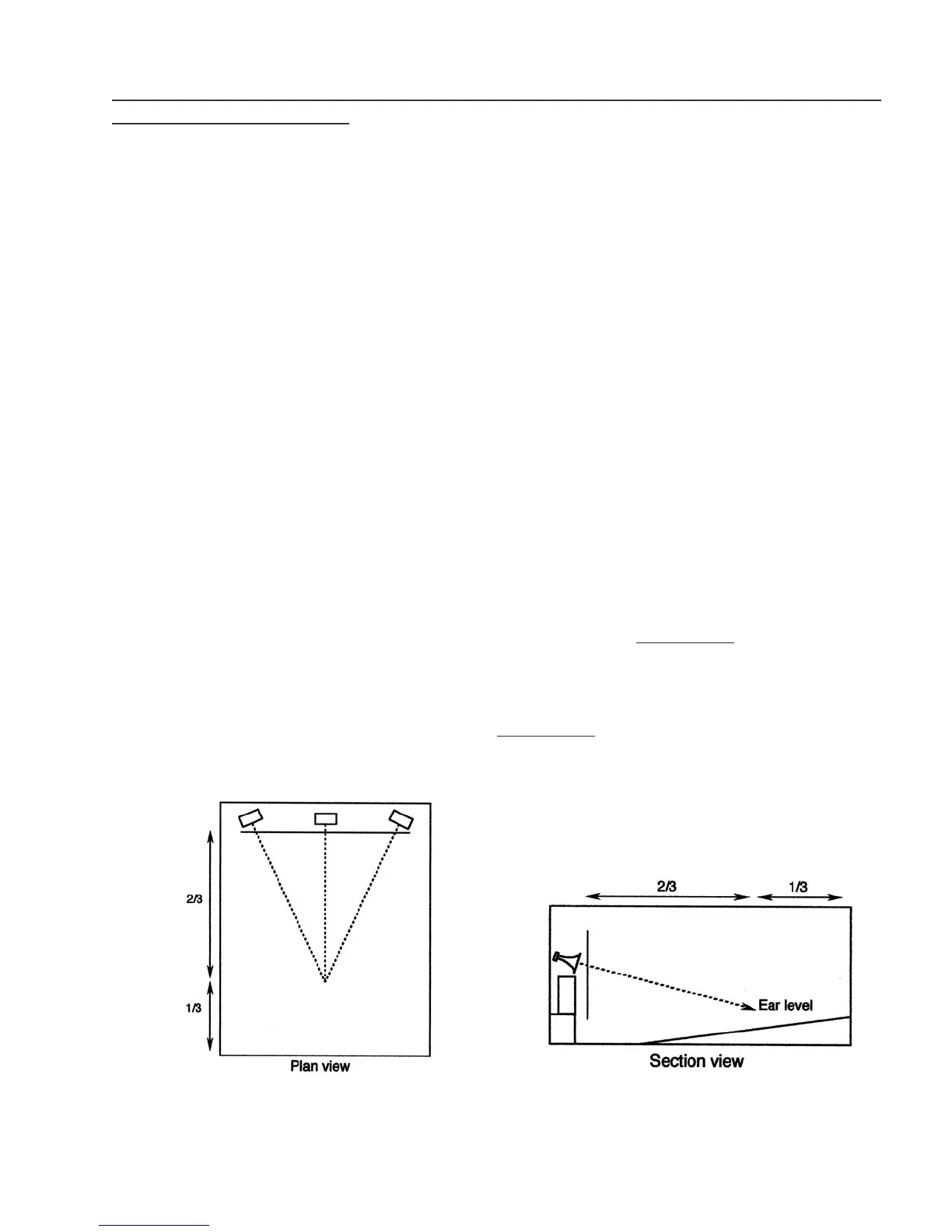
• Whether the screen is curved or not, toe the outside loudspeakers inward so that their on-axis
response will intersect at a point about 2/3 the distance to the back wall. (See Figure 40)
5. Downward tilt of HF sections:
• Tilt the HF elements downward so they point at ear level at about 2/3 the distance to the back
wall. (Note: This will not be necessary for systems that use asymmetrical horns, which
already incorporate the downward tilt in their design. (See Figure 41)
Figure 41: Screen channels, side section view.
Figure 40: Screen channels, plan view.



 To Next Page