EasyManua.ls Logo

JBL SG520 - Page 15

JBL SG520
34 pages
Print Icon
To Next Page IconTo Next Page
To Previous Page IconTo Previous Page
Loading...
Step
3.
Using
an
accurate
electronic
ac
voltmeter
(HP
Model
400
recommended),
trace
the
signal
level
at
each
stage
of
the
amplifier.
Refer
to
figure
4-9
which
shows
the
component
loca-
tions.
Step
4.
Refer
to
the
troubleshooting
chart,
table
4-1,
when
a
signal
fault
is
encountered.
Step
5.
When
a
faulty
component
is
found,
refer
to
paragraph
4.4
for
replacement
recommen-
dations
and
to
Section
5
for
parts
list.
4.2.3
Channel
B
Service.—-The
channel
B
amplifier
must
be
removed
for
service.
Turn
ac
power
off.
Proceed
as
follows:
Step
1.
Using
a
#2
(or
#1)
Phillips
screwdriver,
remove
six
6-32
screws
which
secure
the
chan-
nel
B
circuit
board
to
its
chassis.
Step
2.
Lift
three
power
leads
(red,
grey,
black
twisted
together)
out
of
the
way.
Then
lift
the
channel
B
circuit
board
up.
Step
3.
Tilt
the
circuit
board
up
to
a
vertical
position
and
tuck
a
few
strips
of
paper
under
the
edge
to
insulate
the
edge
connections
from
the
chassis.
Step
4.
In
this
position,
apply
power
and
test
the
circuits
as
explained
in
paragraph
4.2.2,
for
the
A
channel.
Refer
to
table
4-2
for
troubleshooting.
4.3
TEST
TONE
OSCILLATOR
DISASSEMBLY
AND
SERVICE
When
the
test
tone
oscillator
is
known
to
be
inoperative,
service
it
as
follows
(it
is
not
neces-
sary
to
remove
the
front
panel):
Step
1.
Lay
the
chassis
on
its
side
panel,
with
the
oscillator
board
components
facing
up.
Step
2.
Using
a
#2
(or
#1)
Phillips
screwdriver,
remove
four
6-32
screws
which
secure
the
oscil-
lator
circuit
board
to
its
subpanel.
Step
3.
Lift
the
circuit
board
out
into
the
clear.
The
leads
are
long
enough
to
allow
the
board
to
be
placed
on
the
bench
for
testing.
Step
4.
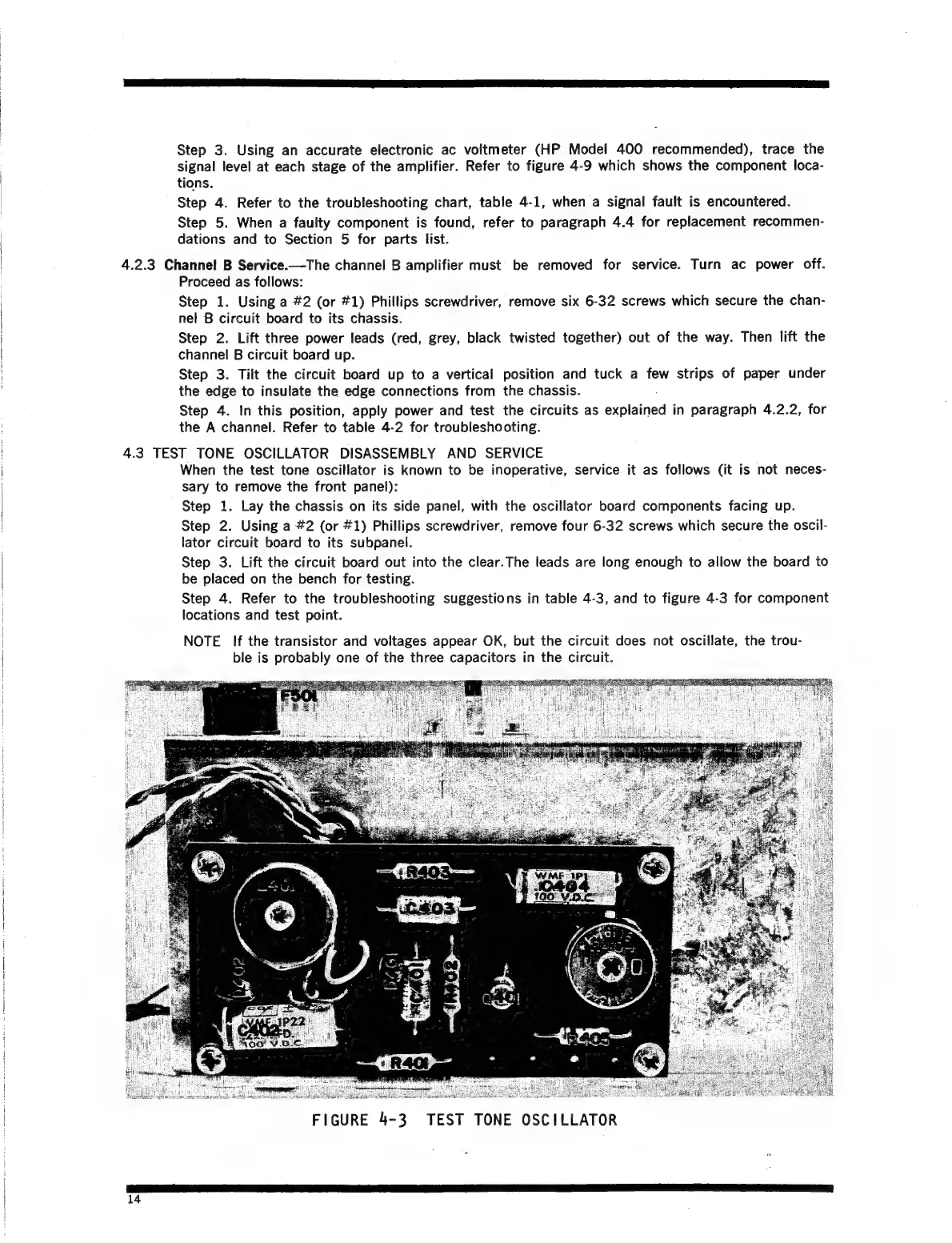
Refer
to
the
troubleshooting
suggestions
in
table
4-3,
and
to
figure
4-3
for
component
locations
and
test
point.
NOTE
lf
the
transistor
and
voltages
appear
OK,
but the
circuit
does
not
oscillate,
the
trou-
ble
is
probably
one
of
the
three
capacitors
in
the
circuit.
FIGURE
4-3
TEST TONE
OSCILLATOR
14

Related product manuals