EasyManua.ls Logo

JBL SG520 - Control the Volume

JBL SG520
34 pages
Print Icon
To Next Page IconTo Next Page
To Previous Page IconTo Previous Page
Loading...
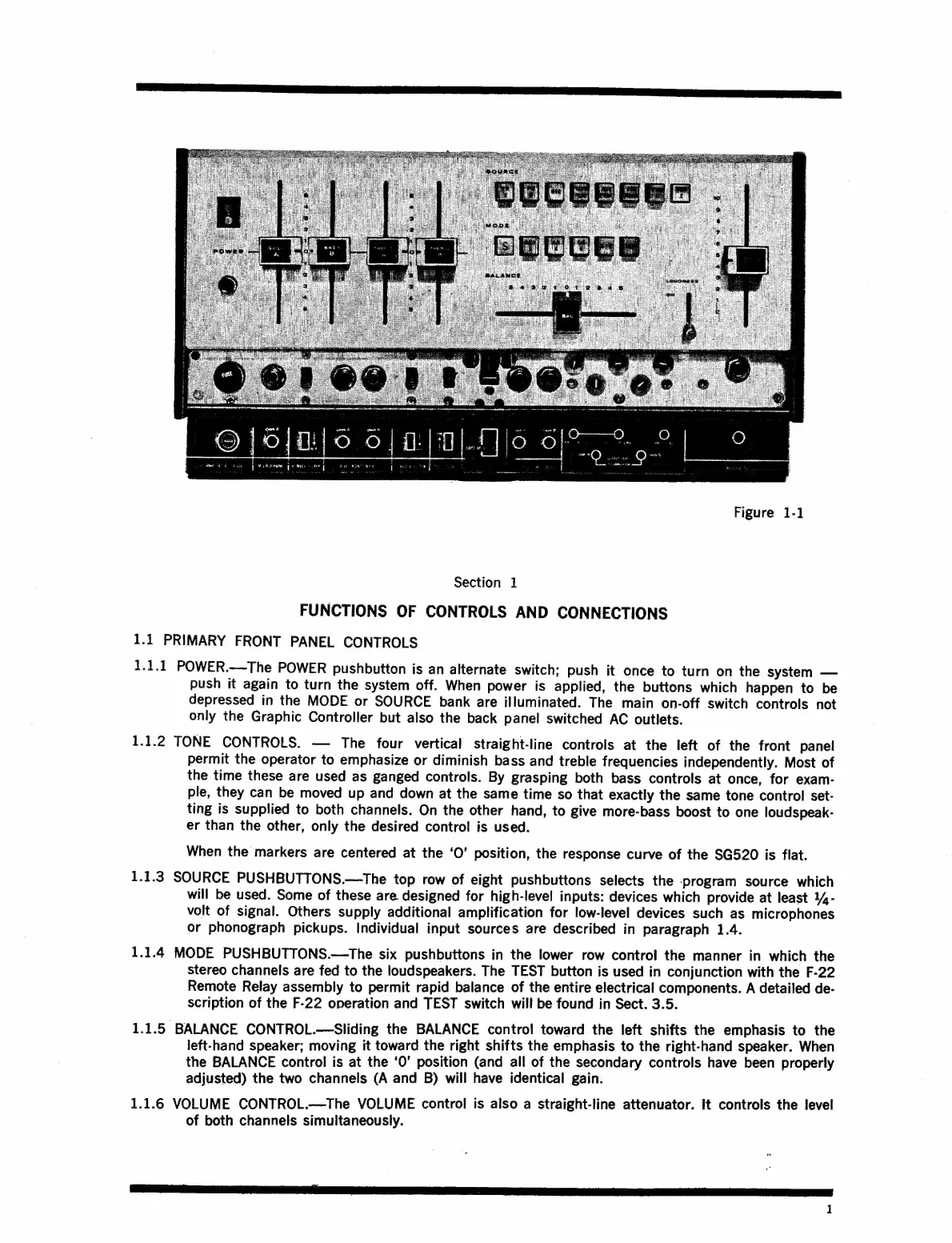
Figure
1-1
Section
1
FUNCTIONS
OF
CONTROLS
AND
CONNECTIONS
1.1
PRIMARY
FRONT
PANEL
CONTROLS
1.1.1
POWER.—The
POWER
pushbutton
is
an
alternate
Switch;
push
it
once
to
turn
on
the
system
push
it
again
to
turn
the
system
off.
When
power
is
applied,
the
buttons
which
happen
to
be
depressed
in
the
MODE
or
SOURCE
bank
are
illuminated.
The
main
on-off
switch
controls
not
only
the
Graphic
Controller
but
also
the
back
panel
switched
AC
outlets.
1.1.2
TONE
CONTROLS.
The
four
vertical
straight-line
controls
at
the
left
of
the
front
panel
permit
the
operator
to
emphasize
or
diminish
bass
and
treble
frequencies
independently.
Most
of
the
time
these
are
used
as
ganged
controls.
By
grasping
both
bass
controls
at
once,
for
exam-
ple,
they
can
be
moved
up
and
down
at
the
same
time
so
that
exactly
the
same
tone
control
set-
ting
is
supplied
to
both
channels.
On
the
other
hand,
to
give
more-bass
boost
to
one
loudspeak-
er
than
the
other,
only
the
desired
control
is
used.
When
the
markers
are
centered
at
the
‘O’
position,
the
response
curve
of
the
$G520
is
flat.
1.1.3
SOURCE
PUSHBUTTONS.—The
top
row
of
eight
pushbuttons
selects
the
-program
source
which
will
be
used.
Some
of
these
are
designed
for
high-level
inputs:
devices
which
provide
at
least
%-
volt
of
signal.
Others
supply
additional
amplification
for
low-level
devices
such
as
microphones
or
phonograph
pickups.
Individual
input
sources
are
described
in
paragraph
1.4.
1.1.4
MODE
PUSHBUTTONS.—The
six
pushbuttons
in
the
lower
row
control
the
manner
in
which
the
stereo
channels
are
fed
to
the
loudspeakers.
The
TEST
button
is
used
in
conjunction
with
the
F-22
Remote
Relay
assembly
to
permit
rapid
balance
of
the
entire
electrical
components.
A
detailed
de-
scription
of
the
F-22
operation
and
TEST
switch
will
be
found
in
Sect.
3.5.
1.1.5
BALANCE
CONTROL.—Sliding
the
BALANCE
control
toward
the
left
shifts
the
emphasis
to
the
left-hand
speaker;
moving
it
toward
the
right
shifts
the
emphasis
to
the
right-hand
speaker.
When
the
BALANCE
control
is
at
the
‘0’
position
(and
all
of
the
secondary
controls
have
been
properly
adjusted)
the
two
channels
(A
and
B)
will
have
identical
gain.
1.1.6
VOLUME
CONTROL.—The
VOLUME
control
is
also
a
straight-line
attenuator.
It
controls
the
level
of
both
channels
simultaneously.

Related product manuals