EasyManua.ls Logo

JBL SG520 - Harmonic Distortion

JBL SG520
34 pages
Print Icon
To Next Page IconTo Next Page
To Previous Page IconTo Previous Page
Loading...
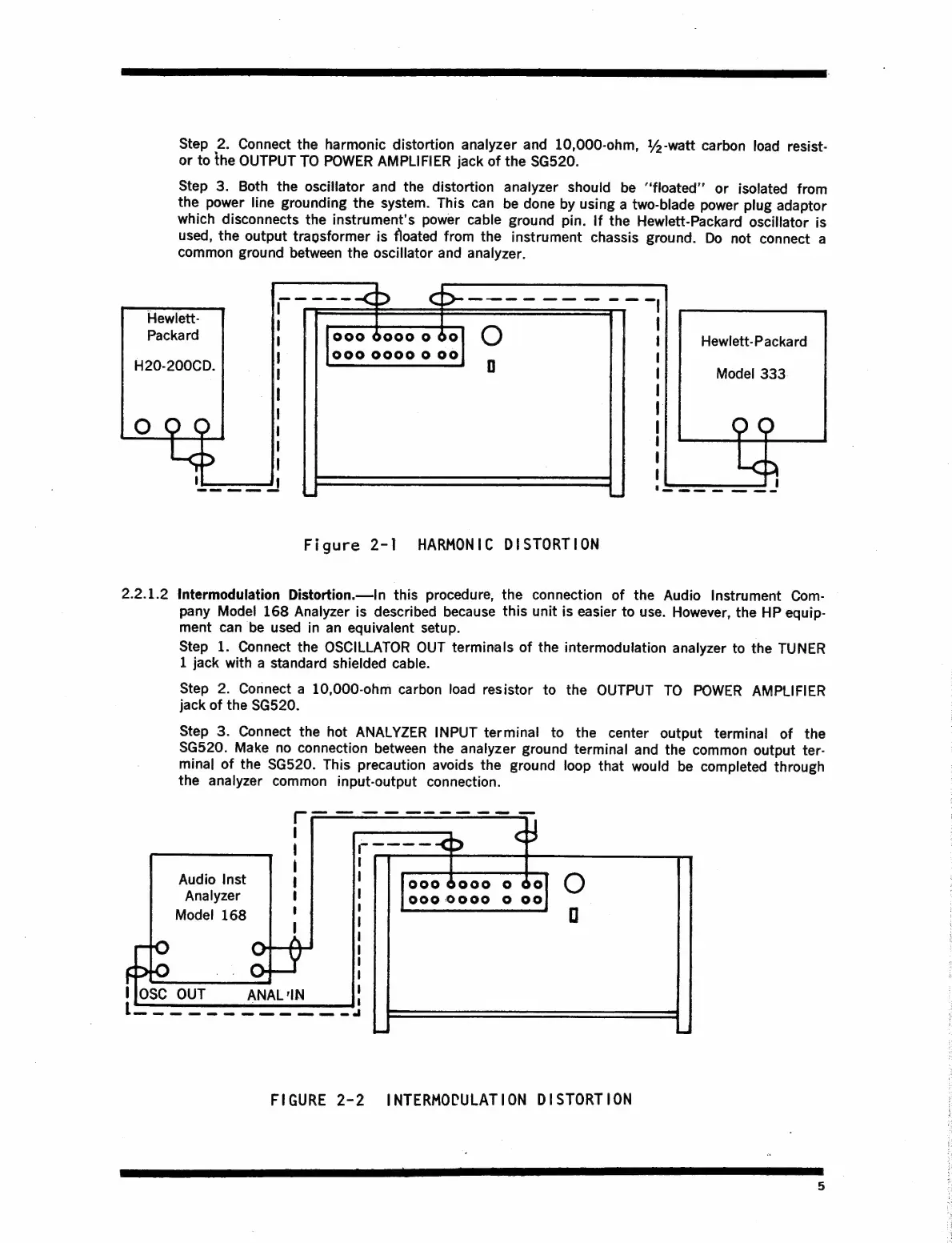
Step
2.
Connect
the
harmonic
distortion
analyzer
and
10,000-ohm,
4-watt
carbon
load
resist-
or
to
the
OUTPUT
TO
POWER
AMPLIFIER
jack
of
the
SG520.
Step
3.
Both
the
oscillator
and
the
distortion
analyzer
should
be
“floated’’
or
isolated
from
the
power
line
grounding
the
system.
This
can
be
done
by
using
a
two-blade
power
plug
adaptor
which
disconnects
the
instrument's
power
cable
ground
pin.
If
the
Hewlett-Packard
oscillator
is
used,
the
output
tragsformer
is
floated
from
the
instrument
chassis
ground.
Do
not
connect
a
common
ground
between
the
oscillator
and
analyzer.
Hewlett-
!
ae
Ne
a
te
ee
el
i
Packard
000
6000
0
60
1
|
Hewlett-Packard
000
0000
0
00
i
|
j
Model
333
Figure
2-1
HARMONIC
DISTORTION
2.2.1.2
intermodulation
Distortion.—In
this
procedure,
the
connection
of
the
Audio
Instrument
Com-
pany
Model
168
Analyzer
is
described
because
this
unit
is
easier
to
use.
However,
the
HP
equip-
ment
can
be
used
in
an
equivalent
setup.
Step
1.
Connect
the
OSCILLATOR
OUT
terminals
of
the
intermodulation
analyzer
to
the
TUNER
1
jack
with
a
standard
shielded
cable.
Step
2.
Connect
a
10,000-ohm
carbon
load
resistor
to
the
OUTPUT
TO
POWER
AMPLIFIER
jack
of
the
SG520.
Step
3.
Connect
the
hot
ANALYZER
INPUT
terminal
to
the
center
output
terminal
of
the
SG520.
Make
no
connection
between
the
analyzer
ground
terminal
and
the
common
output
ter-
minal
of
the
SG520.
This
precaution
avoids
the
ground
loop
that
would
be
completed
through
the
analyzer
common
input-output
connection.
Audio
Inst
Analyzer
Model
168
1900
6000
0
00
|000
0000
0
00
Ilosc
OUT
ANAL
‘IN
FIGURE
2-2
INTERMOCULATION
DISTORTION

Related product manuals