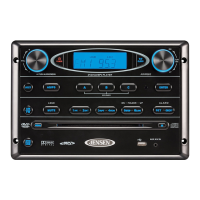
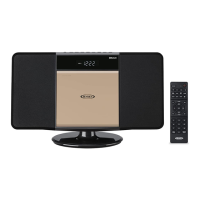
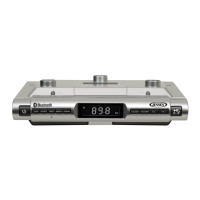
The Jensen AWM914 is a mobile audio system designed for use in recreational vehicles (RVs) and other vehicles with a 12-volt DC, negative ground battery system. This owner's manual provides comprehensive instructions for installation, wiring, basic operation, tuner operation, Bluetooth operation, and specifications.
Function Description:
The AWM914 serves as a central audio hub for your vehicle, offering a variety of playback options and control features. It integrates a backlit display and controls for easy visibility, an electronic AM/FM tuner for radio reception, and Bluetooth connectivity with A2DP/AVRCP streaming audio for wireless music playback from compatible devices. Additionally, it includes a time/alarm clock function and a front auxiliary audio input for connecting external audio sources. The unit provides 4-speaker output across two zones, allowing for flexible audio distribution within the vehicle.
Important Technical Specifications:
- Power Supply Requirements: DC 12 Volts, Negative Ground
- Operating Voltage: 10-16VDC
- Overall Dimensions: 10-7/16"(W) x 2-2/3"(H) x 3-2/3"(D)
- Mounting Dimensions: 9-3/8"(W) x 1-7/8"(H) x 3"(D)
- Weight: 1.0 lbs (0.42 Kg)
- FM Tuner:
- Tuning range: 87.5-107.9Mhz
- Sensitivity: <5uV
- Stereo separation @ 1 kHz: >30dB
- AM Tuner:
- Tuning range: 530-1710Khz
- Sensitivity: <30uV
- Amplifier:
- Output Power: 4 x 6 Watts per Channel
- Output Impedance: Compatible with 4-8 Ohm Speakers, 4 Ohm Load Minimum
- Total system power: 24 Watts Maximum
Usage Features:
- Power Control: The unit can be turned on or put into standby mode by pressing the POWER button.
- Volume Control: Volume can be increased or decreased using the VOL +/- buttons. Holding these buttons allows for continuous adjustment.
- Mode / Menu Selection: The MODE/MENU button switches between radio mode and auxiliary input. A long press of this button accesses a menu for audio adjustments (Bass, Treble, Balance, Fade) and LCD backlight dimmer settings.
- Liquid Crystal Display (LCD) Backlight: The display brightness can be adjusted from "LIGHT 9" (brightest) to "LIGHT 0" (off). Note that in cold temperatures, the LCD may take longer to illuminate and display visibility may decrease, returning to normal as temperature increases.
- Sleep Mode: A sleep timer can be set to automatically turn off the AWM914 after 15, 30, or 60 minutes.
- Alarm Function: The alarm can be turned on/off, and the alarm hour and minute can be set using the VOL +/- buttons.
- Reset Function: Pressing the 6/ENTER button resets the unit to factory default settings.
- Mute / Loudness: The MUTE/LOUD button silences the audio output in tuner, Bluetooth, or auxiliary input modes. Holding this button toggles the Loudness function on/off.
- Auxiliary Input: A standard 3.5mm audio device can be connected to the AUX IN connector on the front panel. Pressing MODE/MENU switches to auxiliary input mode.
- Clock Display and Setup: The T/F button alternates between playback mode and clock time. Holding the T/F button accesses clock setup mode, allowing adjustment of hours and minutes using the VOL +/- buttons.
- Speaker Output Control: Two speaker output buttons (SPEAKER A and SPEAKER B) allow users to turn corresponding speaker sets on or off independently.
- Tuner Operation:
- Band Selection: The BAND button cycles through three FM bands (FM1, FM2, FM3) and two AM bands (AM1, AM2).
- Manual Tuning: Tune up or down one step using the tune up (1) or tune down (2) buttons. Holding these buttons initiates a seek tune to the next strong station.
- Preset Stations: Six numbered preset buttons allow for storing and recalling stations for each band. Hold a preset button to store a station, or press momentarily to recall.
- Automatic Store / Preset Scan (A/PS): Pressing A/PS scans all preset stations in the current band, playing each for five seconds. Holding A/PS for more than one second automatically scans for and stores six strong stations for all bands.
- Bluetooth Operation:
- Pairing: The AWM914 can be paired with Bluetooth devices for streaming audio. To initiate pairing, press and hold the Bluetooth button (10). The unit becomes "discoverable" by smartphones. The device name "AWM914" will appear on the phone, and a password (0000) may be requested.
- BT Audio (A2DP): Once connected, the unit can play songs stored on the Bluetooth device. The "BT AUDIO" indicator will appear on the LCD.
- Track Selection: Use the tune up >>| (1) or tune down |<< (2) buttons to select previous or next tracks.
- Pausing Playback: The 1/|| button pauses and resumes playback. Changing modes will pause mobile phone audio, which can be resumed by returning to BT mode.
- Bluetooth Menu Options: Pressing the Bluetooth button (10) enters menu adjustment mode. Users can view paired devices, connect/disconnect, lock/unlock, or delete devices. The AWM914 can store up to 5 devices, with a "lock" feature to prevent devices from being bumped from the list.
Maintenance Features:
- Cleaning: The front of the unit should only be cleaned with a slightly damp cloth. Avoid using cleansers.
- Troubleshooting: The manual advises contacting authorized service centers for disassembly or adjustment of the product.
- Safety Precautions: Avoid moisture exposure to reduce the risk of fire or electric shock. Use only recommended accessories to reduce the risk of fire, electric shock, and interference.
- Installation Precautions: Before cutting the mounting hole, ensure the area behind the mounting location is clear of wires and fuel, vacuum, and/or brake lines. Disconnect the negative (-) battery cable prior to installation to prevent short circuits, unless the vehicle has an on-board drive or navigation computer, in which case extra caution should be exercised to avoid causing a short circuit.

 Need help?
 General

 To Next Page