4
BASIC OPERATION
○
1
○
2
○
3
○
4
○
5
○
6
○
7
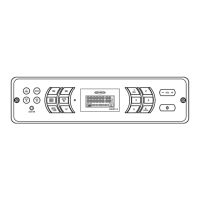
Power
Press the POWER button (4) to turn the unit on or to enter standby
mode.
Volume Control
• Press the VOL + to increase the volume output. Press and hold
the VOL + to increase the volume output continuously.
• Press the VOL - to decrease the volume output. Press and hold
the VOL - to decrease the volume output continuously.
Mode / Menu
Press the MODE/MENU button (7) to switch to radio mode or auxiliary
input function.
Long press the MODE/MENU button (7) to choose the following menu
list:
Audio Adjustment
• BAS: Adjust the Bass level from “-7” to “+7”.
• TRE: Adjust the treble from “-7” to “+7”.
• BAL: Adjust the speaker output balance between “L7” (left) and
○
8
○
9
○
10
○
11
○
12
○
13
• BAL: Adjust the speaker output balance between “L7” (left) and
“R7” (right). “BAL 0” indicates an equal balance between the left
and right speakers.
• FAD: Adjust the speaker fade between “R7” (rear) and “F7” (front).
“FAD 0” indicates an equal balance between the rear and front
speakers.
Use the VOL +/- to make adjustments in each menu item
Liquid Crystal Display (LCD) Back Light
• Dimmer: Adjust the brightness of the LCD from “LIGHT 9”
(brightest) to “LIGHT 0” (off).
NOTE: When subjected to cold temperatures for an extended
period of time, LCD panels will take longer to illuminate and the
display visibility may slightly decrease. Optimal LCD operation
will return to normal when the temperature increases to a normal
range.


 To Next Page
 Loading...