JENSEN'
Install
the
Compact
Disc
Changer
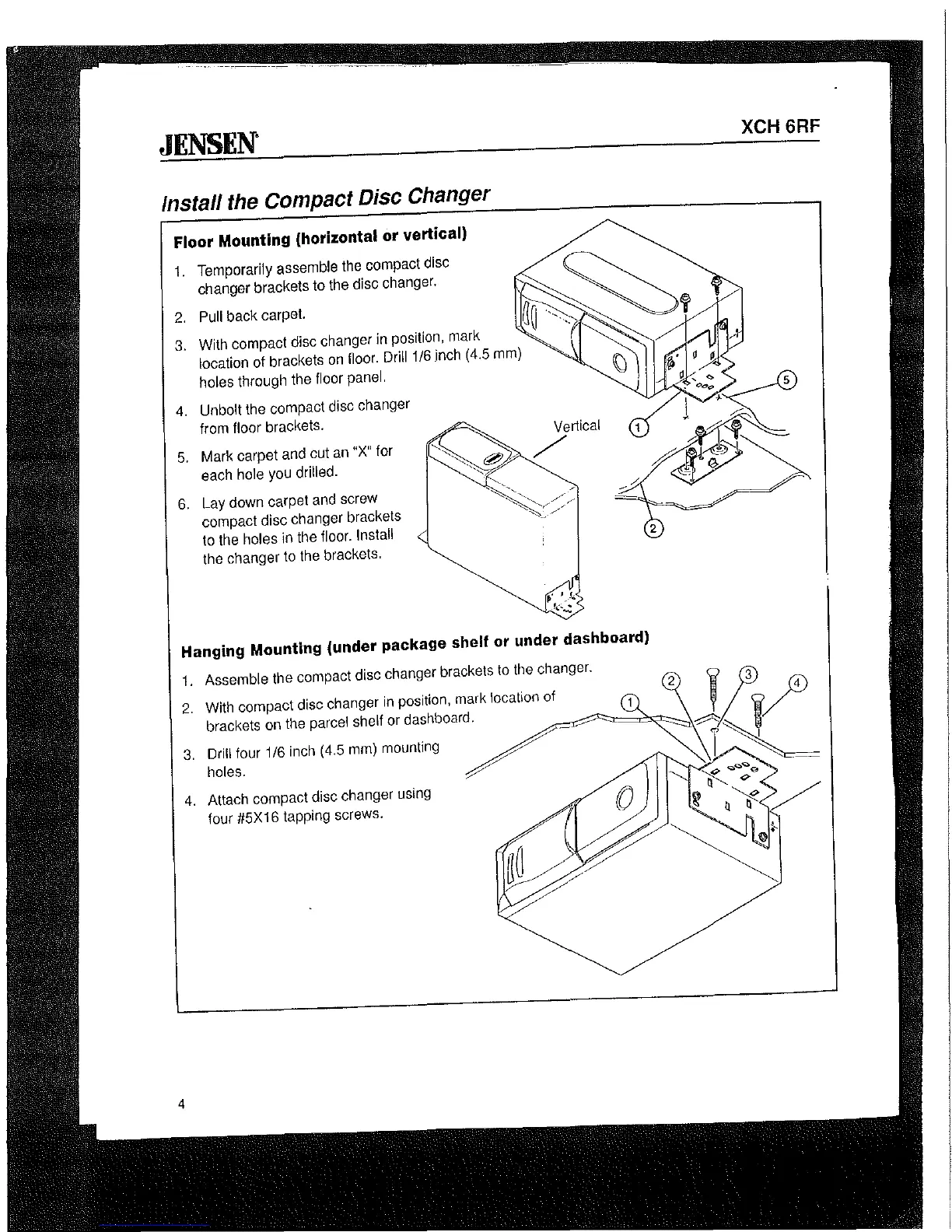
Floor Mounting (horizontal or vertical)
1.
Temporarily assemble the compact disc
changer brackets to the disc changer.
2.
Pull back carpet.
3.
With compact disc changer in position, mark
location of brackets
on
floor. Drill
1/6
inch (4.5
mm)
holes through the floor panel.
4.
Unbolt the compact disc changer
from floor brackets.
5.
Mark carpet and cut
an
"X"
for
each hole
you
drilled.
6.
Lay down carpet
and
screw
compact disc changer brackets
to
the holes in the floor. Install
the changer
to
the brackets.
Vertical
/
Hanging Mounting (under package shelf or under dashboard)
XCH 6RF
2
1.
Assemble the compact disc changer brackets
to
the
changer.
2.
With compact disc changer
in
position, mark location
Of~~====::;o"",~~
~~
JD.4
brackets on the parcel shelf or dashboard. /
~
'L
\/
3.
Drill four 1/6 inch (4.5
mm)
mounting
~I
~
__
holes.
/'.....
~
4
4.
Attach compact disc changer using
four
!l5X16 tapping screws.


 To Next Page