EasyManua.ls Logo

Jensen XCD 9020 - Radio Operation; Select a Band; Select a Station

Jensen XCD 9020
23 pages
Print Icon
To Next Page IconTo Next Page
To Previous Page IconTo Previous Page
Loading...
xeD
9020
JENSEN'
Radio Operation
@J~'«
comp''''
0100
P14yo,
'"
@
))0
+
~
0
(LOC!MUT)
sr
Q)
r:
CIt
DISP
."
8'>
,d
FHI
105.:3003
1 :
(A",I",,)
. ~
-"
~~
§)"'"
,,~,
j
..
-II'··II·'" 0
C"')
J
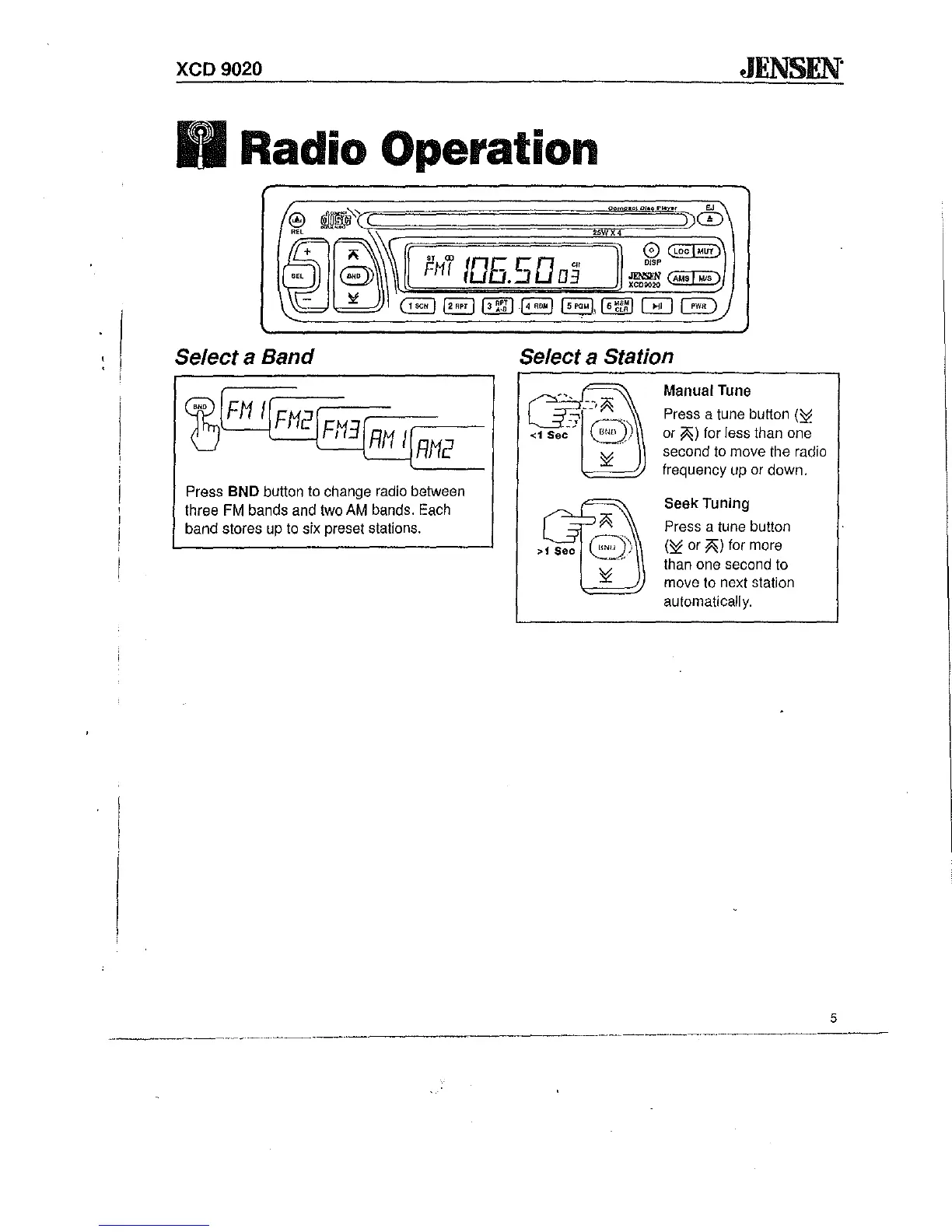
Select a Band
b
"
'FH
If
J
'IFH2IFH3f
t
, 1
RH
IJ
RH2
Press BND button to change radio between
three
FM
bands and two AM bands. Each
band stores up to six preset stations.
Select a Station
Manual Tune
Press a tune button (:i
or
;0;;)
for less than one
second to move the radio
frequency up or down.
Seek
Tuning
Press a tune button
(:i or
;0;;)
for more
than one second to
move to next station
automaticali
y.
5

Related product manuals