JENSEN
Repeat Selection (RPT A-B)
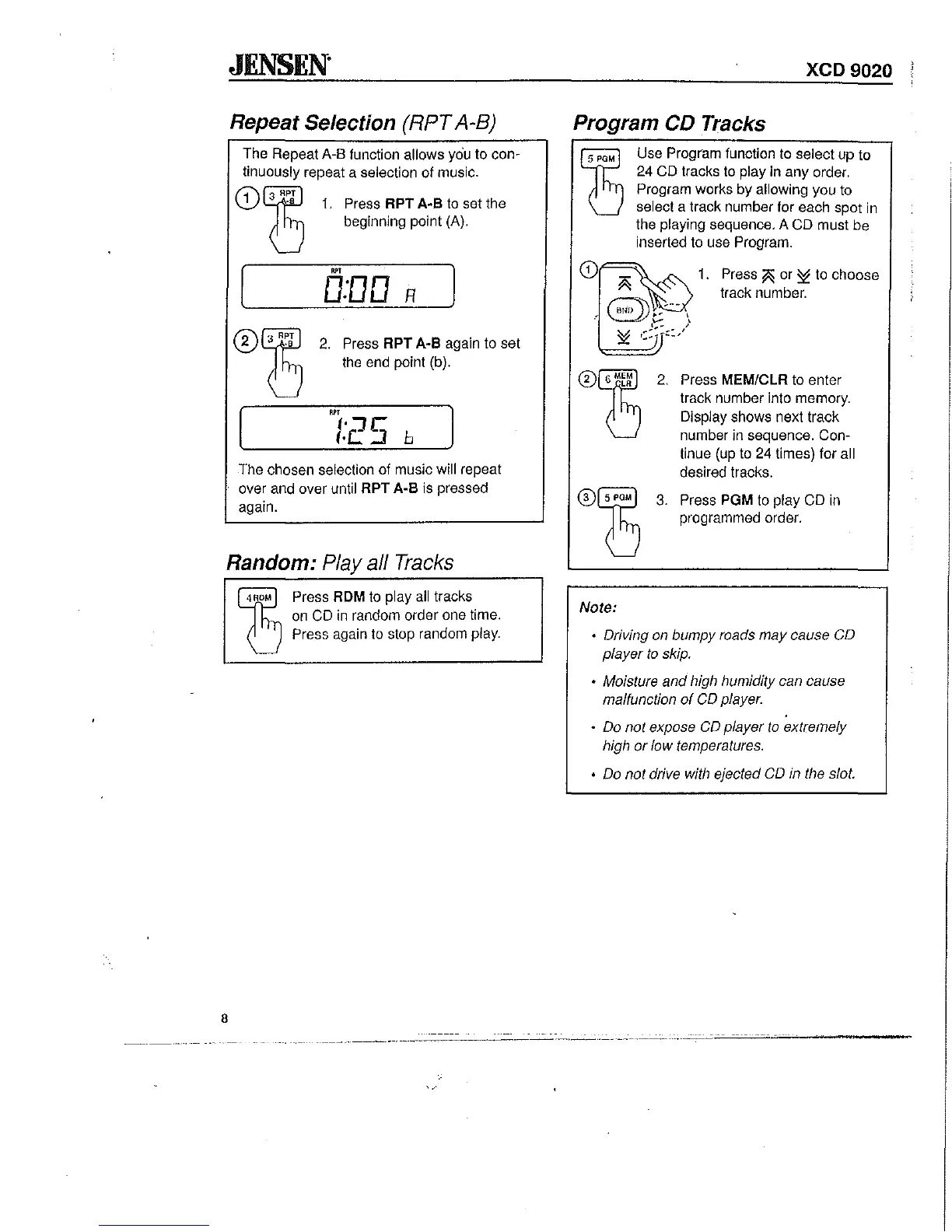
The Repeat A-8 function allows
yciu
to con-
tinuously repeat a selection of music.
1.
Press RPT A·B to set the
beginning point (A).
~,
0:00
R
2.
Press
RPT
A·B again to set
the end point (b).
~,
/:25
b
The chosen selection of music will repeat
over and over until
RPT
A·B
is pressed
again.
Random: Playa/l Tracks
8
~
ROM
Press ROM to play
all
tracks
on
CD
in
random order one time.
Press again to stop random play.
XCD9020
Program CD Tracks
Note:
Use Program function to select up to
24
CD tracks to play in any order.
Program works by allowing you to
select a track number for each spot in
the playing sequence. A CD must be
inserted to use Program.
1.
Press
~
or
S!:
to choose
track number.
Press MEM/CLR
to
enter
track number into memory.
Display shows next track
number in sequence. Con-
tinue (up to
24
times) for all
desired tracks.
Press PGM to play CD
in
programmed order.
• Driving on bumpy roads may cause CD
player
to
skip.
• Moisture
and
high humidity can cause
malfunction
of
CD player.
• Do not expose CD player
to
extremely
high
or
low temperatures.
• Do not drive with ejected CD in the slot.
-
---~.,-----
.-----.-~-----
..
-.~-
..
--
-----.----,
..
-


 To Next Page