~XC~D~9~O=20~
____________________________
~JENSEN·
~
CD Player Operation
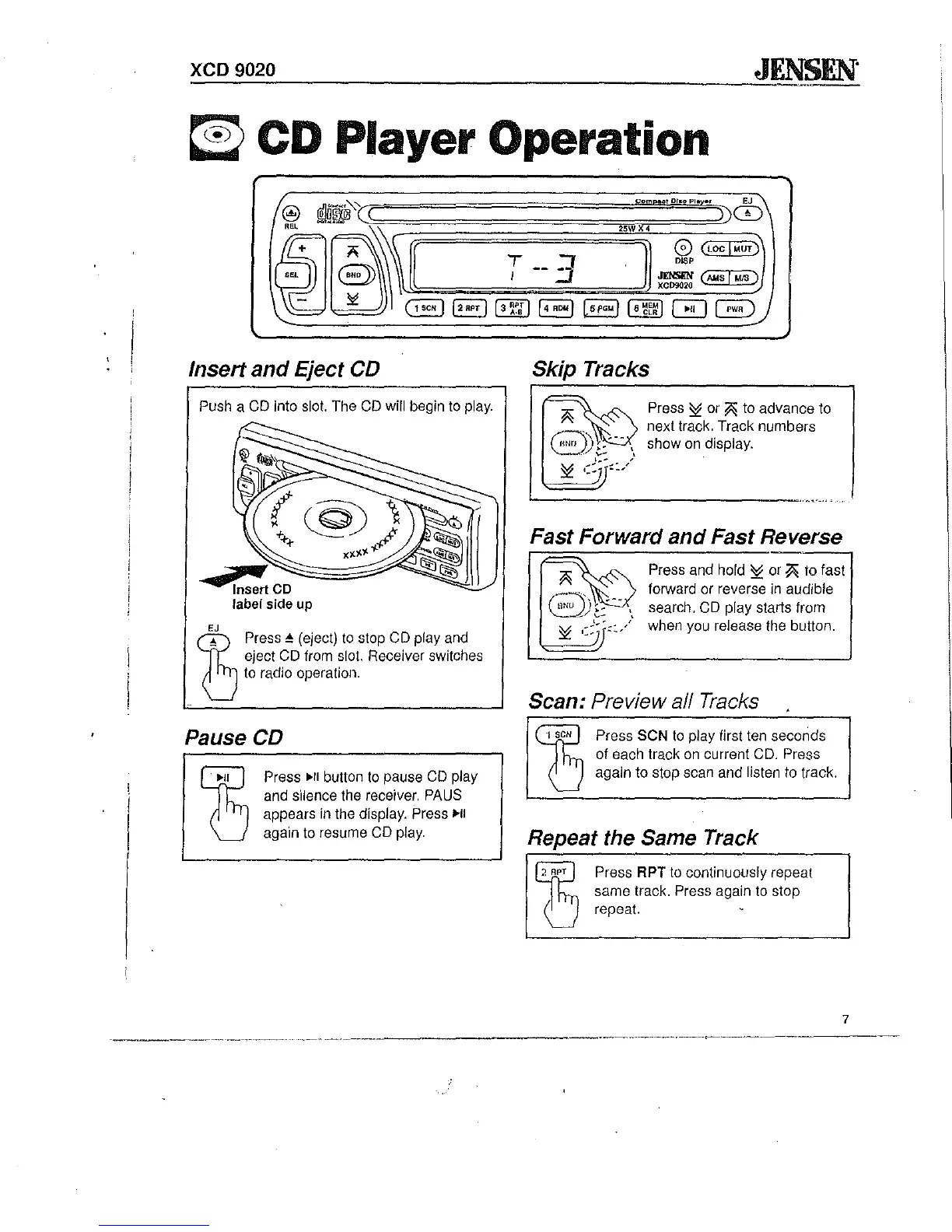
Insert
and
Eject CD
Push a
CD
into slot. The
CD
will begin to play.
4
~
Insert
CD
label side up
EJ
eject CD from slot. Receiver switches
to radio operation.
~
_
Press'"
(eject)
to
stop CD play and
Pause CD
~
~II
Press
~II
button
to
pause
CD
play
and silence the receiver.
PAUS
appears
in
the display. Press
~II
again to resume CD play.
:25WX4
)
0
(locl"UT)
D~P
JfNS/1N
(""":::5""1-::"15::--)
XC09020
.
l5I'GMI16~E~1
0 G
Skip Tracks
Press
~
or
~
to advance to
next track. Track numbers
show
on
display.
Fast Forward
and
Fast Reverse
Press and hold
~
or
~
(0
fast
forward or reverse in audible
search. CD play starts from
when you release the button.
Scan: Preview a/l Tracks
13
,
seN
Press SeN
to
play first ten seconds
of each track
on
current CD. Press
again to stop scan and listen to track.
Repeat the Same Track
b
"
APT
Press APT to continuously repeat
same track.
Press again to stop
repeat.
7
.--
..
-
....
-.... -
..
~-.-~--.----


 To Next Page