6
JENSEN'
Preset Stations
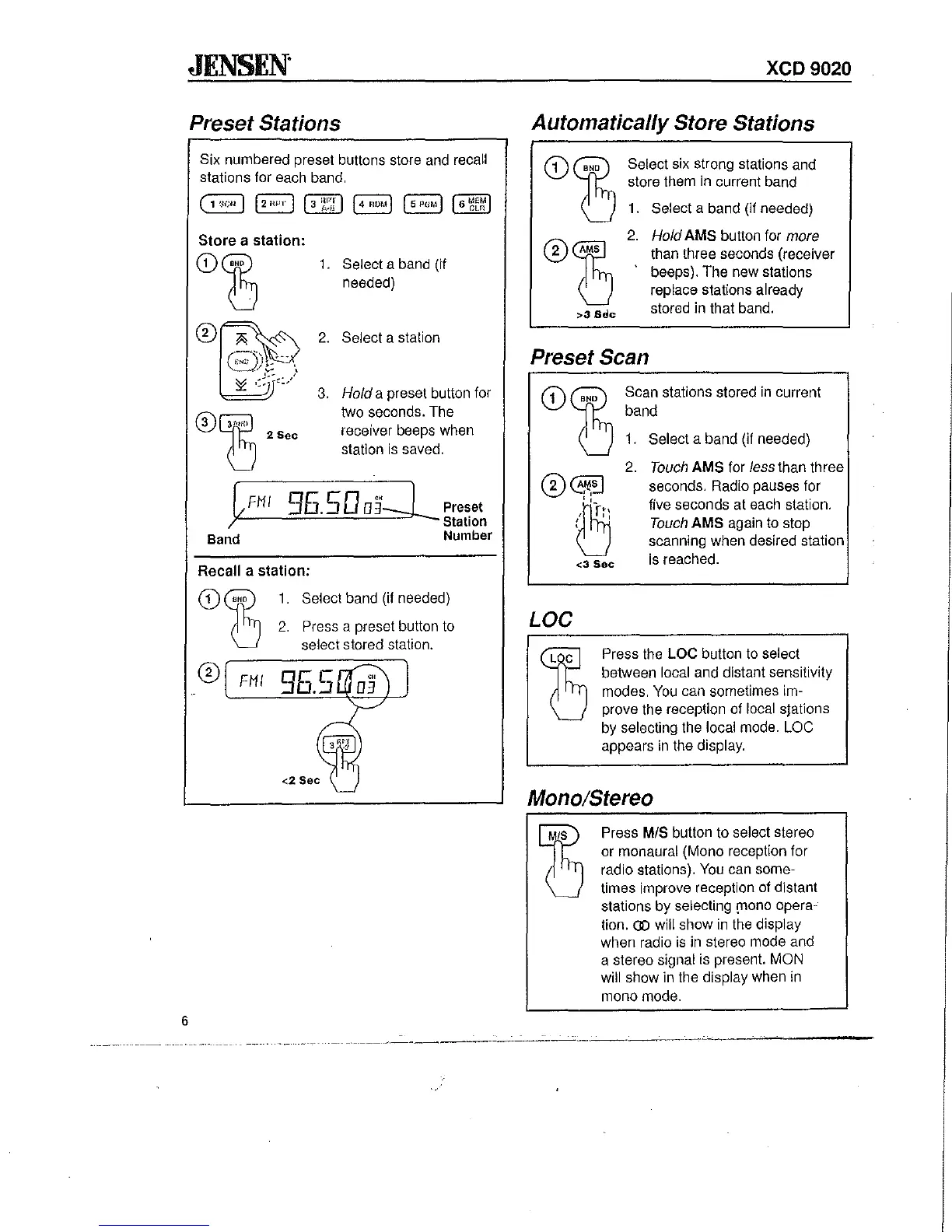
Six numbered preset buttons store and recall
stations for each band.
Store
a
station:
<D~
®~
~=)
®Gffl
(]
2Sec
1.
Select a band (if
needed)
2.
Select a station
3.
Hold a preset button for
two seconds. The
receiver beeps when
station
is
saved.
~FMI
Band
']5.5003'2 Preset
Station
Number
Recall a
station:
CD
FMI
1.
Select band
(if
needed)
2.
Press a preset button to
select stored station.
xeD
9020
Automatically Store Stations
>3
Sdc
Select six strong stations and
store them
in
current band
1.
Select a band (if needed)
2.
Hold AMS button for
more
than three seconds (receiver
beeps). The new stations
replace stations already
stored in that band.
Preset Scan
LOC
<3
Sec
Scan stations stored
in
current
band
1.
Select a band (if needed)
2.
Touch
AMS for
less
than three
seconds. Radio pauses for
five seconds at each station.
Touch
AMS again
to
stop
scanning when desired station
is
reached.
Press the LOC button to select
between
local and distant sensitivity
modes.
You
can sometimes im-
prove
the reception of local slations
by selecting the local mode. LOC
appears
in
the display.
Mono/Stereo
Press MIS button to select stereo
or monaural (Mono reception for
radio stations).
You
can some-
times improve reception of distant
stations by selecting
[I1ono
opera-
tion.
(])
will show
in
the display
when radio
is
in
stereo mode and
a stereo signal is present.
MON
will show in the display when
in
mono mode.


 To Next Page