XCH 6RF
JENSEN"
~
Testing
Before you finish the installation, you should do the following tests to make sure the wiring is correct
and everything is operating properly.
Reconnect Battery
reconnect the battery
'"
_
When wiring is complete,
~'$_
._
negative terminal.
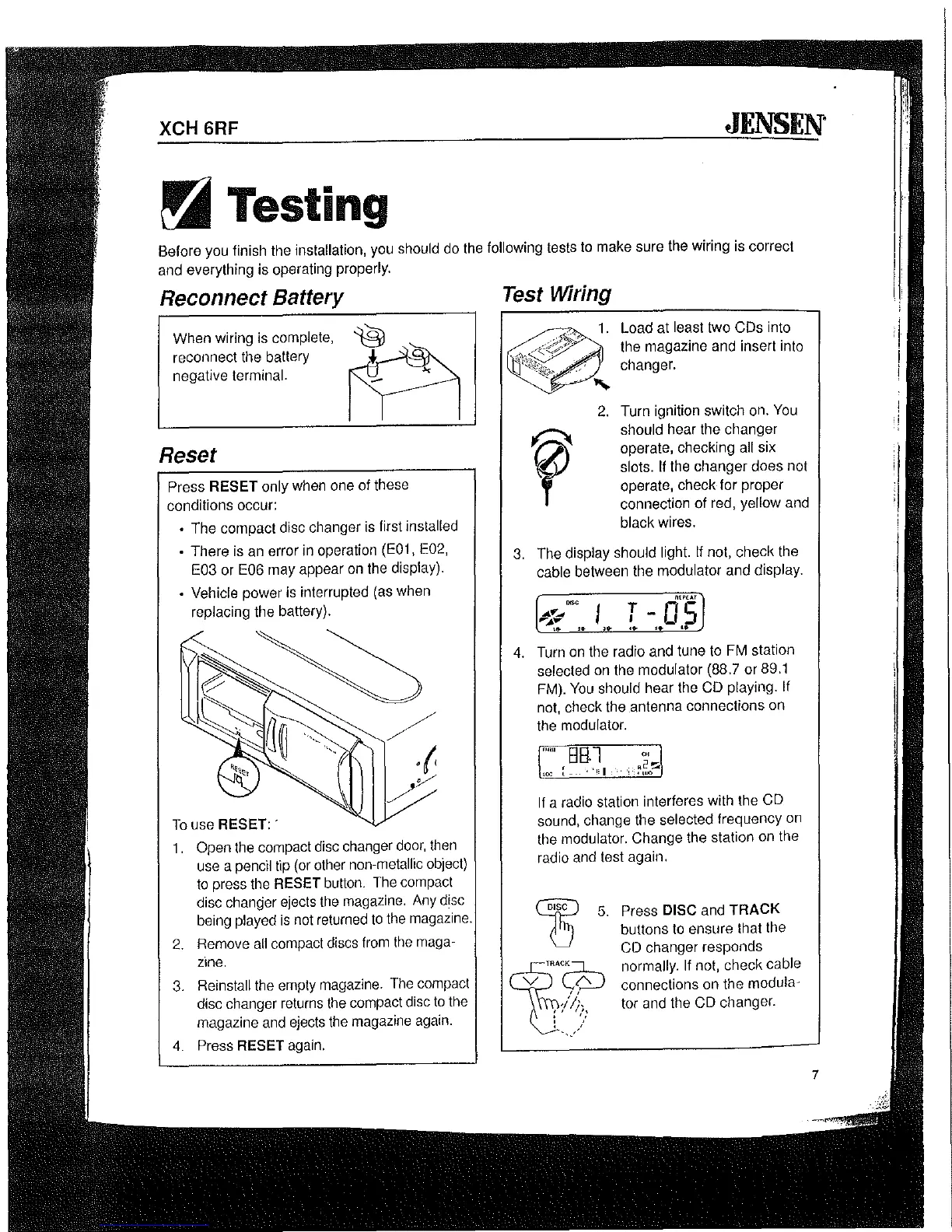
Reset
Press RESET only when one of these
conditions occur:
" The compact disc changer is first installed
"
There is an error in operation (E01, E02,
E03 or E06 may appear
on
the display).
"
Vehicle power is interrupted (as when
replacing the battery).
To
use RESET: .
1.
Open the compact disc changer
door,
then
use a pencil tip (or other
non-metallic object)
to
press the RESET button. The compact
disc changer ejects the magazine. Any disc
being
played
is
not returned
to
the magazine.
2.
Rernove
all
compact discs from
the
maga-
zine.
3.
Reinstall the ernpty magazine. The compact
disc changer returns the compact disc
to
the
magazine and ejects the magazine again.
4.
Press RESET again.
Test Wiring
Load at least two CDs into
the magazine and insert into
changer.
2.
Turn ignition switch on.
You
should hear the changer
operate, checking
all six
slots.
If
the changer does not
operate, check for proper
connection of red,
yellow and
black wires.
3.
The display should light.
If
not, check the
cable between the modulator and display.
T -
d's
..
..
..
4.
Turn
on
the radio and tune to FM station
selected on the modulator (88.7 or 89.1
FM).
You
should hear the CD playing. If
not, check the .antenna connections on
the
modulator.
'"'"
BHl
n,
~2~
,
,oe
t_
•
'1;1·','"
.,uo
If
a radio station interferes with the CD
sound, change the
selected frequency
on
the modulator. Change the station on the
radio and test again.
5.
Press DISC and TRACK
buttons
to
ensure that the
CD
changer responds
normally.
If
not, check cable
connections on the modula-
tor and the CD changer.
7
:[


 To Next Page