11
www.jlltness.co.uk www.jllelectronics.co.uk
Conguration
LCD brightness adjustment
1. In STANDBY mode, press START and
then quickly press STOP. The speed
display window will be ashing.
2. Adjust the brightness of the LCD screen
using FAST/SLOW button.
3. Press START to save the adjustments.
• Stand on the side frames.
• Do not stand on running
belt.
Warning: Falling hazard.
When starting unit.
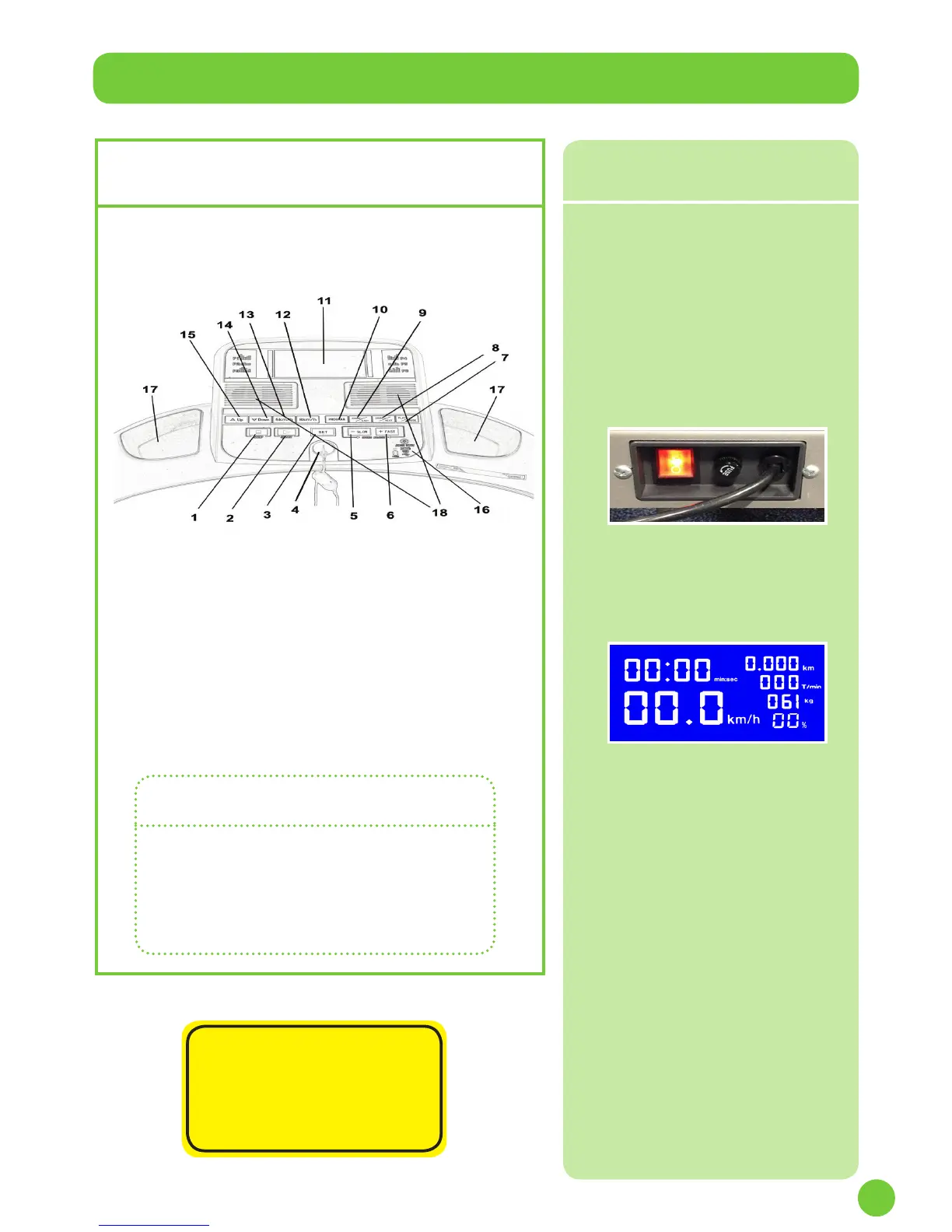
User controls
1 Stop button
2 Start button
3 Set button
4 Safety key
5 Slow button
6 Fast button
7 Play/Pause button
8 Sound+/Next button
9 Sound-/Last button
10 Program button
11 LCD screen
12 Easy speed button
13 Easy speed button
14 Down incline (button)
15 Up incline (button)
16 USB / Headphone
17 Item holder
18 Speakers
Use the following instructions to test
the full speed of the treadmill and to
check the belt for proper operation.
JLL recommends that the treadmill is
unplugged or the on/off power (I/O) is
switched off (O) when not in use.
1. Without anyone on the machine,
plug the treadmill. Ensure the
power cord is not being pinched
under the front of the treadmill.
2. Locate the on/off (I/O) power
switch under the front end of the
treadmill (image above). Switch
it to the on position (I). The
control panel will light up.
3. The weight digits will ash. Adjust
the weight using the SPEED button
located on the handrail.
4. Press START button and the motor
will work at the speed of 0.3 km/h.
Check if the monitor is working
normally.
5. Observe the belt to see if it is
running properly; it should be
centred in the middle of the
deck. If you have problems with
the running belt operation, see
Adjust Running Belt in the
Preventive Maintenance chapter.
6. Press the FAST and SLOW
button to check whether they are
working. Run the treadmill
through its full speed range.
First press the FAST button
until the treadmill reaches its
highest speed. Then press the
SLOW button until the treadmill is
back to 0.3 km/h.
7. Press the STOP button and check if
the machine stops working.
Testing the
Treadmill Operation


 To Next Page