www.jlltness.co.ukwww.jllelectronics.co.uk
26
Adjust Motor Belt
A
fteraperiodoftime,theuserwillfeelthereisapausesensationwhilstrunning.Thatmaybeduetoa
loosedrivebelt,soadjustthemotorbeltwouldbenecessary.Firstofall,youhavetocheckifitisloose
followingthestepsbelow:
Check If The Motor Belt Is Loosen
1. Unplugthetreadmill.
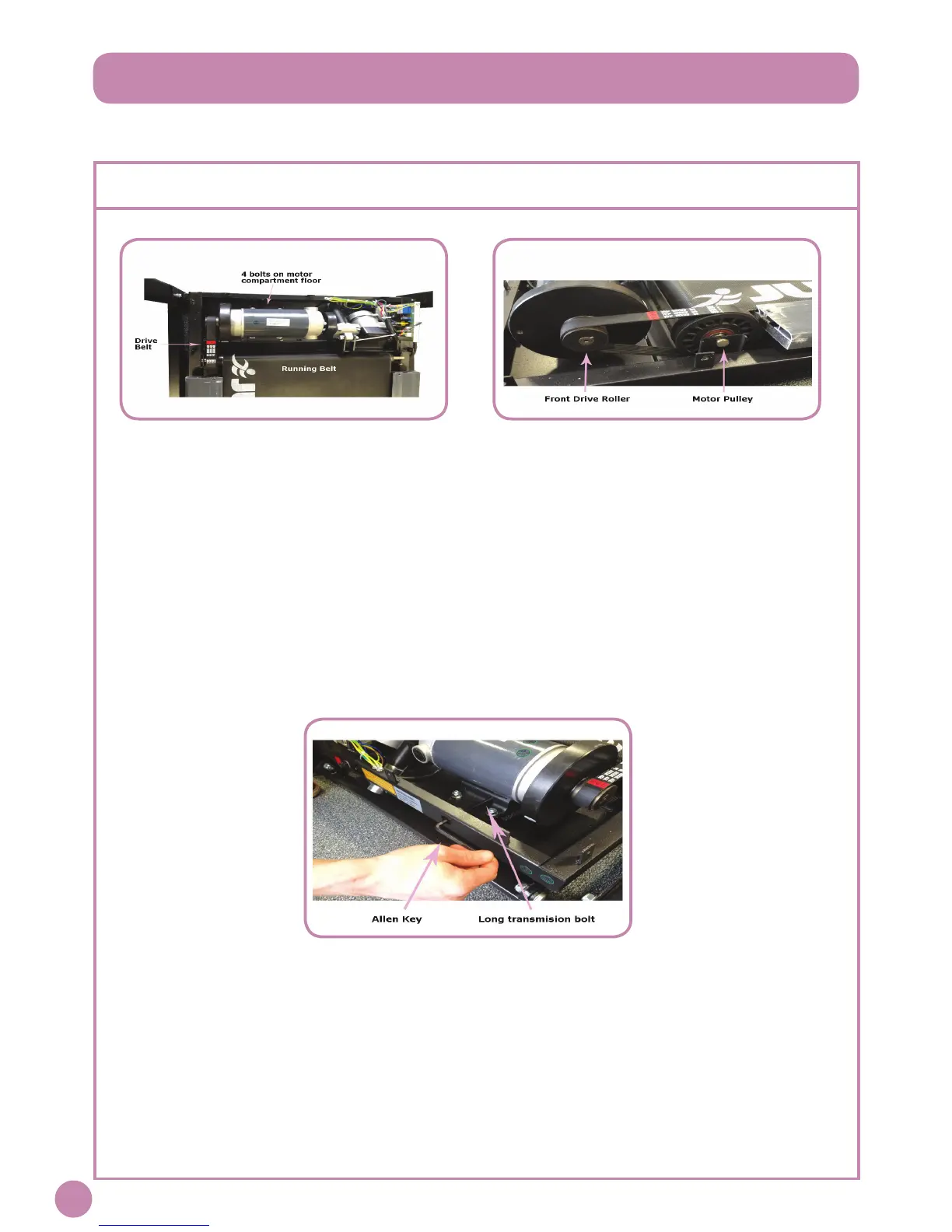
2. Removethemotorcoverbyunscrewingtheboltsoneachside.Youwillseethemotorlocatedontheleft
handsideofthetreadmill.
3. Theeasywayofcheckingisbytouchingthedrivebelttofeelifitisslack.Ifyoucanwigglethebeltupand
down,meansthatthedrivebeltisloose.
4. Anotherwayofcheckingissettingthespeedat2-3km/h.Walkonthemachineandtrytostoptherunning
beltwithyourfeetwhileholdingthehandrailsandpullingyourbodyontheoppositedirection.Ifthemotor
pulleystopsandthefrontdriverollerkeepsrunningmeansthatthemotorbeltislooseanditneedstobe
tightened.
Tight The Running Belt:
1. Poweroff.
2. Locatethefourboltsholdingthemotor.
3. Loosenthosefourbolts,butdonotremovethem.
4. Locatethelongtensioningboltthatgoesfromthefrontedgeofthetreadmilltothefrontedgeofthemotor
pallet.NOTE:Youshouldremovetheplasticcovertohaveaccesstothelongtensionbolt.
5. UseanAllenkeyinaclockwisesensationtotightenthetensioningboltjustenoughtoremovetheslipping.
6. Checkthetensiononthebelt.
7. Poweronthemachineandcheckifthemotorbeltisstillloose.
NOTE:DONOTtightthemotorbelttoomuch,itwillcausethemotorshafttosnap.


 To Next Page