24
Treadmill Cleaning
K
eep the running belt free of dust and debris
forsmoothrunningandpreventinjuries.They
could damage the electric motor and other
movingparts.
After every workout use a neat, dry cloth for
cleaning the treadmill and the handrails to prevent
the machine of corrosion. And wipe away any sweat
that may have dripped onto the running belt. Avoid
scratchingthedisplaybyusingasoftclothandnopa-
pertowel.
Contaminants, such as hand lotions, oils or body
powder,maycomeoffontheheartratesensors.These
canreducesensitivityandinterferewiththeheartrate
signal. It is recommended that the user have clean
hands when using the contact heart rate.Clean the
handlesusingaclothdampenedwithwater.
For cleaning the console unplug the machine and
cleanwithadustfreecloth.Forfurthercleaning,use
asoftclothorpapertoweldampedwithwater.Donot
useabrasiveorchemicalcleaningagents.
3 easy steps to clean your treadmill:
1. Setthespeedat2km/handputahumid,clean
clothattheendoftherunningbelt,holditthere
and move it along the end of the running belt
untilitisfreeofdust.
2. Vacuum or sweep the oor underneath and
around the treadmill to prevent that anyspeck
goes into the mechanism. A treadmill mat can
helptoavoiddustgoesintoit.
3. Vacuum cleaner or soft, damp cloth to clean
treadmill’sentirecoverarea.
When not using product for an extended period of
time the product should be disconnected from the
powersupply.
Toavoidseriousinjuryordeath:
• Replacewornordamaged
componentsimmediatelyandkeep
theequipmentoutofuseuntil
repairiscompleted.
• Unplugunitwhennotinuseor
whenperformingmaintenance.
Warning: Equipment hazard
Treadmill Balance
P
lace the running machine on a level oor for
avoiding off-balance. If that is not possible,
adjustthetreadmillbyalteringthebigscrewswith
plasticheadlocatedunderneaththeframes.
Checkifthetreadmillisbalanced:
1. Stand on the machine with your feet on the side
frames.
2.Putyourweightontherightsiderstandthenswitch
totheleftside.
3. If you feel any shakiness, adjust those big screws
withplastichead.
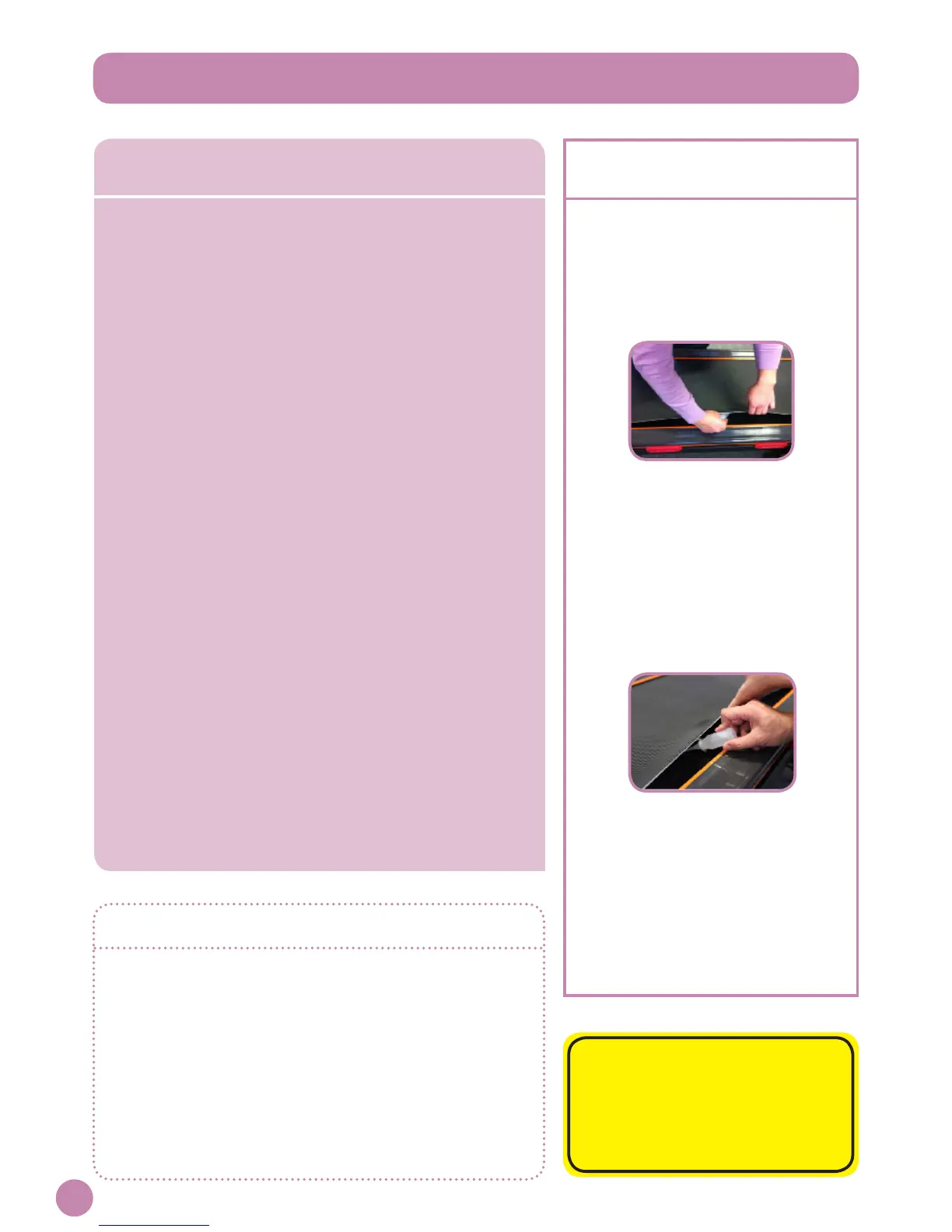
5 steps to lubricate
the JLL D100 treadmill
1. Unplugthetreadmill.
2. Accesstothedeckby
liftingthebeltonthetreadmill
upwithyourngersorwith
somethingatandnosharp.
3. Lookattherunningboardor
touchittocheckifitisoilyor
not.Incaseofdryness,use
thelubricationoilprovided
witheverytreadmillmachine,
applyitontherunningdeck
andspreadastraightline
downthesideofthedeck.
4. Repeatontheotherside.
5. Turnonthemachineand
leaveitrunningforaround
2-3minutesat3-4km/h.
Walkonthetreadmilltohelp
spreadingthelubricationoil.
www.jlltness.co.ukwww.jllelectronics.co.uk


 To Next Page