23
Using the orchestral sounds
8
The ONE contains orchestral sections that can be used in isolation or
together with the organ sounds. The orchestral sounds are velocity
sensitive, this means that their volume and timbre depend on the force
with which you press the keys.
Playing Orchestral Sounds with the
MANUAL II Division
In the music compositions the organ and orchestra have a wide repertoire.
Regarding this aspect, the ONE has orchestral sound to give you the
possibility to play many symphonies for organ and solo orchestral
instruments.
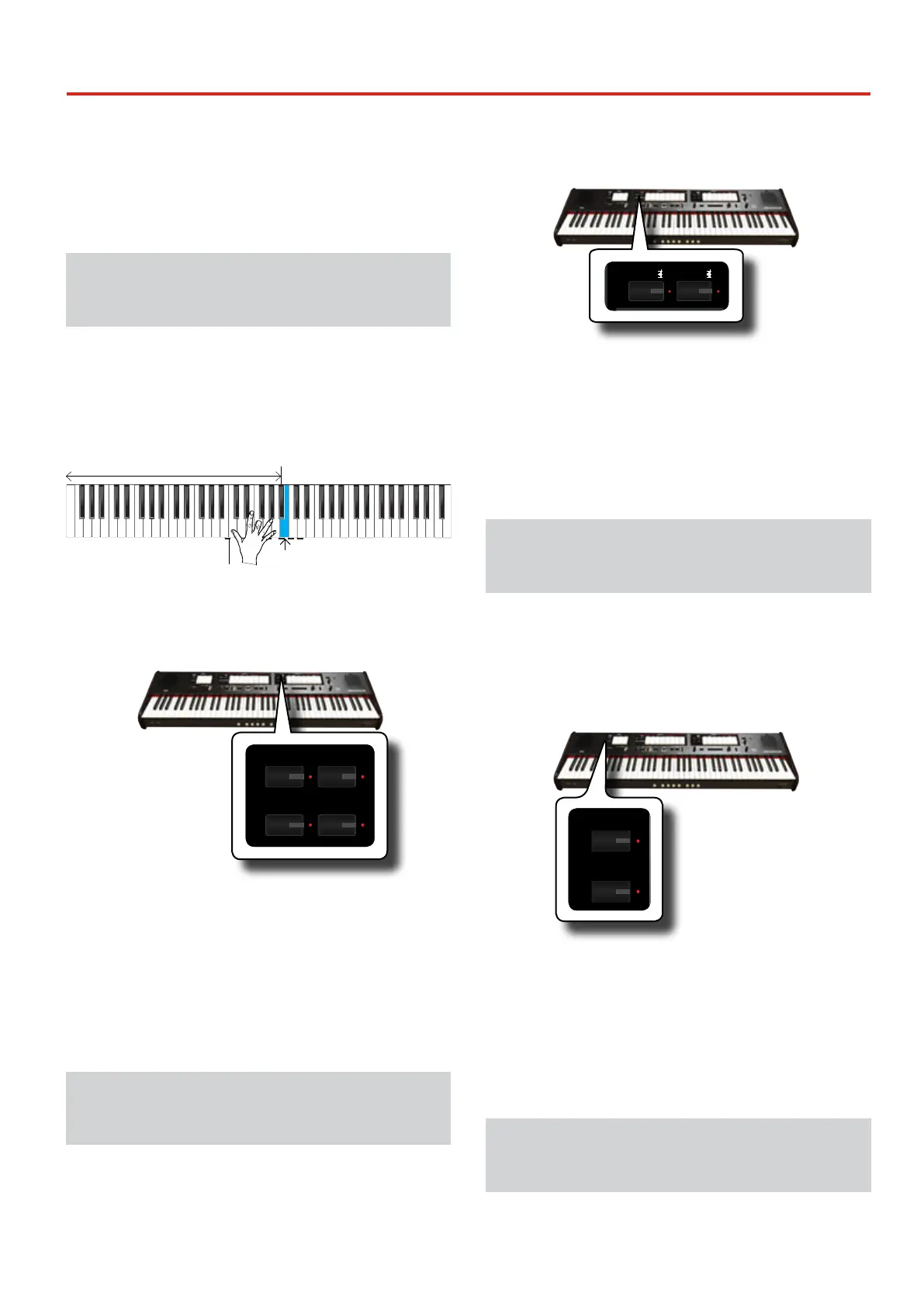
The MANUAL II orchestral sounds are monophonic to play the melody
line. If you press a chord on the keyboard, the orchestral section play the
rightmost note of the chord. Playing an appropriate progression of chords,
the rightmost note of the cords will create the melody line.
This note is played by the
Orchestral section
Lowest notes are
played by the
Organ section
Lowest notes
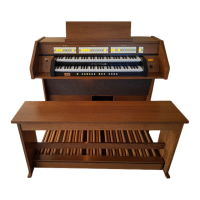
1. Press an orchestral button [FLUTE], [VIOLIN], [OBOE] or
[TRUMPET] button to select the sound that you want to
play.
REVERB
DEPTH TYPE
/
PLAYER
SONG
DEMO
LEVEL
CRESCENDO
VALUE/REV TYPE
7 - TUTTI
6
5
4
3
2
1
TONE
OBOE TRUMPET
FLUTE VIOLIN
PRINCIPAL 8
OPEN DIAPASON 8
MONTRE 8
PRINZIPAL 8
ROHRFLUTE 8
STOPPED DIAPASON 8
FLÛTE HARMONIQUE 8
ROHRFLÖTE 8
MANUAL II
OCTAVE 4
OCTAVE 4
PRESTANT 4
OKTAVE 4
OCTAVE 2
FIFTEENTH 2
DOUBLETTE 2
OKTAVE 2
MIXTURE
FURNITURE
FOURNITURE
MIXTUR
KRUMMHORN 8
CORNET
CROMORNE 8
SESQUIALTERA
TRUMPET 8
TRUMPET 8
TROMP. HARMONIQUE 8
TROMPETE 8
AMERICAN
ENGLISH
FRENCH
GERMAN
The pressed button lights. If you press another orchestral button,
the previous selected of this section turns o. In this operation you
can select one sound at a time only.
2. Press the bottom part of a MANUAL II tilt tab to activate
the desired organ register.
You can activate as many registers as you like.
3. Play the keyboard.
Play an appropriate progression of chords, the right most note of
the cords will create the melody line.
Playing Orchestral Sounds with the
MANUAL I Division
As we seen before , the MANUAL II orchestral sounds are monophonic to
play the melody line. It is dierent for the MANUAL I orchestral sounds
that are polyphonic and used as instruments accompanying.
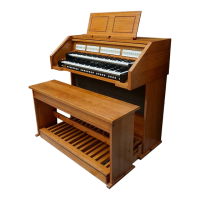
1. Press an orchestral button [STRINGS] or [CHOIR] button to
select the sound that you want to play.
PRESETFINE
466
444
442
440
432
415
392
EQUAL
PYTHAGOREAN
MEANTONE
YOUNG II
KIRNBERGER III
VALLOTTI
WERCKMEISTER III
SCALE
TRANSPOSE
6
4
2
0
-2
-4
-6
5
3
1
-1
-3
-5
ENHANCER
CHORD
STRINGS
PIANO HARPSICHORD
CHOIR
BOURDON 8
GEDACT 8
BOURDON 8
HOHLFLÖTE 8
VIOLA DI GAMBA 8
SALICIONAL 8
SALICIONAL 8
QUINTATÖN 8
VOX CELESTE 8
VOIX CELESTES II
VOIX CELESTES II
BLOCKFLÖTE 4
ROHRFLUTE 4
CHIMNEY FLUTE 4
FLÛTE OCTAVIANTE 4
QUINTE 2 2/3
NASARD 2 2/3
VIOLA 4
NAZARD 2 2/3
WALDFLÖTE 2
WALDFLUTE 2
BLOCK FLUTE 2
OCTAVIN 2
QUINTE 1 1/3
AMERICAN
ENGLISH
FRENCH
GERMAN
MANUAL I
TUNING TEMPERAMENT
SPLIT POI NT
The pressed button lights. If you press another orchestral button,
the previous selected of this section turns o. In this operation you
can select one sound at a time only.
2. Press the bottom part of a MANUAL I tilt tab to activate
the desired organ register.
You can activate as many registers as you like.
3. Play the keyboard.
You’ll hear the sounds you selected.
Playing Orchestral Sounds with the
PEDAL Division
As mentioned before, the PEDAL division can be played via the keyboard,
or with an commercially available MIDI pedalboard.
If you use the keyboard, the orchestral section is monophonic and the
leftmost note played on the keyboard is added to the Organ division.
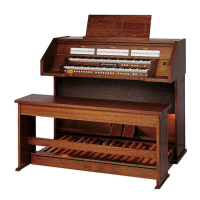
1. Press an orchestral button [BASS]or [ORCHESTRA] button
to select the sound that you want to play.
AMERICAN
ENGLISH
FRENCH
GERMAN
SUBBASS 16
SUBBASS 16
SOUBASSE 16
SUBBASS 16
BASS
ORCHESTRA
OCTAVEBASS 8
OCTAVE 8
FLÛTE 8
OKTAVBASS 8
BOMBARDE 16
FAGOTTO 16
BOMBARDE 16
POSAUNE 16
AUDIO IN
ORGAN
AMERICAN
ENGLISH
FRENCH
GERMAN
DEFAULT
USER 1
USER 2
PEDAL
The pressed button lights. If you press another orchestral button,
the previous selected of this section turns o. In this operation you
can select one sound at a time only.
2. Press the bottom part of a PEDAL tilt tab to activate the
desired organ register.
You can activate as many registers as you like.
3. Play the keyboard.
You’ll hear the selected sounds.
How to Select More Orchestral Sounds
(Variations)
The ONE allows you to select orchestral sounds (even though there is only
one button for each category (Flute, Violin, Oboe, Trumpet, Strings, etc).
See "The ONE Orchestral Tone List" (p. 24).


 To Next Page