35
Practice with Song Player
13
The ONE can play back audio les in the mp3 and WAV formats directly
from a USB memory you connect to its USB MEMORY port.
You can practice playing along backing song.
The ONE can play back the following le types:
File Type Extension
Audio les
.mp3
.wav
.ai or .aif
Before Playing Songs
Before being able to play back audio (mp3 or WAV) on the ONE, you must
rst appropriately rename them. This operation is necessary to select a
song by a numerical prex.
In second instance, you need to copy the songs into a USB Memory.
For performing these operations you need a personal computer.
Rule Naming Audio Files
1. Use your personal computer to rename the songs adding
a number to their name.
Here is an example: if the le is named “OliebeSeele.wav” and
another one called “GottDurchDeineGüte.mp3”, consider renaming
them as follows to
01_OliebeSeele.wav
02_GottDurchDeineGüte.mp3
You can use the prexes from [01_] to [ 99_].
Copying Audio Files to an USB Memory
2. Insert your USB Memory into the USB socket of your
computer.
3. Create in the root directory of USB Memory the folder
"SONG".
4. Copy all audio les previous renamed into the "SONG"
folder of the USB Memory.
SONG
MP3 WAV MP3
5. Disconnect your USB Memory safely.
NOTE
Be aware that the ONE can only play back les located in the
USB memory’s "SONG" folder.
Selecting and Playing a Song
1. Insert an USB Memory that contains songs. See
"Connecting an USB Memory (commercially available)" (p.
18) and see "Before Playing Songs" (p. 35).
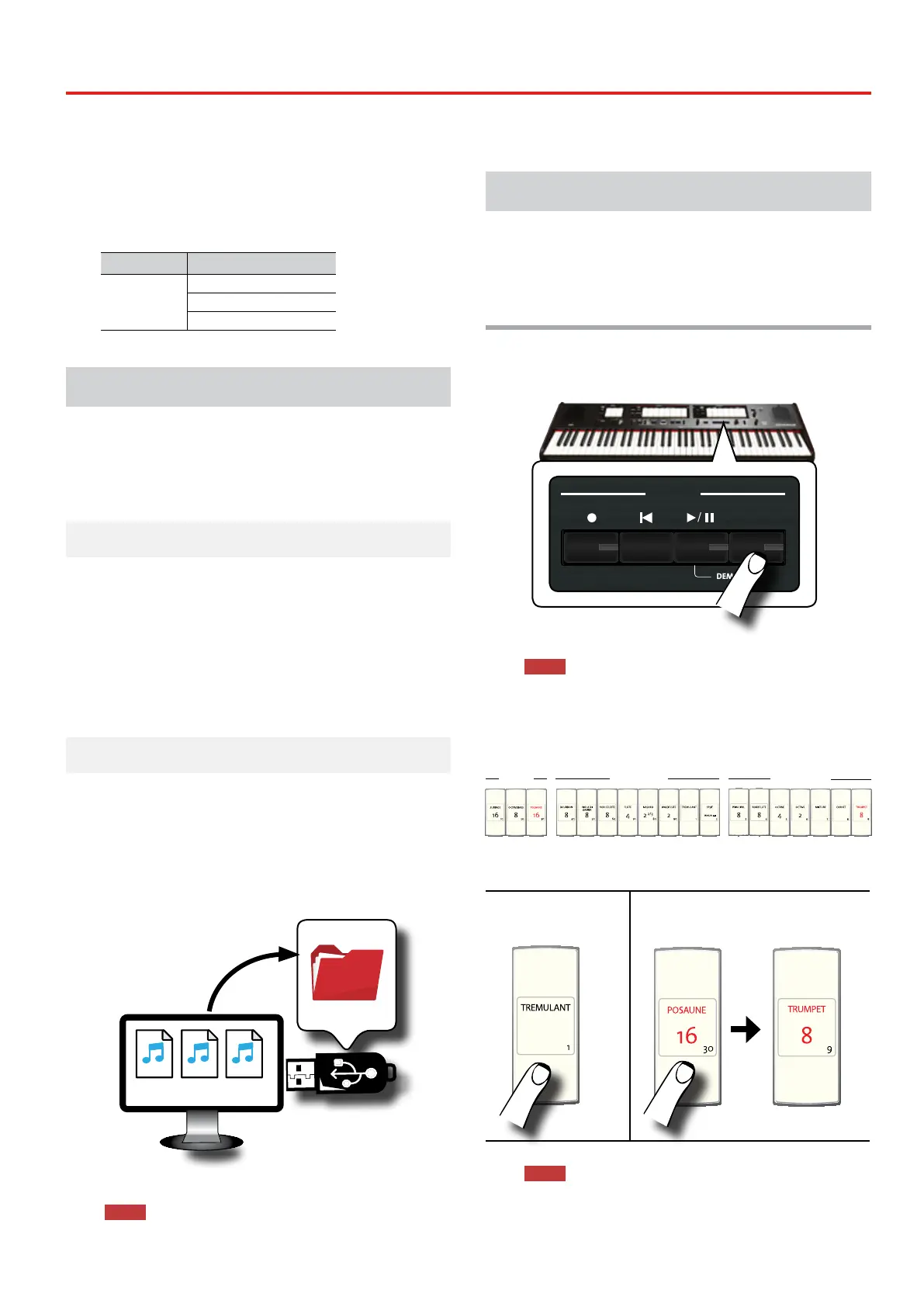
Select the song
1. Press the [SONG] button to enter in SONG mode. Its
indicator lights.
REVERB
DEPTH TYPE
/
PLAYER
SONG
DEMO
LEVEL
CRESCENDO
VALUE/REV TYPE
7 - TUTTI
6
5
4
3
2
1
TONE
OBOE TRUMPET
FLUTE VIOLIN
PRINCIPAL 8
OPEN DIAPASON 8
MONTRE 8
PRINZIPAL 8
ROHRFLUTE 8
STOPPED DIAPASON 8
FLÛTE HARMONIQUE 8
ROHRFLÖTE 8
MANUAL II
OCTAVE 4
OCTAVE 4
PRESTANT 4
OKTAVE 4
OCTAVE 2
FIFTEENTH 2
DOUBLETTE 2
OKTAVE 2
MIXTURE
FURNITURE
FOURNITURE
MIXTUR
KRUMMHORN 8
CORNET
CROMORNE 8
SESQUIALTERA
TRUMPET 8
TRUMPET 8
TROMP. HARMONIQUE 8
TROMPETE 8
AMERICAN
ENGLISH
FRENCH
GERMAN
All tilt tabs light o temporarily.
NOTE
The SONG mode is active momentarily. After few seconds
without pressing any tilt tab, the instrument leaves this mode. If
necessary, press again the [SONG] button (step 1).
2. To select the song, enter a number between “1” and “99"
using the PEDAL, MANUAL I and MANUAL II tilt tabs.
PEDAL MANUAL I MANUAL II
10 20 30 40 50 60
70 80 90
1 2 3 4 5 6 7 8 9
See the numbers below the tilt tabs.
To enter “1”, just press
[TREMULANT] (number
“1”)
To enter “39”, press [POSAUNE 16] (number
“30”) followed by [TRUMPET] “9”) (in that
order).
NOTE
The song number "99" recall your song preciously recorded. See
"Recording Your Performance" (p. 37)


 To Next Page