40
Wireless Function
17
Bluetooth® Audio Connectivity
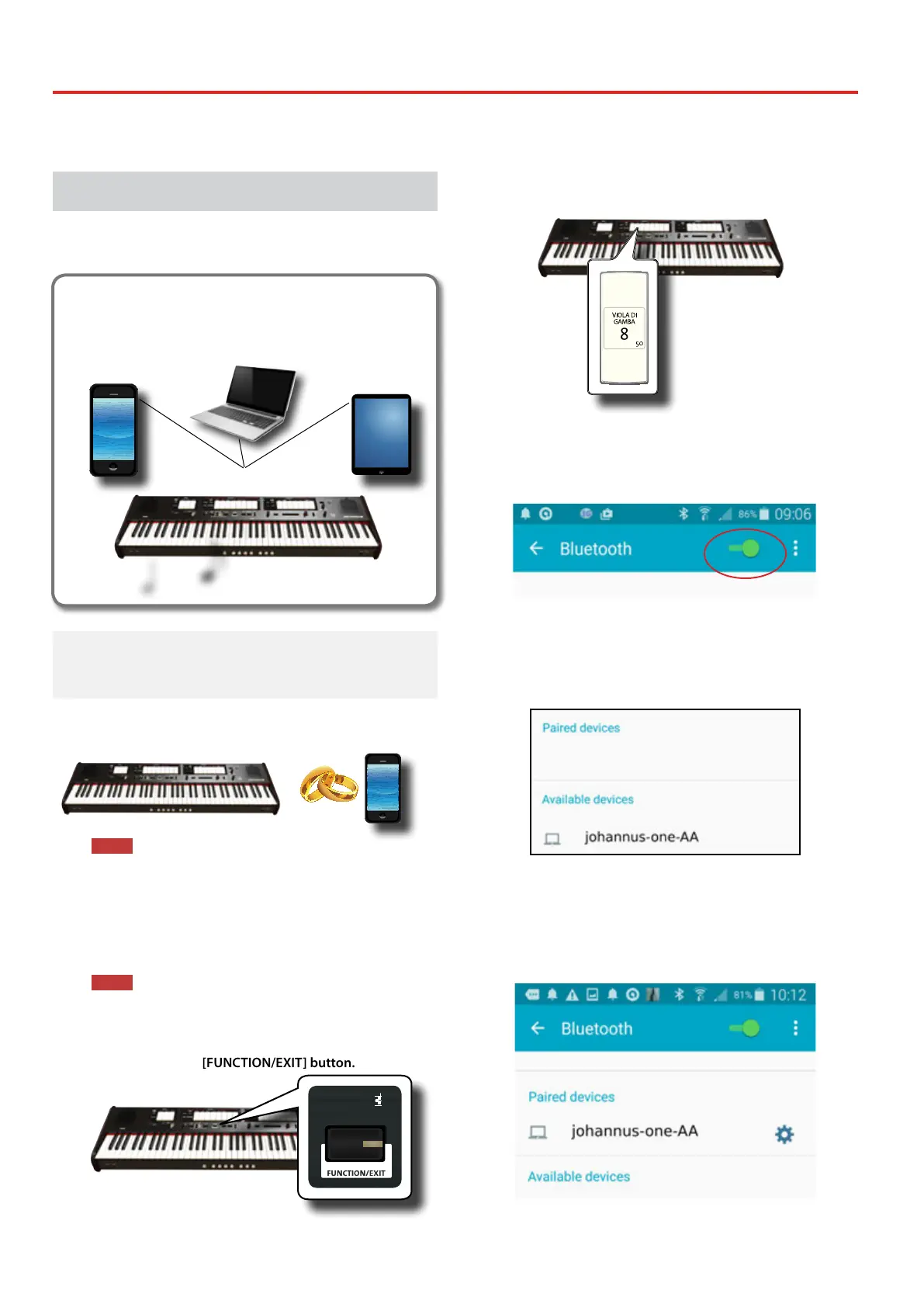
The ONE is equipped with Bluetooth® Audio function.
Thanks to this technology, you'll be able to stream music wirelessly from a
Bluetooth® capable smartphone, tablet or computer to the ONE.
Bluetooth
®
connection
e
xq
h
Preliminary Operation, Pairing a Mobile
Device
The rst time you use a new mobile device, you need to "pair"
it with your device so that both devices know how to connect
securely to each other.
NOTE
Please take in consideration that the explanation to pair your
mobile device with the ONE is as an example. The operations to
pair your mobile device can be dierent from our explanation
and depend on the operating system of your device. For details,
please refer to the user manual of your mobile device.
1. Place the mobile device within 1 meter (3 ft) from the ONE.
NOTE
When pairing, make sure that other devices are o or out of
range.
2. Make sure that the ONE is visible to other devices. To do it,
press and hold the [FUNCTION/EXIT] button.
PRESETFINE
466
444
442
440
432
415
392
EQUAL
PYTHAGOREAN
MEANTONE
YOUNG II
KIRNBERGER III
VALLOTTI
WERCKMEISTER III
SCALE
TRANSPOSE
6
4
2
0
-2
-4
-6
5
3
1
-1
-3
-5
ENHANCER
CHORD
STRINGS
PIANO HARPSICHORD
CHOIR
BOURDON 8
GEDACT 8
BOURDON 8
HOHLFLÖTE 8
VIOLA DI GAMBA 8
SALICIONAL 8
SALICIONAL 8
QUINTATÖN 8
VOX CELESTE 8
VOIX CELESTES II
VOIX CELESTES II
BLOCKFLÖTE 4
ROHRFLUTE 4
CHIMNEY FLUTE 4
FLÛTE OCTAVIANTE 4
QUINTE 2 2/3
NASARD 2 2/3
VIOLA 4
NAZARD 2 2/3
WALDFLÖTE 2
WALDFLUTE 2
BLOCK FLUTE 2
OCTAVIN 2
QUINTE 1 1/3
AMERICAN
ENGLISH
FRENCH
GERMAN
MANUAL I
TUNING TEMPERAMENT
SPLIT POINT
The [FUNCTION/EXIT] button ashes to indicate that we are in
function mode. All other indicators go dark.
3. Press the lower part of the "50" tilt tab to make the ONE
visible to other devices.
The tilt tab ashes to indicate that your instrument is now visible to
other devices.
4. On the mobile device that you want to connect, turn on
the Bluetooth® function and, if necessary, search for the
available devices.
For details on how to enable the Bluetooth® function, refer to the
user manual of your mobile device.
The list of available devices is now shown in your mobile device.
5. Select the "johannus-one-xx" device that is shown in the
Bluetooth® list of your mobile device.
In example above the device name is "johannus-one-AA".
6. If the mobile device and the ONE ask you to conrm the
connection showing the "passkey" screen, conrm on
your mobile device.
When pairing succeeds "johannus-one-xx" is added to the list of
paired devices in the mobile device..
7. Select the "johannus-one-xx" device that is shown in the
paired devices list of your mobile device.


 To Next Page