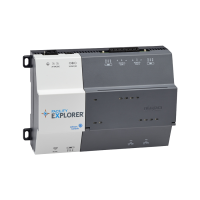
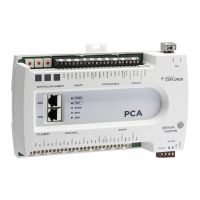
FX-PCA4911 Advanced Application Controller
Installation Guide
Application
The FX-PCA4911 Advanced Application Controller is part of
the FX-PC Series Programmable Controller family. The FX-
PCA equipment controllers run pre-engineered and user-
programmed applications, and provide the inputs and
outputs required to monitor and control a wide variety of
HVAC equipment.
FX-PCA4911 controllers operate on BACnet
®
/IP networks
and integrate into Johnson Controls
®
and third-party
systems. The controllers include an integral real-time
clock, which enables the controllers to monitor and
control schedules, calendars, and trends, and operate for
extended periods of time as stand-alone controllers when
offline from the Facility Explorer
®
system network.
The FX-PC controllers and network sensors communicate
using the BACnet protocol. The BACnet protocol is
a standard for ANSI, ASHRAE, and the International
Standards Organization (ISO) for building controls. FX-
PCA controllers are BTL-listed and certified as BACnet
Advanced Application Controllers (B-AACs).
North American emissions compliance
United States
This equipment has been tested and found to comply with
the limits for a Class A digital device pursuant to Part 15
of the FCC Rules. These limits are designed to provide
reasonable protection against harmful interference when
this equipment is operated in a commercial environment.
This equipment generates, uses, and can radiate radio
frequency energy and, if not installed and used in
accordance with the instruction manual, may cause
harmful interference to radio communications. Operation
of this equipment in a residential area may cause harmful
interference, in which case the users will be required to
correct the interference at their own expense.
Canada
This Class (A) digital apparatus meets all the requirements
of the Canadian Interference-Causing Equipment
Regulations.
Cet appareil numérique de la Classe (A) respecte toutes
les exigences du Règlement sur le matériel brouilleur du
Canada.
Installation
Observe the following guidelines when installing a
controller:
• To minimize vibration and shock damage, transport the
controller in the original container.
• Verify that all parts shipped with the controller.
• Do not drop the controller or subject it to physical
shock.
Parts included
• One Advanced Application Controller.
• One installation instructions sheet.
Materials and special tools needed
• Three fasteners appropriate for the mounting surface
(M4 screws or #8 screws)
• One 23 cm (9.125 in.) or longer piece of 35 mm DIN rail
and appropriate hardware for DIN rail mount (only)
• Small straight-blade screwdriver for securing wires in
the terminal blocks
*241014301531C*
Part No. 24-10143-01531 Rev. C
2020-11-11
(barcode for factory use only)
FX-PCA4911-0

 Need help?
 General







 To Next Page